- 9 -
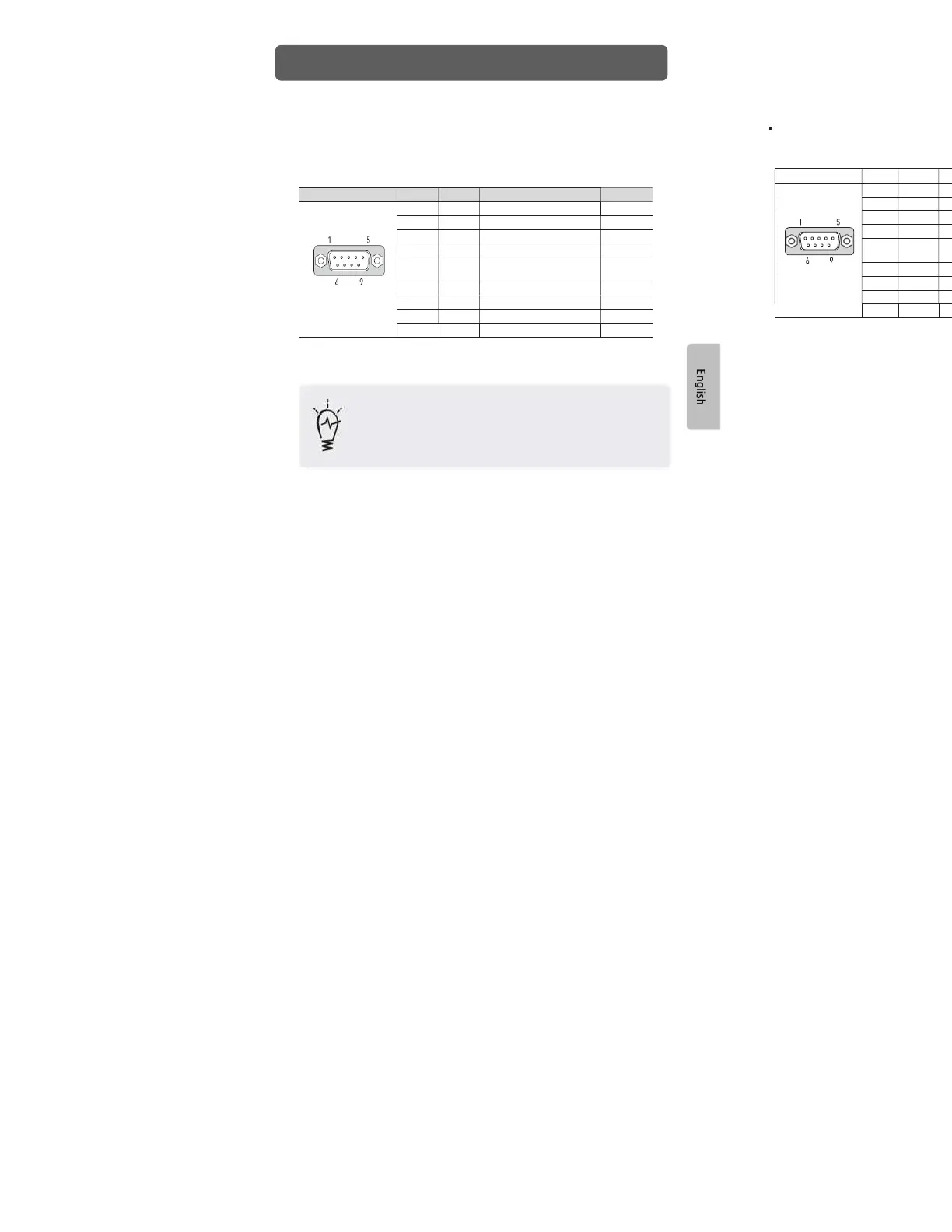
1) XT04/XT07 COM Ports
• COM1: RS-232C / COM2: RS-422/485
This interface is used to connect the Xpanel to the host (PLC), via an RS-232C or RS-
422/485 cable. COM1 and COM2 share pins of 9Pin DSUB connector.
Connector Pin No.
Name
Description Port
1
SDA
Send Data A COM2
2
RD
Receive Data
COM1
3
TD
Transmit Data
COM1
4
RDA
Receive Data A
COM2
5
SG
Signal Ground
COM1
COM2
6
SDB
Send Data B COM2
7
RTS
Request To Send
COM1
8
CTS
Clear To Send COM1
9
RDB
Receive Data B
COM2
● Normal communication is not guaranteed when using USB connector as a
communication port in ordinary times.
• In case of RS-485 cable (2-wire) connection, connect only both SDA and
SDB lines.
• The RS-485 of the Xpanel runs under auto toggle mode.
• To reduce the risk of damaging the RS-422 circuit, be sure to connect the
Pin 5(SG) terminal.
Connector Pin No.
Name
1
SDA
2
RD
3
TD
4
RDA
5
SG
6
SDB
7
RTS
8
CTS
9
RDB
Interfaces


 To Next Page