EasyManua.ls Logo

Cincinnati 175 CB - Page 13

Default Icon
32 pages
Print Icon
To Next Page IconTo Next Page
To Previous Page IconTo Previous Page
Loading...
Two
guarded
palmbuttons,
which
must
be
depressed
about
the
same
time,
are
provided
to
activate
the
ram
in
either
the
"INCHttor
"SINGLE
STROKE
- NO
AUTO
RETURN"
modes.
Releasing
either
palmbutton
will
stop
the
ram.
Both
buttons
Inust
be
released
and
redepressed
to
restart
ram
motion.
EMERGENCY STOP
Button:
Depressing
this
push-
button
deactivates
the
main
drive
motor.
RAM
UP
Button:
This
pushbutton,
when
depressed,
will
cause
the
ram
to
go
up
regardless
of
the
motion,
position
or
previous
direction
of
the
ram.
The
ram
will
stop
when
the
button
is
released
or
when
the
top
stop
position
is
reached.
RAM
UP -.
RAM
DOWN
Directional
Lights:
These
lights
indicate
the
direction
of
motion
(
green
-
UP
or
red-DOWN)
that
the
ram
is
moving
or
will· move
should
an
operator
station
be
activated.
OPERATOR
STATION
Switch:
This
is
a
two
position
("ONU_HOFF")
key
selector
for
activating
the
palm-
buttons.
When
in
the
ttOFF
fJ
position,
ram
cannot
be
cycled
by
pressing
the
palm
buttons.
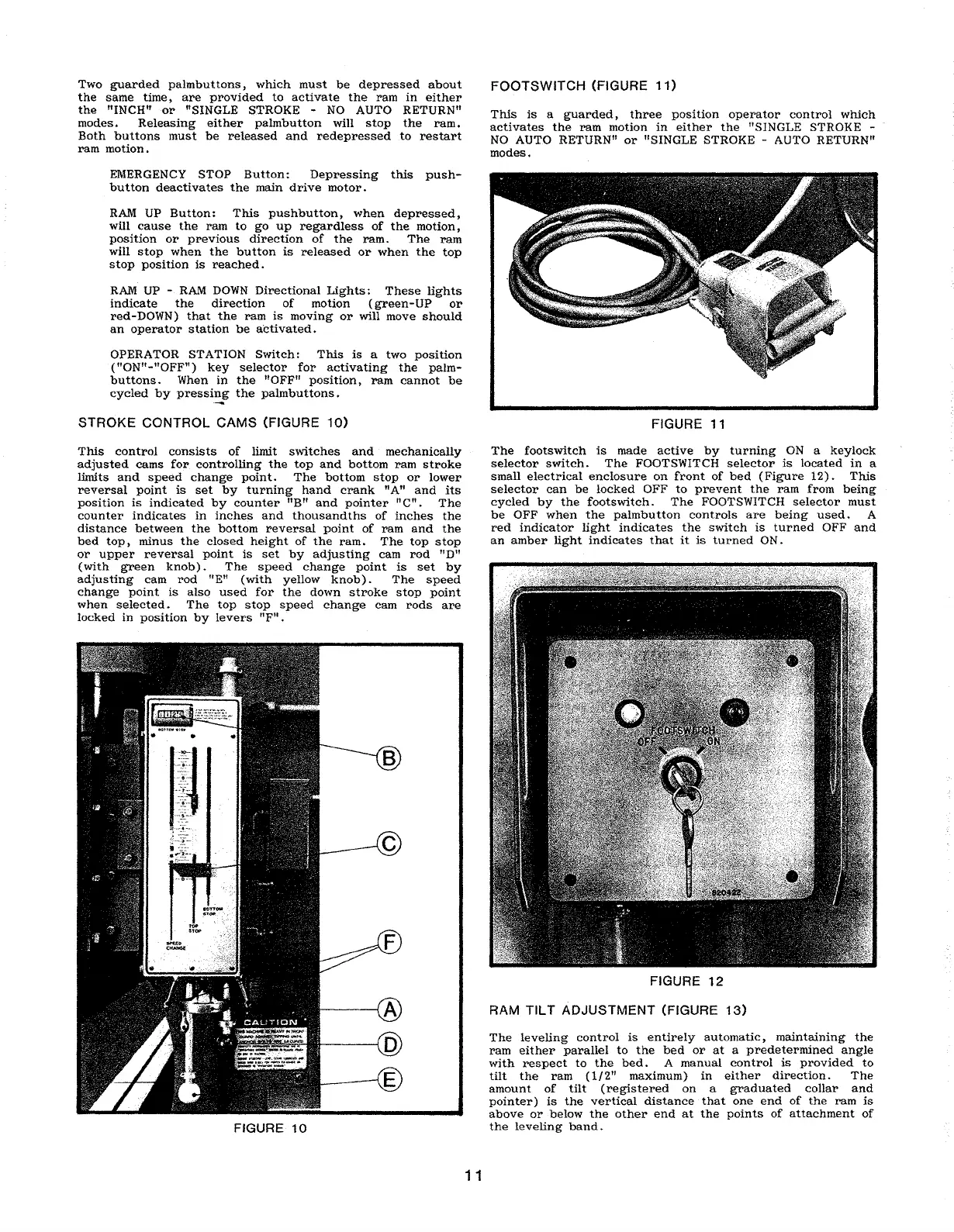
STROKE
CONTROL
CAMS
(FIGURE
10)
This
control
consists
of
limit
switches
and
mechanically
adjusted
cams
for
controlling
the
top
and
bottom
ram
stroke
limits
and
speed
change
point.
The
bottom
stop
or
lower
reversal
point
is
set
by
turning
hand
crank
nAft
and
its
position
is
indicated
by
counter
nB"
and
pointer
"en.
The
counter
indicates
in
inches
and
thousandths
of
inches
the
distance
between
the
bottom
reversal
point
of
ram
and
the
bed
top,
minus
the
closed
height
of
the
ram.
The
top
stop
or
upper
reversal
point
is
set
by
adjusting
cam
rod
uD"
(with
green
knob)
.
The
speed
change
point
is
set
by
adjusting
cam
rod
"En
(with
yellow
knob).
The
speed
change
point
is
also
used
for
the
down
stroke
stop
point
when
selected.
The
.top
stop
speed
change
cam·
rods
are
locked
in
position
by
levers
"F
n
FIGURE·
10
11
FOOTS
WITCH
(FIGURE
11)
This
is
a
guarded,
three
position
operator
control
which
activates
the
ram
motion
in
either
the
"SINGLE
STROKE -
NO
AUTO
RETURNu
or
"SINGLE
STROKE
- AUTO
RETURN"
modes.
FIGURE 11
The
footswitch
is
made
active
by
turning
ON
a
keylock
selector.
switch.
The
FOOTSWITCH
selector
is
located
in
a
small
electrical
enclosure
on
front
of
bed
(Figure
12).
This
selector
can
be
locked
OFF
to
prevent
the
ram
from
being
cycled
by
the
footswitch.
The
FOOTSWITCH
selector
must
be
OFF
when
the
palmbutton
controls
are
being
used.
A
red
indicator
light
indicates
the
switch
is
turned
OFF
and
an
amber
light
indicates
that
it
is
turned
ON.
FIGURE
12
RAM
TILT
ADJUSTMENT
(FIGURE
13)
The
leveling
control
is
entirely
automatic,
maintaining
the
ram
either
parallel
to
the
bed
or
at
a
predetermined
angle
with
respect
to
the
bed.
A
manual
control
is
provided
to
tilt
the
ram
(1/2"
maximum)
in
either
direction.
The
amount
of
tilt
(registered
on
a
graduated
collar
and
pointer)
is
the
vertical
distance
that
one
end
of
the
ram
is
above
or
below
the
other
end
at
the
points
of
attachment
of
the
leveling
band.

Related product manuals