FAVORITES – Stores your favorite channels. You can mark a channel as favorite by clicking on the *
button while watching the channel. This feature is coming soon.
LIVE TV – Click to watch Live TV streams.
REPLAY – Records all the TV channels. It allows you to record within 3 days. Contents are deleted
after 3 days. This feature is coming soon.
PVR – Allows you to record programs and watch at a later time. Allows you to manage when to
delete these PVR programs. This feature is coming soon.
VIDEO – Video on Demand (VoD). This feature is coming soon.
OTHERS – Additional features to be announced.
ACCOUNT – Allows you to manage your account. This feature is coming soon.
ABOUT – Provides contact information so you can reach us.
SETTINGS – Click to access the settings menu¬.
WORLD ENTERTAINMENT ON DEMAND
www.ciphertv.comCipherTV STB 3.5A User Guide
16
6.1 Tips to Troubleshooting the STB
Who do we call to escalate issues?
Call CipherTV technical support team at 604-288-1616 (toll free 1-888-851-8858) or email ts@ci-
phertv.com
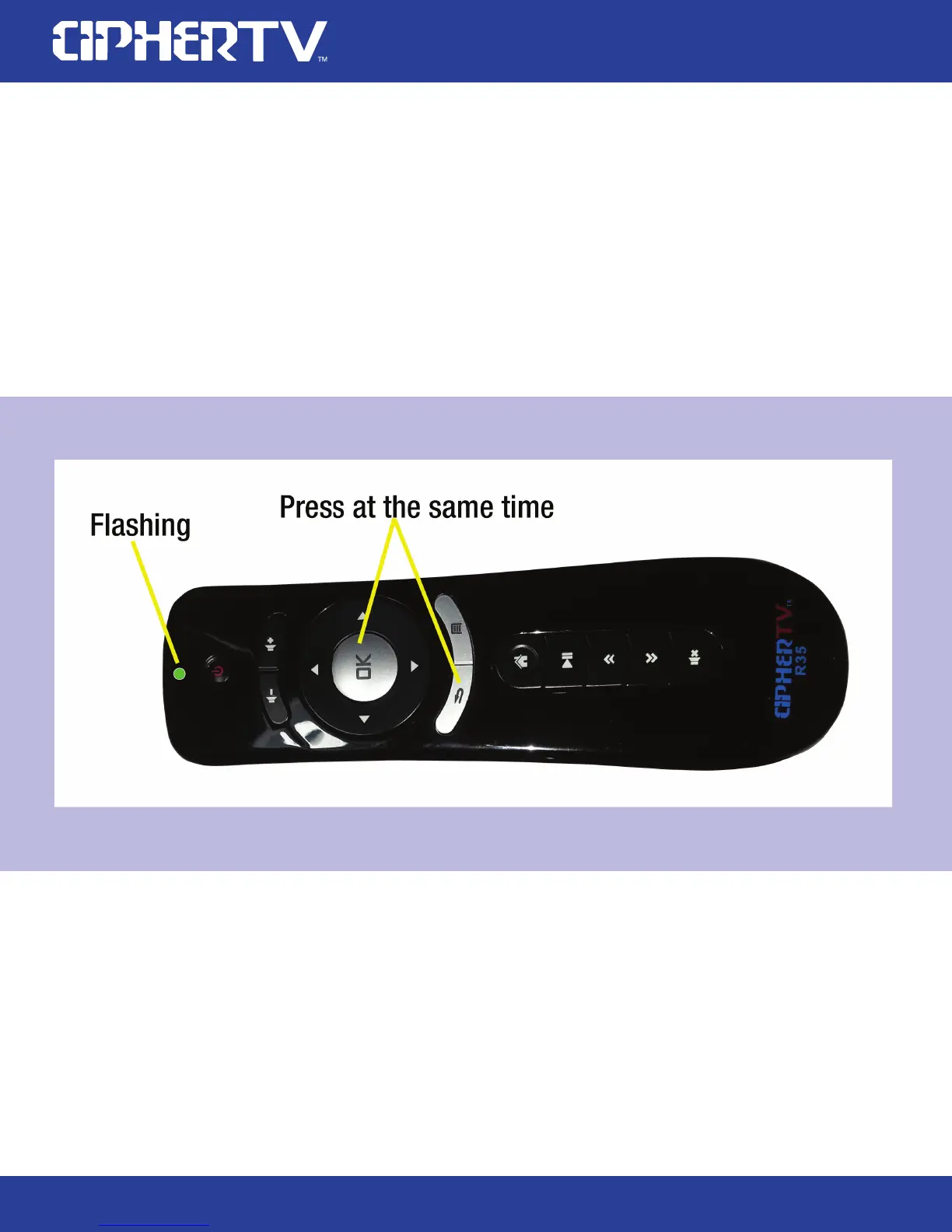
How to calibrate your R35 remote controller
To calibrate or re-pair your R35 remote controller is simple. Place the remote on a flat surface and
press the OK & Back button until the green LED flashes fast and go to slow flash then the calibration
and pairing are completed.



 To Next Page