WORLD ENTERTAINMENT ON DEMAND
www.ciphertv.comCipherTV STB 3.5A User Guide
1
1.0 GETTING STARTED
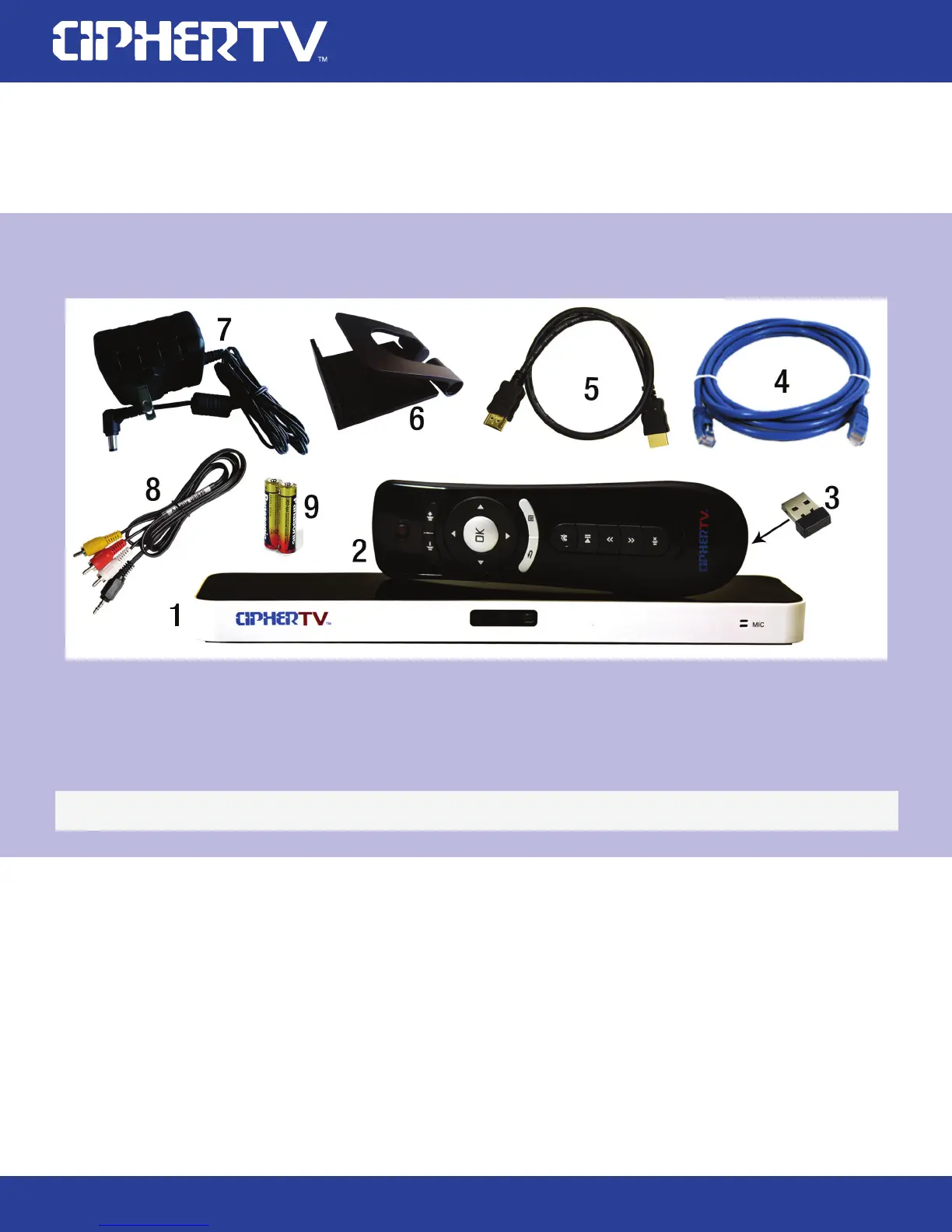
1.1 What is included in your STB 3.5A box?
1. CipherTV Bar
2. Air Mouse Remote Controller
3. Air Mouse USB Receiver (refer to Page 4, Figure 4)
4. Ethernet Cable
5. HDMI Cable
Your CipherTV Bar includes the following items
Optional Accessories:
Infrared Remote, Micro-SD or TF card. For replacement parts visit www.ciphertv.com
6. CipherTV Bar Mount Stand
7. Power Adapter
8. 3.5mm AV cable
9. 2 AAA Batteries required
**Actual product & accessories may look different and batteries may not be included.
1.2 Using the air mouse (R35 remote controller)
Open the remote controller battery cover, install 2 new size AAA batteries into the battery slots. Find
and remove the USB receiver dongle on the battery cover and attach the dongle to the back of your
STB USB port. Power up the CipherTV bar and it is ready for use.
The air mouse works like a cordless computer mouse. Point the air mouse towards the TV screen,
press the OK button, an arrow cursor will appear on the TV screen. Point the arrow to the items you
like to select and press the OK button to make your selection.
Any time you want to get back to the home screen, press the button with the picture of a house and it
will bring you back to your home screen



 To Next Page