EasyManua.ls Logo

Cisco MERAKI MR33 - User Manual

Cisco MERAKI MR33
13 pages
Print Icon
To Next Page IconTo Next Page
Loading...
MR33 Installation Guide
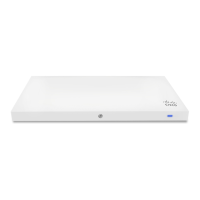
The Cisco Meraki MR33 is a dual-band enterprise class 802.11ac cloud-managed access point. Designed for high
capacity and high density, the MR33 meets the needs of the most demanding environments, and also includes the first
ever cloud-managed third radio dedicated to optimizing the RF environment and securing the airwaves.
Package Contents
The MR33 package contains the following:
MR33 Cloud-Managed Access Point
Mount cradle including built-in level tool
Mount Kit
Drop ceiling mount kit
Wall screws, wall screw anchors, and security screw
Spare hardware
1

Other manuals for Cisco MERAKI MR33

Question and Answer IconNeed help?

Do you have a question about the Cisco MERAKI MR33 and is the answer not in the manual?

Summary

Security Features

Configure Your Network in Dashboard

Assigning IP Addresses to MR33 s

Installation Instructions

Attach the mount cradle

Mount the MR33

Attach the MR33 to the Mount Cradle

Align top tabs, insert MR33 into cradle, and secure with a screw in the bottom tab.

Secure the MR33

Security Screw

Install the security screw in the lower mount cradle tab to secure the AP.

Kensington Lock

Attach Kensington lock cable to the device's hard point and a secure location.

Verify Device Functionality and Test Network Coverage

Troubleshooting

Summary

Security Features

Configure Your Network in Dashboard

Assigning IP Addresses to MR33 s

Installation Instructions

Attach the mount cradle

Mount the MR33

Attach the MR33 to the Mount Cradle

Align top tabs, insert MR33 into cradle, and secure with a screw in the bottom tab.

Secure the MR33

Security Screw

Install the security screw in the lower mount cradle tab to secure the AP.

Kensington Lock

Attach Kensington lock cable to the device's hard point and a secure location.

Verify Device Functionality and Test Network Coverage

Troubleshooting

Overview

The Cisco Meraki MR33 is a sophisticated, cloud-managed access point designed for high-performance wireless networking in demanding environments. It features dual-band 802.11ac capabilities, making it suitable for high-capacity and high-density deployments. A unique aspect of the MR33 is its third radio, which is dedicated to optimizing the RF environment and securing the airwaves, all managed through the cloud. This ensures not only robust connectivity but also a stable and secure wireless landscape.

Function Description

The primary function of the MR33 is to provide reliable and high-speed wireless access. As an 802.11ac access point, it supports modern wireless standards, delivering faster speeds and better performance compared to older generations. Its dual-band operation allows it to utilize both 2.4 GHz and 5 GHz frequencies, accommodating a wide range of client devices and reducing network congestion. The cloud-managed nature of the MR33 means that its configuration, monitoring, and troubleshooting can all be performed remotely through the Meraki dashboard, simplifying network administration.

The dedicated third radio is a key differentiator, serving several critical functions. It continuously scans the RF environment to identify interference, optimize channel selection, and ensure optimal performance for the other two radios. This proactive approach to RF management helps maintain consistent and high-quality wireless service, even in environments with many competing wireless signals. Additionally, this third radio contributes to airwave security by detecting rogue access points and other potential threats, enhancing the overall security posture of the wireless network.

The MR33 is equipped with a Gigabit Ethernet RJ45 port, labeled "Eth0, PoE," which serves as the uplink to the WAN connection. This port supports both 802.3at and 802.3af power standards, allowing the device to be powered directly over the Ethernet cable, which simplifies installation by eliminating the need for a separate power outlet.

Usage Features

The MR33 offers several features that enhance its usability and integration into various network environments.

Power Source Options: The device can be powered in multiple ways:

  • Meraki AC Adapter: A traditional power adapter (sold separately) can be used when PoE is not available or preferred.
  • PoE Injector: A Meraki PoE Injector (sold separately) provides power over Ethernet for installations where a PoE-enabled switch is not present.
  • Third-party PoE Switch: The most common method, connecting the MR33 to a PoE-enabled switch, allows for both data and power transmission over a single Ethernet cable.

Mounting Flexibility: The MR33 is designed for versatile installation, accommodating various scenarios:

  • Wall or Solid Ceiling Mount: The included mount cradle can be securely attached to walls or solid ceilings using wall anchors and screws. This method is recommended for physical security.
  • Drop Ceiling Mount: For suspended ceilings, the accessory kit includes drop ceiling mounting clips and screws, compatible with most 9/16", 15/16", or 1 ½" T-rails. Rubber spacers are also provided for recessed T-rail mounts.
  • Electrical Junction Box Mount: The mount cradle can be attached to various electrical junction boxes, including 4" square, 3.5" or 4" round, and standard U.S. and European outlet boxes (mounting screws for junction boxes are not included).
  • Desk or Shelf Mount: For temporary or non-permanent setups, the MR33 can simply be placed on a desk or shelf, utilizing its non-scratch rubber feet. The mount cradle is not required for this type of installation.

Physical Security: The MR33 incorporates multiple features to prevent theft and accidental dislodging:

  • Security Screw: The accessory kit includes screws that can be used to secure the access point to the mount cradle, preventing easy removal.
  • Kensington Lock: A hard point on the device allows for the attachment of a standard Kensington lock cable, which can then be secured to a permanent structure like a pipe or building fixture.

LED Indicators and Run Dark Mode: The MR33 features a multi-color LED light on the front that conveys information about its system functionality and performance:

  • Orange: Indicates the AP is booting. A permanent orange light suggests a hardware issue.
  • Rainbow: Signifies that the AP is initializing or scanning.
  • Blinking Blue: The AP is undergoing a firmware upgrade.
  • Green: The AP is in Gateway mode with no clients associated.
  • Blue: The AP is in Gateway mode with clients associated.
  • Blinking Orange: The AP cannot find an uplink connection. For environments where discretion is important, the MR33 can be operated in "Run Dark" mode, which disables the LED illumination. This mode can be enabled through the Meraki dashboard, enhancing security and reducing visibility.

Network Configuration: The Meraki dashboard provides a centralized platform for managing the MR33:

  • Firmware Upgrades: The dashboard facilitates automatic firmware upgrades, ensuring the device always runs the latest software with the newest features and security patches.
  • IP Address Assignment: MR33s can be assigned IP addresses dynamically via DHCP or statically. For static assignments, the local web server on each AP can be accessed, or DHCP reservations can be configured on the upstream DHCP server.
  • Firewall Settings: If a firewall is in place, it must be configured to allow outgoing connections on specific ports and to particular IP addresses for the MR33 to communicate with the Meraki cloud.

Maintenance Features

The MR33 is designed for ease of maintenance and troubleshooting, primarily through its cloud management capabilities and built-in diagnostic tools.

Factory Reset Button: A factory reset button allows the device to be restored to its original factory settings. Pressing and holding the button for at least five seconds and then releasing it will cause the MR33 to reboot and delete all stored configuration information. This is useful for troubleshooting or re-provisioning the device.

Remote Management via Meraki Dashboard: The cloud-managed nature of the MR33 significantly simplifies maintenance:

  • Centralized Monitoring: Administrators can monitor the status, performance, and client connectivity of all MR33s from a single dashboard interface, regardless of their physical location.
  • Remote Configuration: All configuration changes, from SSID settings to security policies, can be applied remotely through the dashboard, eliminating the need for on-site visits for most adjustments.
  • Troubleshooting Tools: The dashboard provides diagnostic tools and logs that help identify and resolve network issues efficiently. The LED indicators also offer immediate visual feedback on the device's operational state.
  • Firmware Management: Firmware upgrades are handled automatically or can be initiated remotely via the dashboard, ensuring the device remains up-to-date with minimal manual intervention.

Installation Tools and Hardware: The manual outlines the necessary tools and hardware for installation, simplifying the setup process:

  • Tools: T8 Torx screwdriver, Phillips screwdriver, hammer, and a drill with 1/4" (6.3mm) bits.
  • Hardware: Drop ceiling mount kit (clips and set screws), wall screws, wall screw anchors, and a security screw. Spare hardware is also included.

Verification of Functionality: After installation, the MR33's functionality can be easily verified:

  • LED Check: Observing the LED indicators provides immediate feedback on the device's booting, upgrading, and operational status.
  • Client Connectivity Test: Connecting a client device (e.g., laptop, smartphone) to the MR33 and verifying internet access confirms basic connectivity.
  • Network Coverage Check: Using a signal strength meter on a wireless device helps confirm good signal strength throughout the intended coverage area.

The MR33's design emphasizes robust performance, flexible deployment, and simplified management, making it a powerful solution for modern wireless networks.

Cisco MERAKI MR33 Specifications

General IconGeneral
Frequency Bands2.4 GHz and 5 GHz
Ethernet Ports1x 10/100/1000BASE-T Ethernet (RJ45)
Operating Temperature0°C to 40°C (32°F to 104°F)
Max Data Rate1.3 Gbps
Product TypeWireless Access Point
AntennasIntegrated omni-directional antennas
VLAN SupportYes
Wireless Standards802.11a/b/g/n/ac
Power over Ethernet (PoE)802.3af
SecurityWPA2-Enterprise, WPA2-PSK, 802.1X
Weight340 g (12 oz)
Power MethodPoE
MountingWall, Ceiling
Cloud ManagementYes
Guest AccessYes
MIMO2x2:2 MU-MIMO

Related product manuals