EasyManua.ls Logo

Cisco 6500-E - Page 12

Cisco 6500-E
34 pages
Print Icon
To Next Page IconTo Next Page
To Previous Page IconTo Previous Page
Loading...
Installing and Removing the Module
12
Cisco Communication Media Module for Catalyst 6500 Series Switch and Cisco 7600 Series Router Installation and Verification Note
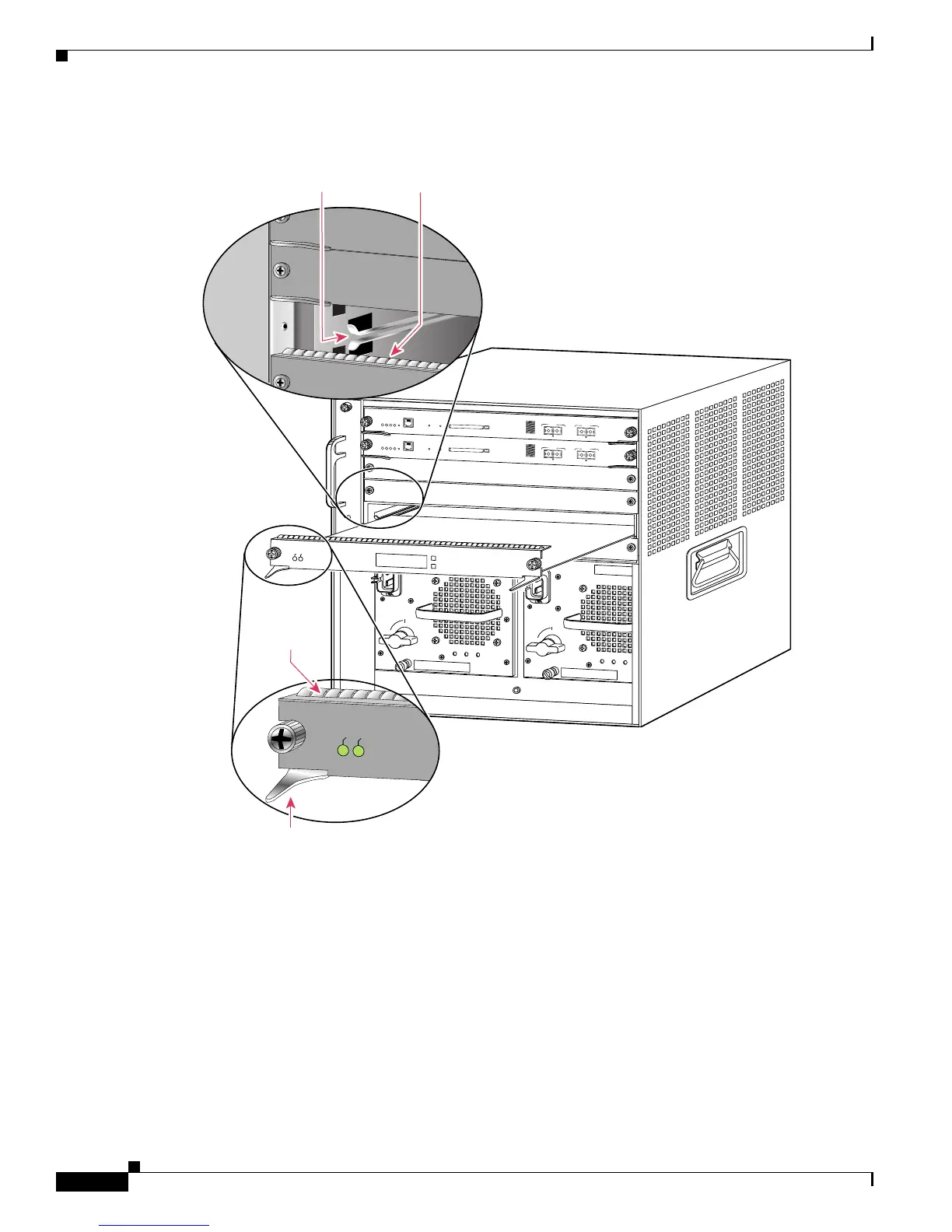
Figure 5 Positioning the Module in a Horizontal Slot Chassis
58569
INPUT
OK
FAN
OK
OUTPUT
FAI L
o
INPUT
OK
FAN
OK
OUTPUT
FAI L
o
1
2
3
FAN
STATUS
4
5
6
S
U
P
E
R
V
IS
O
R
2
W
S
-X
6
K
-S
U
P
2
-2
G
E
S
T
A
T
U
S
S
Y
S
T
E
M
C
O
N
S
O
L
E
P
W
R
M
G
M
T
R
E
S
E
T
C
O
N
S
O
L
E
C
O
N
S
O
L
E
P
O
R
T
M
O
D
E
P
C
M
C
I
A
E
J
E
C
T
P
O
R
T
1
P
O
R
T
2
S
w
i
tc
h
L
o
a
d
1
0
0
%
1
%
2
4
P
O
R
T
1
0
0
F
X
WS-X6224
S
E
L
E
C
T
N
E
X
T
EMI gasket
EMI gasket
Insert module
between slot guides
Ejector lever fully
extended
S
T
A
T
U
S
A
C
T
IV
E
4
3
5
5
4
6
6
SWITCH FABRIC MDL
W
S-C6500-SFM
S
TA
TU
S
A
C
TIV
E
S
U
P
E
R
V
IS
O
R
2
W
S
-X
6K
-S
U
P
2-2
G
E
S
T
A
T
U
S
S
Y
S
T
E
M
C
O
N
S
O
L
E
P
W
R
M
G
M
T
R
E
S
E
T
C
O
N
S
O
L
E
C
O
N
S
O
L
E
P
O
R
T
M
O
D
E
P
C
M
C
I
A
E
J
E
C
T
P
O
R
T
1
P
O
R
T
2
S
w
it
c
h
L
o
a
d
1
0
0
%
1
%

Related product manuals