7
• Router: 192.168.42.1
Step 7 Click OK.
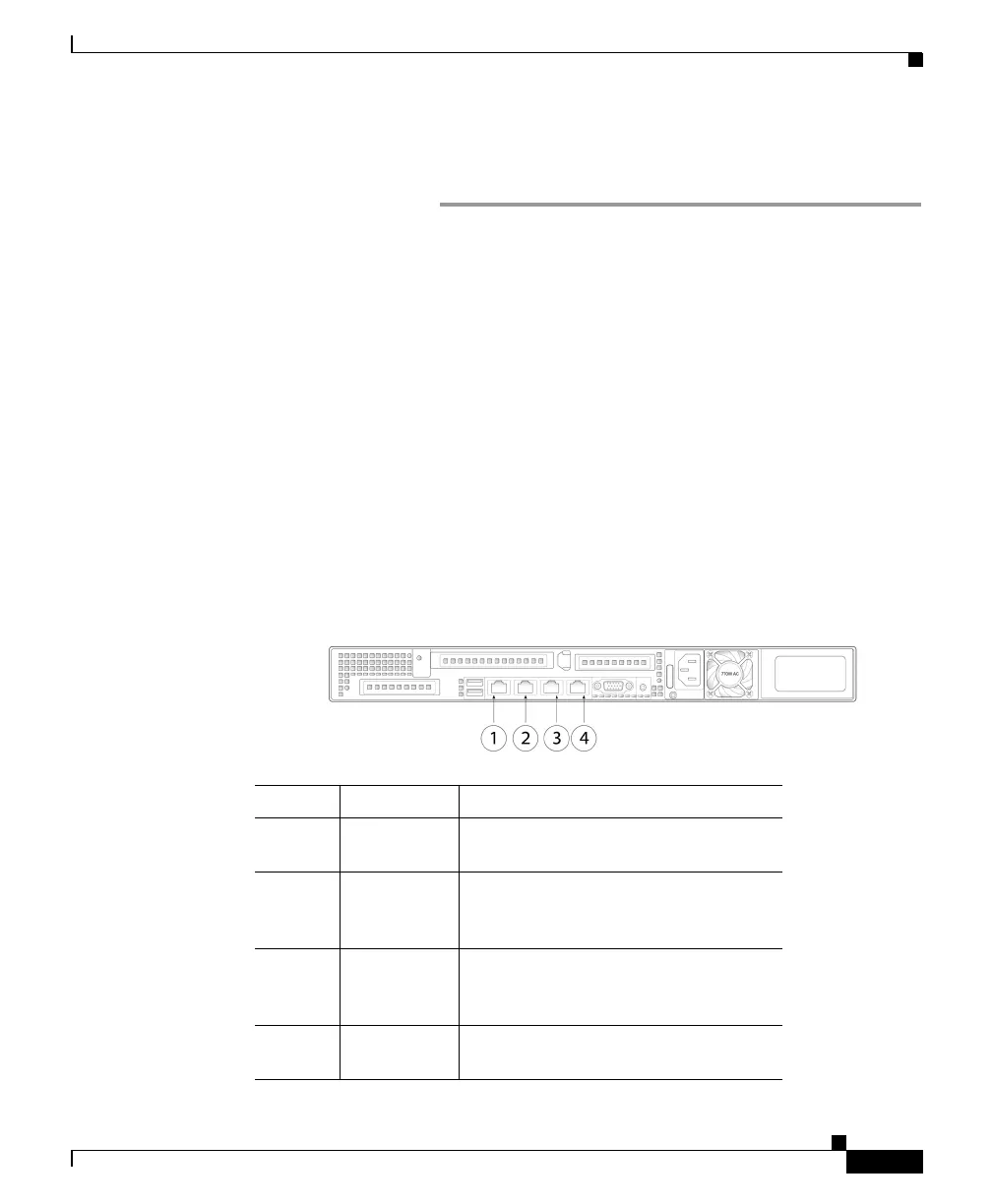
Connect to the Appliance
The Cisco C190 appliance has two gigabit network ports:
Data 1 and Data 2. At least one static IP address is required to send and receive
email.
You can receive and deliver email from a s
ingle connection to either network
port if your network topology dictates it. Two IP addresses can be configured on
one network interface.
Alternatively, you can connect the
Data 1 network port to your public network
and connect the
Data 2 network port to your private network.
To access the appliance by Ethernet, connect to
Data 1 as your management
interface and configure incoming email on
Data 2.
For serial access to the appliance, connect to the
console port.
Item Port Description
1 Remote
Power Cycle
The port that is used for Remote
Power Cycle (RPC).
2 Console The console port that directly
conne
cts a computer to the
appliance.
3 Data 1 A Gigabit Ethernet customer data
in
terface. This port is used as a
management interface.
4 Data 2 A Gigabit Ethernet customer data
in
terface.



 To Next Page