Configuring Wireless Access Point Access Control
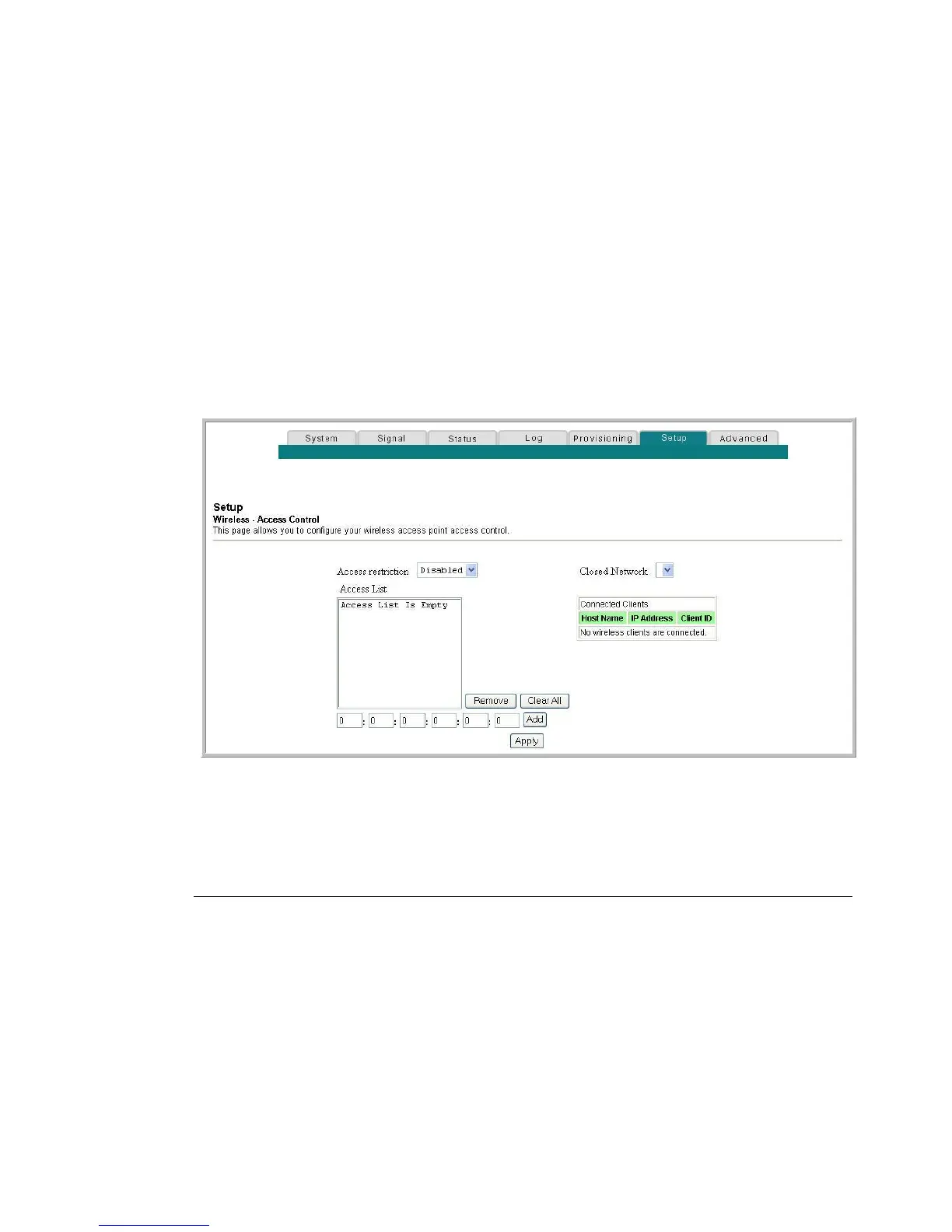
Use the Setup Wireless - Access Control page to configure your wireless access point
access control.
Note: If you are not familiar with the advanced settings detailed in this section,
contact your service provider before you attempt to change any of the residential
gateway default wireless advanced settings.
Click Access Control in the Wireless section of the Setup page to access the Setup
Wireless - Access Control page.
Setup Wireless Access Control Page
The following illustration is an example of the Setup Wireless - Access Control page.
Setup Wireless - Access Control Page Description
This section describes the section headings and field descriptions of the Setup
Wireless - Access Control page.
When encryption is enabled, this selection allows you to choose one of
the following options from the drop-down list:
Disable (factory default)–No access restrictions based on MAC
address of wireless access devices.
Allow–Allows wireless access to only the MAC addresses listed in
the Access List.
Deny–Denies wireless access to only the MAC address listed in
the Access List.


 To Next Page