EasyManua.ls Logo

Cisco NCS 1014 - User Manual

Cisco NCS 1014
10 pages
Print Icon
To Next Page IconTo Next Page
Loading...
Remove and Replace Cisco NCS 1014 Modules
This chapter describes the procedures to replace Cisco NCS 1014 modules.
All the modular slots in the NCS 1014 chassis should always be populated with respective modules (line-cards,
controller, PSU & fan units). Empty line card slots to be populated with filler modules, which are shipped
with the chassis. The replacement or upgrade of the modules (Online Insertion or Removal, OIR) to be
performed only when the ambient temperature is below 30-degree C. The OIR of modules should be completed
within five minutes to prevent overheating of the components.
Caution
Remove and Replace the Pluggables in the 2.4T Line Card, on page 1
Remove and Replace a Line Card, on page 2
Remove and Replace the Power Supply Unit (PSU), on page 2
Remove and Replace the Controller, on page 5
Remove and Replace the Fan Module, on page 6
Remove and Replace the Solid State Drive (SSD), on page 8
Wipe Data in Disk Using Secure Erase, on page 10
Remove and Replace the Pluggables in the 2.4T Line Card
Use this procedure to remove and replace the pluggables in the 2.4T DWDM line card.
This procedure is applicable to replacing pluggables in other line cards too.
Note
Remove and Replace Cisco NCS 1014 Modules
1
Question and Answer IconNeed help?

Do you have a question about the Cisco NCS 1014 and is the answer not in the manual?

Overview

The Cisco NCS 1014 is a modular chassis designed for network operations, with various components that can be removed and replaced for maintenance, upgrades, or troubleshooting. The device is built to house line cards, controllers, power supply units (PSUs), fan modules, and solid-state drives (SSDs).

Function Description:

The Cisco NCS 1014 serves as a core networking device, likely for high-capacity data transmission, given its modular design and the mention of DWDM (Dense Wavelength Division Multiplexing) line cards. Its modular architecture allows for flexible configuration and scalability, enabling network administrators to customize the device based on specific operational requirements. The ability to hot-swap modules (Online Insertion or Removal, OIR) is a key feature, minimizing downtime during maintenance or upgrades. The presence of a controller suggests centralized management and control over the various line cards and other components within the chassis. Power supply units provide the necessary electrical power, while fan modules ensure adequate cooling to prevent overheating, especially during OIR procedures. Solid-state drives are likely used for storing operating system software, configuration files, logs, and potentially other operational data. The inclusion of a secure erase feature for SSDs highlights data security as an important aspect, particularly when units are returned for repair or replacement (RMA).

Important Technical Specifications:

While specific numerical specifications like throughput, port density, or power consumption are not explicitly detailed in the provided text, several operational parameters and component types are mentioned:
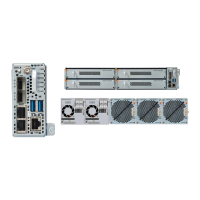
  • Modular Slots: The chassis features multiple modular slots designed for various components, including line cards, controllers, PSUs, and fan units. All slots must be populated, either with functional modules or filler modules, to ensure proper operation and airflow.
  • Line Cards: The text specifically mentions "2.4T DWDM line card" and "CIM8 module," indicating support for high-capacity optical networking technologies. The term "pluggables" refers to smaller, hot-swappable optical transceivers or other components that fit into the line cards.
  • Power Supply Units (PSUs): The device supports both AC and DC power supply units, as indicated by "Locking Latch on the DC PSU" and "Locking Latch on the AC PSU" figures. This offers flexibility in deployment environments.
  • Controllers: The chassis includes dedicated controller modules for managing the system.
  • Fan Modules: Essential for thermal management, these modules are also hot-swappable.
  • Solid State Drives (SSDs): The system utilizes SSDs for data storage, with specific mentions of "CPU SSD" (D:13) and "Chassis SSD" (D:14), suggesting multiple SSDs for different functions or redundancy.
  • Operating Temperature for OIR: A critical operational constraint is that OIR procedures for modules (line cards, filler cards, fan modules) must be performed when the ambient temperature is below 30°C (80°F). This is to prevent overheating of components during the brief period when a slot might be open or a module is being replaced.
  • OIR Duration: OIR procedures for modules must be completed within five minutes to prevent overheating. For fan modules specifically, the OIR duration at 30°C ambient temperature is also five minutes.
  • Tools: A T-15 six lobe/slot screwdriver is required for loosening captive screws on line cards, controllers, and SSDs.

Usage Features:

  • Hot-Swappable Modules (OIR): Most, if not all, modules (line cards, controllers, PSUs, fan modules, SSDs) are designed for Online Insertion or Removal, allowing for replacement or upgrade without powering down the entire chassis. This is crucial for maintaining continuous network operation.
  • Filler Modules: Empty line card slots must be populated with filler modules, which are shipped with the chassis. This ensures proper airflow and prevents dust ingress, maintaining the integrity of the system's cooling and internal environment.
  • Fiber Management: The presence of "fiber management bracket" and "Velcro tapes holding the fibers" suggests integrated cable management features to organize and secure optical fibers connected to the line cards.
  • Pull Tabs and Handles: Modules are equipped with pull tabs or handles to facilitate their removal and insertion, making physical handling easier and safer.
  • Locking Latches: PSUs feature locking latches to secure them in their slots, preventing accidental dislodgement.
  • Console Port Access: Access to the NCS 1014 for certain procedures, like secure erase, is done via the console port, indicating a direct, out-of-band management interface.

Maintenance Features:

  • Modular Replacement: The entire document is dedicated to the procedures for removing and replacing various modules:
    • Pluggables in 2.4T Line Cards
    • Line Cards (and filler cards)
    • Power Supply Units (PSUs)
    • Controllers
    • Fan Modules
    • Solid State Drives (SSDs)
  • Pre-Checks for PSU Replacement: Before replacing a PSU, connections to the power supply must be removed, including disconnecting power from the breaker. Cable retainers, power cables (for AC PSUs), protection covers, fasteners, and lugs (for DC PSUs) must also be removed.
  • Support During Removal/Insertion: Users are instructed to support modules (e.g., line cards, PSUs, controllers, fan modules) with one hand while pulling or pushing them, emphasizing careful handling to prevent damage. Fiber management brackets should only be used for pulling/pushing, not for carrying cards.
  • Thermal Management During OIR: Strict adherence to ambient temperature limits (below 30°C/80°F) and OIR completion times (within five minutes) is mandated to prevent overheating, which could damage components.
  • Secure Erase Feature: For data security, especially when returning a faulty unit (RMA), the NCS 1014 provides a "Secure Erase" feature for its SSDs. This procedure involves accessing the BIOS setup (via DEL or ESC key during boot), navigating to the "Advanced" tab, selecting "HDD Secure Erase," choosing the specific SSD (CPU SSD D:13 or Chassis SSD D:14), and confirming the erase operation. This ensures sensitive data is permanently removed from the drives.
  • Warning for Secure Erase: The secure erase procedure is explicitly marked as a "Warning" and should "Use this procedure only during RMA," indicating its irreversible nature and specific use case.
  • Safety Precautions: A prominent warning advises against introducing body parts or objects into chassis slots (chassis, PSU, fan tray, LC slots) during installation or removal, as exposed circuitry presents an "ENERGY HAZARD" and a "RISQUE D'ÉLECTROCUTION." This highlights electrical safety as a primary concern during maintenance.

Cisco NCS 1014 Specifications

General IconGeneral
BrandCisco
ModelNCS 1014
CategoryChassis
LanguageEnglish

Related product manuals