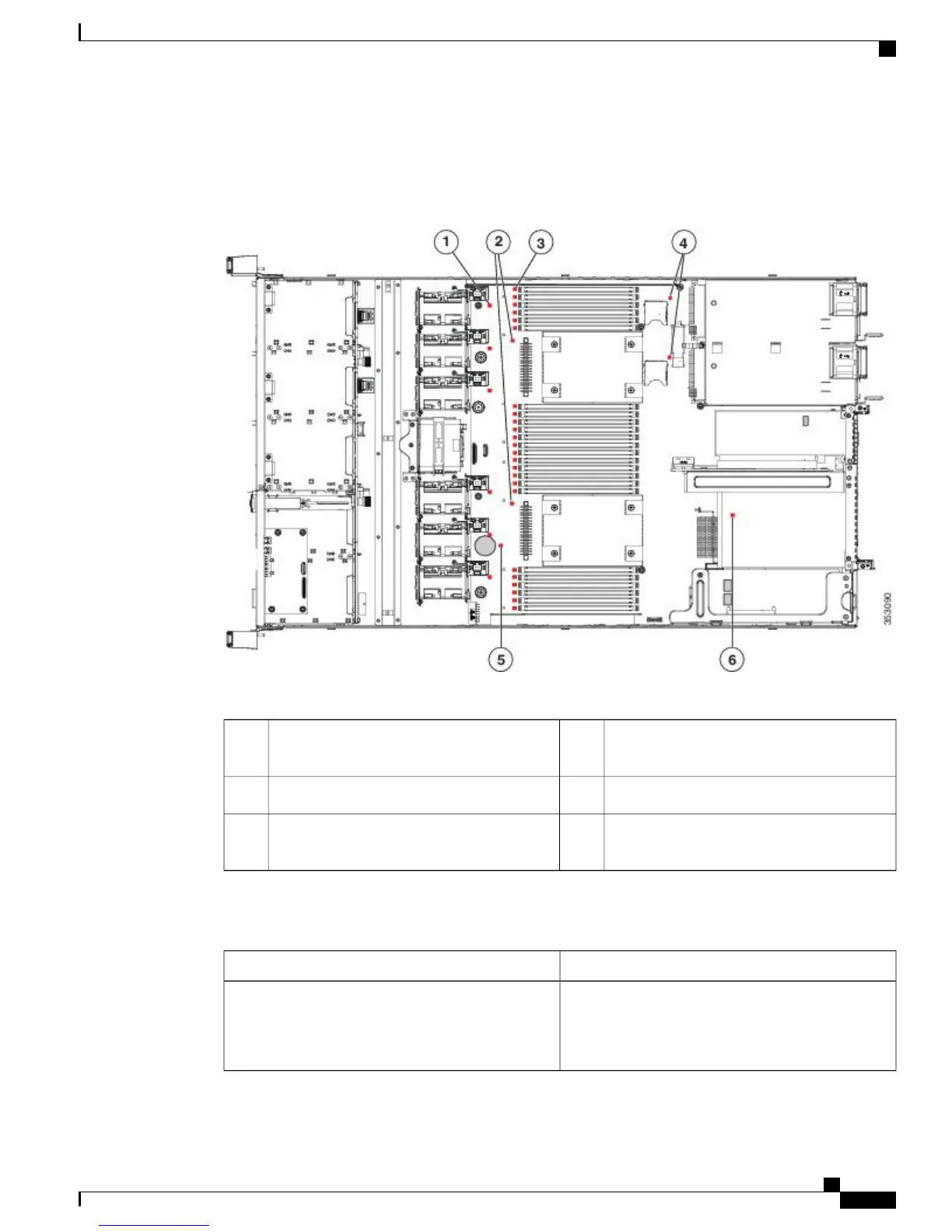
The following figure shows the locations of these internal LEDs in Cisco SNS-3515 or Cisco SNS-3595
appliance.
Figure 3: Cisco SNS-3515 or 3595 Internal Diagnostic LED Locations
The following table describes the callouts in the above figure.
SD card fault LEDs (one next to each bay)4Fan module fault LEDs (one next to each fan
connector on the motherboard)
1
RTC battery fault LED5CPU fault LEDs (one in front of each CPU)2
mLOM card fault LED (on motherboard next
to mLOM socket)
6DIMM fault LEDs (one in front of each
DIMM socket on the motherboard)
3
The following table describes the internal diagnostic LEDs located inside the Cisco SNS-3515 or Cisco
SNS-3595 appliance.
StateLED Name
• Off—Component is functioning normally.
• Amber—Component has failed.
Internal diagnostic LEDs (all)
Cisco SNS 3500 Series Appliance Hardware Installation Guide
9
Cisco SNS 3500 Series Appliance Overview
Internal Diagnostic LEDs









 To Next Page