EasyManua.ls Logo

Cisco SPA112 - Configuration and Management of the ATA; Using the Web-Based Configuration Utility

Cisco SPA112
8 pages
To Next Page IconTo Next Page

To Previous Page IconTo Previous Page
Loading...
Copyright © 2005-2012 Jaguar Telecom Version 1.8 Page 4 of 8
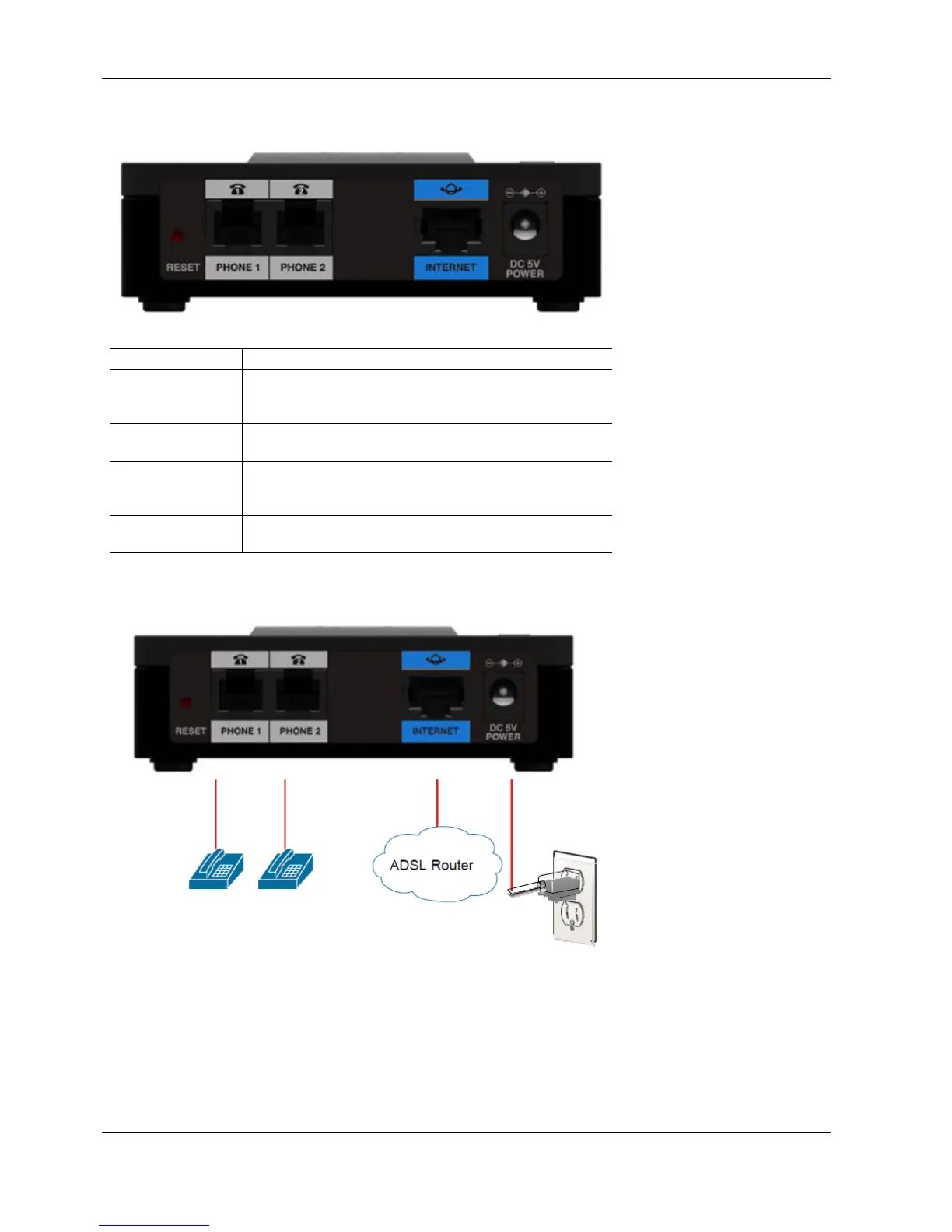
2.3 SPA112 Back Panel
Fe
a
tu
r
e
D
e
s
cri
p
t
i
o
n
Re
s
e
t
No not press the reset button under any
circumstances. This will permanently disable the
operation of the unit
.
Phone
1
,
Phone 2
(Gra
y)
Connect
to an
analogue phone,
using the UK Phone
adaptor provided
Internet (Blue)
Connect
to a
broadband network device
(DSL
or
cable
mo
dem
)
or a
network
r
out
e
r
,
using an
E
thernet
cable.
Power
Connect
to a
power source,
using the
pr
ovide
d
power
adapt
e
r
.
2.4 Network Setup
Please follow the instructions below
Connect the Internet cable directly into your ADSL router.
Plug in the phone(s) that you are going to use now, using the UK/RJ11 phone
adaptors if necessary.
Insert power lead. Power on the Cisco and wait for 60 seconds

Other manuals for Cisco SPA112

Related product manuals