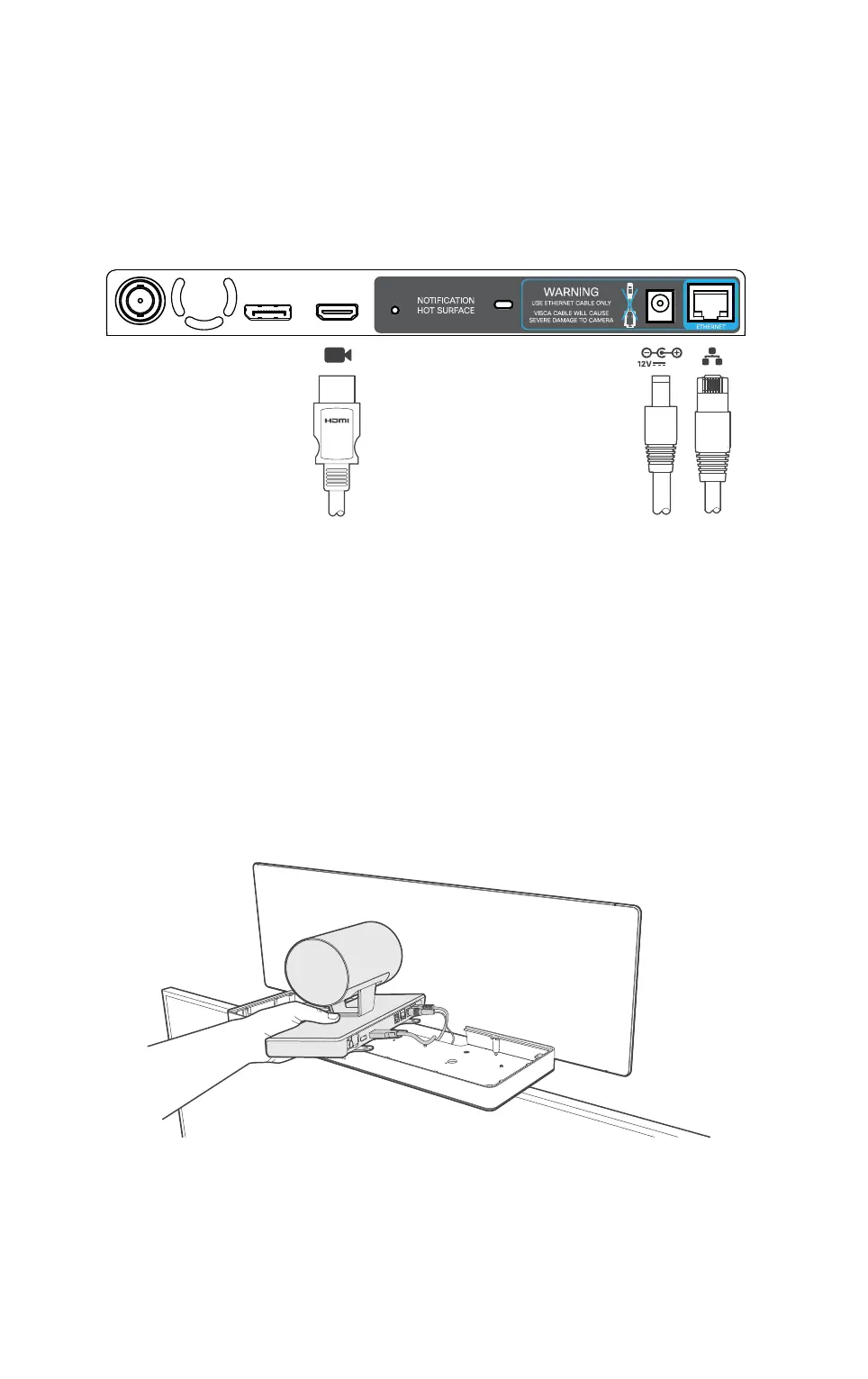
Connect the camera cables
It can be a bit cramped when you connect and secure the cameras, so you’ll probably
want to inspect the camera connector panel to know where the HDMI, Ethernet and power
are located.
Start with the camera to the right and hold the camera as illustrated. Make sure the short
cables (Ethernet and power) are available for this camera and connect the cables. Then
connect the HDMI cable coming from the codec. Guide the camera into position.
Proceed with the camera to the left and hold the camera the same way as you did with the
rst camera. Connect the long cables (Ethernet and power) to the left camera. Connect the
HDMI cable coming from the codec. Guide the camera into position.
3,0A
Connect one HDMI cable
to each camera. The HDMI
cables for the two cameras
are going to the codec.
The Ethernet and power
cables are coming from the
base unit. The short cables
goes to the right camera and
the longer cables to the left
camera.
Right
side
Left
side












 To Next Page