8
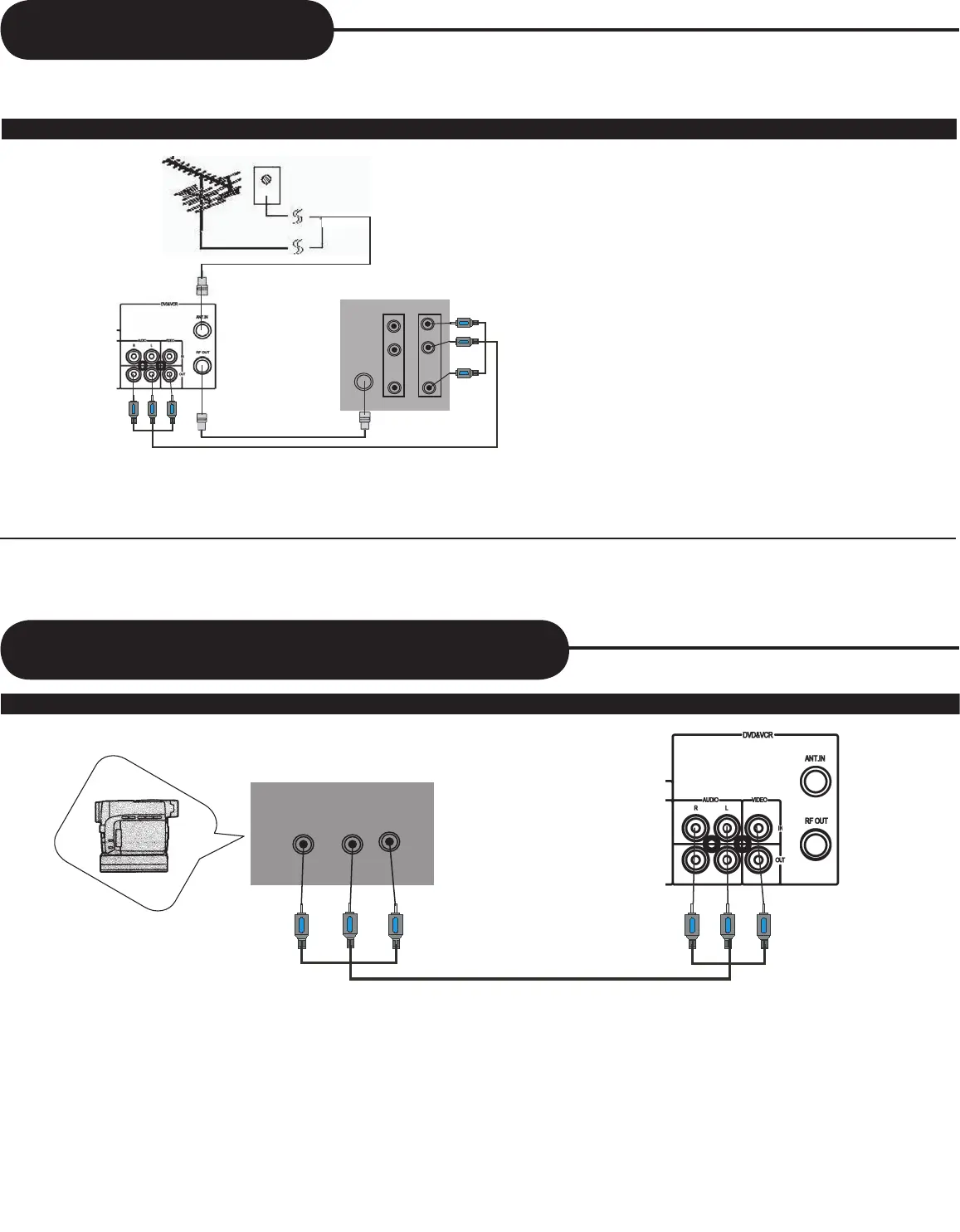
Connecting With TV
• In connecting RF cable to TV, set TV channel to CH3.
INPUT 1
INPUT 2
R
L
AUDIO
ANT IN
RF CABLE
AUDIO&VIDEO CABLE
OUT SIDE ANTENNA
OR WALL ANTENNA OUTLET
REAR PANEL OF TV
1 Connect antenna cable to the “ANT.IN” jack on rear panel of player.
2 Connect TV to the Combo Player by connecting the “RF OUT” jack with “ANT.IN” jack of the TV with RF cable(included).
3 Connect AV OUT jack on VCR&DVD PLAYER to AV IN jack of the TV with RCA(composite) cables(included).
• Connect with Audio/Video terminal, you can enjoy more clear video and audio.
REAR PANEL OF CAMCORDER
VIDEO
L
R
AUDIO
OUT
Connecting With Optional Equipment
Connect AV OUT jack on camcorder (or playback video) to AV IN jack on rear panel (or front panel) of VCR&DVD PLAYER with
RCA(composite) cables.
How to Connect with RF cable or AV cable
How to Connect



 To Next Page