Windows Installation
Step 1
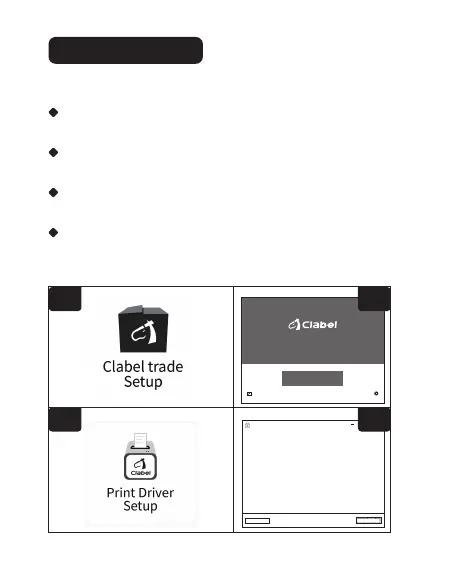
Click to open the downloaded "Clabel trade" installation package.(fig.1)
Step 2
Click"install immediately".(fig.2)
Step 3
Click to open the downloaded print driver package.(fig.3)
Step 4
Click the printer to the computer via USB. Click on the USB printer
and follow the prompts to proceed to the next steps.(fig.4)
fig.1
fig.3
Notice before installation
This driver is applicable to the CLABEL brand label printer.
Make sure the printer is turned on before installation and
connected to the computer with a data cable.Setup will
automatically detect printer status,Help you install printer
drivers easily.
If you confirm that the above steps are ready,please select
the installation method.
Net Printer USB Printer
Simple and smart with CLABEL
Clabel trade
Install lmmediately
Agree Clabel trade
User agreement
Custom installation
fig.2
fig.4
① Install the software and driver.
12


 To Next Page