Note:
• Be sure
to
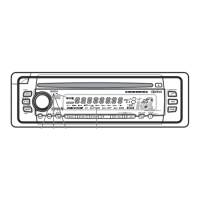
read this chapter referring to the front diagrams
of
chapter
"3.
CONTROLS" on page 5
(unfold).
Names
of
the
Buttons
and
their Functions
[CD/CDC] (CD/CD changer) button
• Use to switch between CD and CD changer
mode.
[SAT] (Satellite) button
• Use to switch to SIRIUS mode.
• Switch the band.
[AMlFM] button
• Use to switch to radio mode.
• Switch the band.
[AUX] button
• Use to switch to AUX mode.
[ROTARY] knob
• Adjust the volume by turning the knob
clockwise or counterclockwise.
• Use the knob to perform function
adjustments.
[OPEN] button
• Open the panel by pressing the "Clarion
Marine"
oval latch button. Audio will mute
with the front panel open.
[SEEK/MAN] (Seek/Manual) button
• Seek
or
manual tunings while
in
the radio
mode.
[MENU] button
• Press and hold the button for 1 second
or
longer to switch to the menu mode.
[ENT] (Enter) button
• Performs various settings.
[DIRECT]
(1-6)
buttons
• Store a station into memory
or
recall it
directly while
in
the radio mode.
[DISP] (Display) button
• Switch the display indication (Main display,
Sub display, Clock display).
[RANDOM] button
• CD plays random track order.
6 CMD4
[REPEAT] button
• Repeat play while
in
the CD mode.
[SCAN]
button
• Plays
10
seconds
of
each track while in the
CD mode.
[FADE] (Fader) knob
• Adjust the fader by turning the knob
clockwise
or
counterclockwise.
[TREBLE]
knob
• Adjust the treble by turning the knob
clockwise
or
counterclockwise.
[BASS]
knob
• Adjust the bass by turning the knob clockwise
or
counterclockwise.
[~~],
[~~]
buttons
• Select a station while in the radio mode or
select a track when listening to a CD. The
buttons are also used to adjust function
settings.
• Press and hold the button for 1 second
or
longer
to
switch to fast-forward/fast-rewind.
[POWER]
button
• Press the button to turn on the power.
Press and hold the button for 1 second or
longer
to
turn the power off.
• Switches operation between Radio, CD, Aux,
and CeNET modes.
[~/II/MUTE]
(Play/Pause/Mute)
button
• When held depressed for 1 second
or
longer,
performs Play
or
Pause.
• Turns mute ON/OFF.
[CD SLOT]
• CD insertion slot.
[~]
(Eject)
button
• Eject a CD when it is loaded into the unit.
[RESET]
button
• Press and hold the button for about 2
seconds when the
follOWing
symptoms occur.
*Nothing happens when buttons are pressed.
*Display is not accurate.



 To Next Page