EasyManua.ls Logo

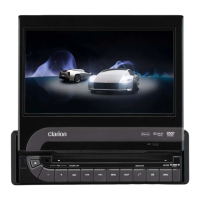
Clarion VZ709E - User Manual

Clarion VZ709E
84 pages
Print Icon
To Next Page IconTo Next Page
Loading...
DVD MULTIMEDIA STATION WITH
7-inch TOUCH PANEL CONTROL
STATION MULTIMEDIA DVD AVEC COMMANDE PAR
ECRAN TACTILE 7 pouces
DVD-MULTIMEDIA-STATION MIT
7-Zoll-TOUCHSCREEN-STEUERUNG
STAZIONE MULTIMEDIALE DVD DOTATA DI PANNELLO DI
CONTROLLO A SFIORAMENTO DA 7 POLLICI
DVD MULTIMEDIA STATION MET
7-inch TOUCH PANEL BEDIENING
EQUIPO DVD MULTIMEDIA CON
PANEL DE CONTROL TÁCTIL DE 7 pulgadas
DVD MULTIMEDIA-STATION MED
7-tums PEKSKÄRM
ESTAÇÃO MULTIMÉDIA DE DVD COM CONTROLO DE
PAINEL DIGITAL DE 7 polegadas
DVD MULTIMEDIESTATION MED 7" BERØRINGSPANEL
Owner’s manual & Installation manual
Mode d’emploi et manuel d’installation
Benutzerhandbuch & Installationshandbuch
Manuale dell’utente e manuale di installazione
Gebruikershandleiding en installatiehandleiding
Manual de instrucciones y de instalación
Ägar- & installationshandbok
Manual do utilizador e manual de instalação
Betjeningsvejledning og installationsvejledning
VZ709E


Table of Contents

Other manuals for Clarion VZ709E

Questions and Answers

  • J
    jsanchezAug 19, 2025
    Why won't my Clarion Car Video System power on?
    • S
      Spencer TaylorAug 19, 2025
      If your Clarion Car Video System isn't powering on, it could be due to a blown fuse. Replace it with a fuse of the same amperage. If it blows again, consult your store of purchase. Another potential cause is incorrect wiring, in which case you should also consult your store of purchase.
  • A
    Ariel FreemanAug 21, 2025
    What to do if the Clarion Car Video System remote control unit does not work?
    • S
      Shannon GoodAug 21, 2025
      If the remote control for your Clarion Car Video System isn't working, it could be because direct sunlight is hitting the light-receptive part of the unit. Also, check the remote's battery to ensure it's not dead or missing.
  • E
    Erika DavisAug 23, 2025
    What to do if my Clarion Car Video System disc cannot be loaded?
    • B
      browncharlotteAug 23, 2025
      If your Clarion Car Video System won't load a disc, first check if another disc is already inside and eject it. Also, check for any foreign objects and remove them.
  • L
    Lydia SimsAug 26, 2025
    Why is the display dark on my Clarion Car Video System?
    • J
      jordanbrayAug 26, 2025
      A dark display on your Clarion Car Video System could be due to several reasons. First, check the Dimmer control and adjust it properly. Also, very low temperatures inside the vehicle may cause issues – try setting to an appropriate temperature (25°C or so). Finally, the display darkens at night when the vehicle's headlights are on to reduce glare; this can also happen during the day if the headlights are on.
  • K
    karen23Aug 28, 2025
    What to do if sound skips or is noisy on Clarion VZ709E?
    • U
      usmithAug 28, 2025
      If the sound from your Clarion Car Video System skips or is noisy, the disc may be dirty. Clean it with a soft cloth. Alternatively, the disc might be heavily scratched or warped, requiring a replacement. Finally, ensure that MP3/WMA/AAC files are encoded correctly.
  • L
    Lacey AnthonyAug 30, 2025
    What to do if nothing happens when I press buttons on my Clarion VZ709E?
    • S
      Sarah FullerAug 30, 2025
      If your Clarion Car Video System isn't responding to button presses and the display is inaccurate, the microprocessor may have malfunctioned. Turn off the power and remove the DCP. Press the reset button with a thin rod. Note: When the Reset button is pressed, turn off the ACC power. When the Reset button is pressed, frequencies of radio stations, etc. stored in memory are cleared.
  • J
    Jennifer WashingtonSep 1, 2025
    Why is the USB device not recognized by my Clarion VZ709E?
    • T
      Trevor FisherSep 2, 2025
      If your Clarion Car Video System isn't recognizing the USB device, disconnect the USB device and reconnect. If the device is still not recognized, try replacing with a different USB device.
  • C
    Cassandra SerranoSep 4, 2025
    What to do if the Clarion VZ709E Car Video System sound is bad directly after power is turned on?
    • C
      charleslewisSep 4, 2025
      If the sound quality of your Clarion Car Video System is poor immediately after turning it on, water droplets might have formed on the internal lens due to humidity. Leave the unit on for about 1 hour to allow it to dry.
  • T
    teresa44Sep 6, 2025
    Why is there no sound with the display “NO FILE” shown on Clarion VZ709E?
    • D
      Dawn GarciaSep 6, 2025
      If your Clarion Car Video System displays 'NO FILE' and there's no sound, it means there are no MP3/WMA/AAC files stored on the USB device. Ensure these files are properly stored on the USB device.
  • U
    umillerSep 8, 2025
    Why is the image not displayed on my Clarion Car Video System?
    • S
      Susan BellSep 8, 2025
      If there is no image displayed on your Clarion Car Video System, make sure the parking brake is engaged.

Summary

CAUTIONS

!CAUTION

Important safety warnings and precautions regarding laser product classification.

3. CONTROLS

Functions of Buttons

Detailed explanation of each button on the main unit and their operations.

4. BASIC OPERATIONS

5. SOURCE OPERATIONS

Radio Operations

Detailed guide on tuning, seeking, presets, and RDS features.

DVD Video Operations

How to select and start playing DVD video discs.

6. SOURCE OPERATIONS (ACCESSORIES)

iPod Operations

Instructions for connecting and controlling Apple iPods.

Bluetooth Audio Player Operations

Connecting and controlling Bluetooth audio devices for playback.

Bluetooth Telephone Operations

Pairing and using a Bluetooth mobile phone for calls.

7. SYSTEM SETTINGS

Audio Settings

Customizing audio parameters like bass, treble, balance, and DZE.

8. TROUBLESHOOTING

General

Common problems and solutions for the unit's general operation.

9. ERROR DISPLAYS

DVD Player

Explains error messages for DVD player and how to resolve them.

INSTALLATION AND WIRE CONNECTION MANUAL

1. SAFETY PRECAUTIONS

Essential safety warnings and guidelines before starting installation.

9. WIRE CONNECTION

Diagrams and instructions for connecting various cables and accessories.

Clarion VZ709E Specifications

General IconGeneral
Display Size7 inches
Resolution800 x 480 pixels
BluetoothYes
Radio TunerAM/FM
NavigationNo
Motorized MonitorYes
Touch ScreenYes
DVD PlayerYes
CD PlayerYes
MP3 PlaybackYes
WMA PlaybackYes
GPS NavigationNo
Audio Formats SupportedMP3, WMA
Video Formats SupportedMPEG-1, MPEG-2, MPEG-4
SD Card SlotYes
USB PortsYes, Rear

Related product manuals