EasyManua.ls Logo

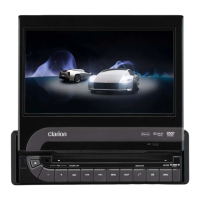
Clarion VZ709E - User Manual

Clarion VZ709E
84 pages
Print Icon
To Next Page IconTo Next Page
Loading...
DVD MULTIMEDIA STATION WITH
7-inch TOUCH PANEL CONTROL
STATION MULTIMEDIA DVD AVEC COMMANDE PAR
ECRAN TACTILE 7 pouces
DVD-MULTIMEDIA-STATION MIT
7-Zoll-TOUCHSCREEN-STEUERUNG
STAZIONE MULTIMEDIALE DVD DOTATA DI PANNELLO DI
CONTROLLO A SFIORAMENTO DA 7 POLLICI
DVD MULTIMEDIA STATION MET
7-inch TOUCH PANEL BEDIENING
EQUIPO DVD MULTIMEDIA CON
PANEL DE CONTROL TÁCTIL DE 7 pulgadas
DVD MULTIMEDIA-STATION MED
7-tums PEKSKÄRM
ESTAÇÃO MULTIMÉDIA DE DVD COM CONTROLO DE
PAINEL DIGITAL DE 7 polegadas
DVD MULTIMEDIESTATION MED 7" BERØRINGSPANEL
Owner’s manual & Installation manual
Mode d’emploi et manuel d’installation
Benutzerhandbuch & Installationshandbuch
Manuale dell’utente e manuale di installazione
Gebruikershandleiding en installatiehandleiding
Manual de instrucciones y de instalación
Ägar- & installationshandbok
Manual do utilizador e manual de instalação
Betjeningsvejledning og installationsvejledning
VZ709E


Table of Contents

Other manuals for Clarion VZ709E

Questions and Answers

  • N
    Nathaniel PierceSep 12, 2025
    How to fix disturbed iPod video image on Clarion VZ709E Car Video System?
    • J
      Jay NewtonSep 12, 2025
      If the video image from your iPod is disturbed on your Clarion Car Video System, check the TV Signal setting on the iPod and make sure it's set correctly (NTSC/PAL).
  • B
    Brian SuttonSep 13, 2025
    Why is the color of the display light or not good on my Clarion VZ709E Car Video System?
    • Y
      yatesgeorgeSep 13, 2025
      If the color on your Clarion Car Video System's display is light or the shade of color is not good, check that the Bright, Color, Contrast, and Hue are adjusted properly.
  • C
    Courtney McdonaldSep 15, 2025
    What to do if the USB device cannot be inserted into Clarion Car Video System?
    • J
      Jamie GeorgeSep 15, 2025
      If you can't insert the USB device into your Clarion Car Video System, it might be due to incorrect direction. Try reversing the connection. If that doesn't work, the USB connector might be broken and needs replacement.

Summary

CAUTIONS

!CAUTION

Important safety warnings and precautions regarding laser product classification.

3. CONTROLS

Functions of Buttons

Detailed explanation of each button on the main unit and their operations.

4. BASIC OPERATIONS

5. SOURCE OPERATIONS

Radio Operations

Detailed guide on tuning, seeking, presets, and RDS features.

DVD Video Operations

How to select and start playing DVD video discs.

6. SOURCE OPERATIONS (ACCESSORIES)

iPod Operations

Instructions for connecting and controlling Apple iPods.

Bluetooth Audio Player Operations

Connecting and controlling Bluetooth audio devices for playback.

Bluetooth Telephone Operations

Pairing and using a Bluetooth mobile phone for calls.

7. SYSTEM SETTINGS

Audio Settings

Customizing audio parameters like bass, treble, balance, and DZE.

8. TROUBLESHOOTING

General

Common problems and solutions for the unit's general operation.

9. ERROR DISPLAYS

DVD Player

Explains error messages for DVD player and how to resolve them.

INSTALLATION AND WIRE CONNECTION MANUAL

1. SAFETY PRECAUTIONS

Essential safety warnings and guidelines before starting installation.

9. WIRE CONNECTION

Diagrams and instructions for connecting various cables and accessories.

Clarion VZ709E Specifications

General IconGeneral
Display Size7 inches
Resolution800 x 480 pixels
BluetoothYes
Radio TunerAM/FM
NavigationNo
Motorized MonitorYes
Touch ScreenYes
DVD PlayerYes
CD PlayerYes
MP3 PlaybackYes
WMA PlaybackYes
GPS NavigationNo
Audio Formats SupportedMP3, WMA
Video Formats SupportedMPEG-1, MPEG-2, MPEG-4
SD Card SlotYes
USB PortsYes, Rear

Related product manuals