Pod Symbols and Functions 3-7
Section 3. Operator Compartment and Controls
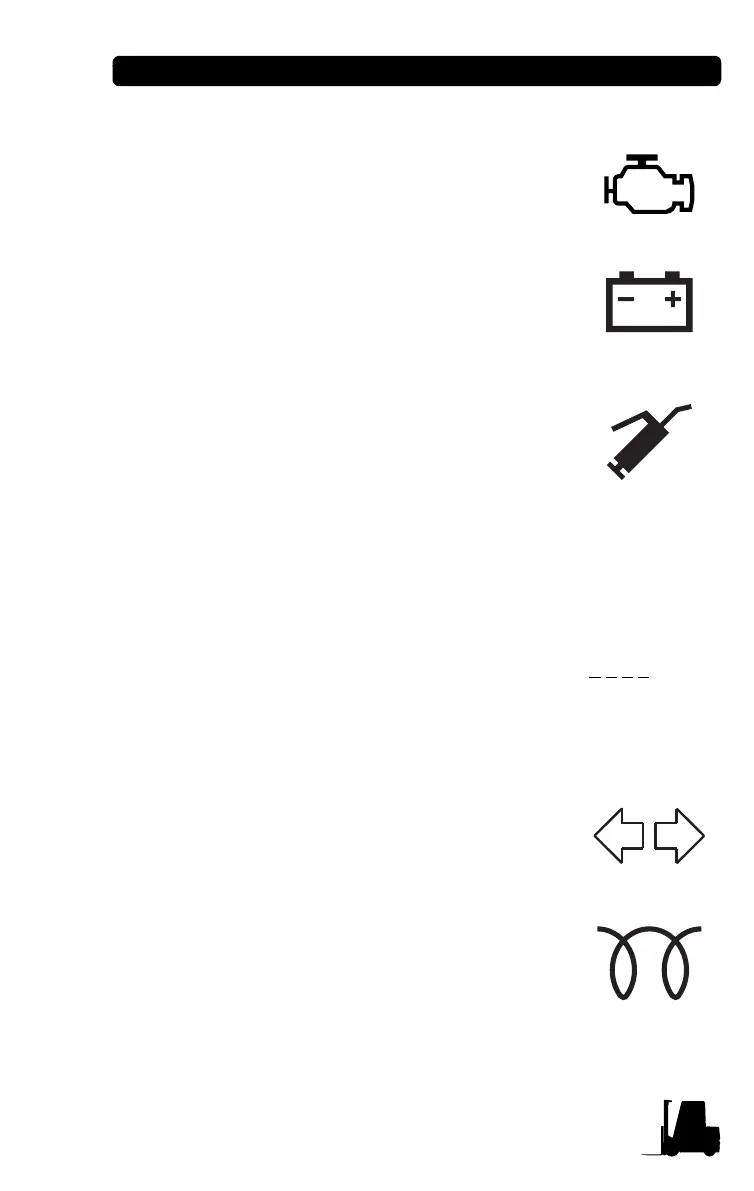
• Engine check
When the engine has problem, this LED
will be on.
• Alternator charging status
Indicates that the alternator is not properly
charging the battery. Service is required to
correct the problem.
• Service icon
LED will illuminate when pre-set service
time is reached. When LED is on, the pre-
set service time has been reached
indicating that a PM is required. Refer to
Service Manual for proper PM procedures.
Pre-set service time setting method - initialized by “key on +
FWD + F1 + F2”, service time display at hour meter. Here, F1
is for up set, F2 is for down set (with interval times of 50
hours). When the key switch is turned OFF, the pre-set
service time setting time is saved. Pre-set service time counts
down opposite to operating time. To disable the Service Icon,
set the pre-set service time to “-1000” (display 1
0 0 0 ); If you
push the F2 switch when setting the pre-set service time, the
time will be adjusted to “-1000”.
• Turn signal
Indicates that the turn signal switch is
actuated.
• Glow plug Preheat (Diesel truck)
Indicates glow plugs are in the process of
preheating the diesel engine. When the
ignition switch is turned to the “ON”
position, a timer is set. This symbol
displays until the timer cycle is completed.
The engine may then be started.



 To Next Page