9
3. PRODUCT INFORMATION
3.1 Device Description
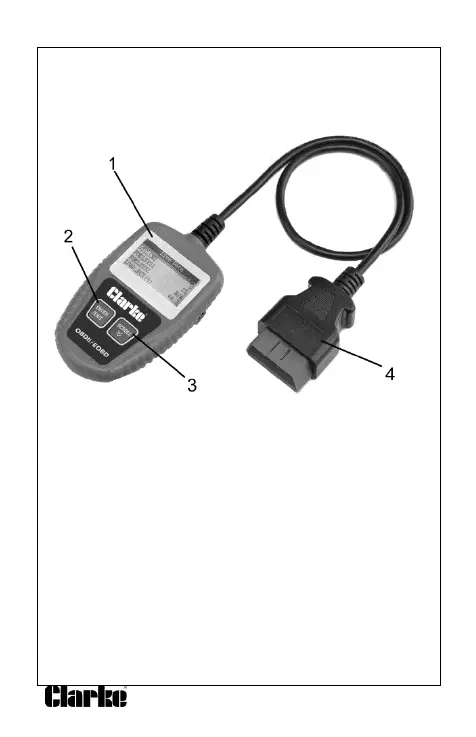
1. LCD DISPLAY--Indicates test results & optional settings.
2. ENTER BUTTON--Confirms a selection (or action) from a menu
list, or returns to the main menu.
3. SCROLL BUTTON--Scrolls through menu items or cancel an
operation.
4. OBD II CONNECTOR--Connects the Code Scanner to the
vehicle’s Data Link Connector (DLC).
3.2 Product Specifications
1. Display: LCD dot matrix
2. Operating Temperature: -10 to 60°C (-14 to 140 F°)
3. Storage Temperature: -20 to 70°C (-4 to 158 F°)
4. Power—8-18V DC provided via detachable OBD II cable
5. Dimensions:
Length /Width /Height
128 mm x 75 mm x 20mm
6. Weight: 330g


 To Next Page