2
English
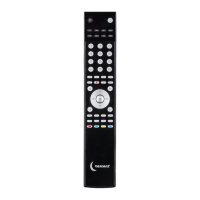
Pre-Programmed Remote Control
Art.no 38-4362 Model SR1000
Please read theentire instruction manual before use and save it for future reference.
Wereserve theright for any errors in text or images and for making any necessary
technical changes to this document. Ifyou should have any questions concerning
technical problems please contact our Customer Services.
1. Description of theproduct
This remote control has been pre-programmed at thefactory. Itreplaces up to eight
separate remote controls to operate devices such as TV sets, video recorders,
satellite receivers, cable TV receivers and DVD players. Allyou need to do is key in
theright control code and theremote control is ready for use. Thereis alist of
control codes at theback of this user guide.
• Pre-programmed for themost common makes of equipment.
• Replaces remote controls that have been dropped or damaged.
• Can replace up to eight remote controls, eg for TV sets, video recorders,
satellite and digital receivers, DVD players and cable TV receivers.
• Teletext function.
• Powered by two AAA/LR03 batteries (sold separately).
2. Worth bearing in mind
• This remote control works with most brands on themarket but it is not certain that
it will work with your particular model of device, even though thebrand appears in
thecode list. You can’t tell from thecode list whether theremote control will work
with aparticular device. Youhave to find out by experiment.
• The remote control may work with more than one code. Youwill have to experi-
ment to find thecode for which thegreatest number of button functions work.
3. Getting started
3.1 Installing thebatteries
The remote control is powered by two AAA/LR03 batteries.
1. Remove thebattery cover on theback.
2. Install thebatteries, observing themarkings in thebattery compartment.
Make sure thebatteries are theright way round, with plus (+) and minus (-)
as shown by themarkings.
3. Refit thebattery cover.


 To Next Page