6
English
5.5 Normal use
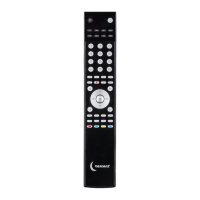
Aim theremote control at thedevice and press thebutton for function you want.
TheLED flashes during sending to confirm thekeypress.
5.6 Advanced use
The remote control has several built-in functions:
• Volume control on all devices
• Code check
• Total reset
The volume and mute buttons can be set to use theTV code even when
theremote control is set to theother modes. Thismeans that you can control
theTV sound even when theremote control is set to video mode.
5.6.1 To de-activate volume control on all devices
1. If you do not want theTV volume to be controlled when theremote control is in
VCR mode, first choose themode you want, eg VCR.
2. Then press and hold down
followed by therelevant device, eg .
TheLED lights up.
3. Release both buttons.
4. Using thenumber keys
– , enter 9-0-2. TheLED goes out.
5.6.2 To re-activate volume control on all devices
1. If you want to be able to control theTV volume when theremote control is in VCR
mode, first choose themode you want, eg VCR.
2. Then press and hold down followed by therelevant device, eg .
TheLED lights up.
3. Release both buttons.
4. Using thenumber keys – , enter 9-0-1. TheLED goes out.
5.6.3 Code check
You can check your four-digit code.
1. Press adevice mode, eg
.
2. Press and hold down . TheLED flashes 0 to 9 times to show thefirst digit of
thecode. Example: Two flashes represent thedigit 2.
3. Repeat step 2 for thesecond, third and fourth digits of thecode.
5.6.4 Total reset
1. Resetting theremote control to its factory default settings.
2. Press and hold down and . TheLED lights up.
3. Using thenumber keys, enter 9-9-0. TheLED flashes three times.


 To Next Page