EasyManua.ls Logo

Classe Audio CA-300 - User Manual

Classe Audio CA-300
16 pages
Print Icon
To Next Page IconTo Next Page
Loading...
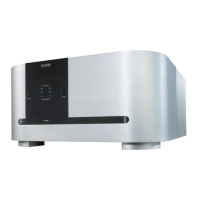
CLASSÉ AUDIO
CA-300
POWER AMPLIFIER
CA-300
OWNER'S MANUAL

Other manuals for Classe Audio CA-300

Questions and Answers

  • Z
    Zachary WolfeAug 12, 2025
    What to do if Classe Audio Amplifier turns into protection?
    • K
      Kelly Short MDAug 12, 2025
      If your Classe Audio Amplifier is turning into protection mode, examine it for any smoked or burned components. Also, check the power supply circuits (positive rail, negative rail, and Mosfet supply), the source and load, the protection circuit itself, the sensor wires between the sensor PCB and control PCB, and the output transistors and Mosfet drivers.
  • M
    Matthew HoltAug 16, 2025
    Why Classe Audio CA-300 Amplifier has no output?
    • C
      Christine HollandAug 16, 2025
      If your Classe Audio Amplifier has no output, begin by inspecting the connections. Then, check the output relays, the power supply circuits (positive rail, negative rail, and Mosfet supply), and the output transistors.
  • J
    jonathanbentonAug 19, 2025
    How to fix Classe Audio CA-300 that won’t turn on?
    • M
      Mikayla LopezAug 19, 2025
      If your Classe Audio Amplifier won’t turn on, check the connections, fuses, soft-start circuit, relays, and power supply circuits (positive rail, negative rail, and Mosfet supply).
  • G
    gwilliamsAug 23, 2025
    What to do if Classe Audio Amplifier has smoked components?
    • J
      Joshua CookAug 23, 2025
      If you find smoked or burned components in your Classe Audio Amplifier, check for shorts between components and ground. Also, check the output transistors, output relays, and power supply circuits (positive rail, negative rail, and Mosfet supply).
  • J
    Jeffrey WilsonAug 27, 2025
    Why Classe Audio CA-300 blowing fuses?
    • J
      jessica31Aug 27, 2025
      If the fuses in your Classe Audio Amplifier are blowing, check for a short between the fuse and ground. Also, check the power supply circuits, specifically the positive rail, negative rail, and Mosfet supply.
  • I
    Isaac AguilarAug 30, 2025
    How to eliminate excessive buzz from Classe Audio CA-300 Amplifier?
    • M
      Michael GregoryAug 30, 2025
      To address excessive buzz and/or hum in your Classe Audio Amplifier, check the electrical lines and inspect for a ground loop in the system.
  • M
    Megan JimenezSep 4, 2025
    How to fix oscillation in Classe Audio CA-300 Amplifier?
    • A
      Amy WrightSep 4, 2025
      To resolve oscillation issues with your Classe Audio Amplifier, check the source, the capacitors on the main board, and the 4.7? resistor.
  • M
    Michael EdwardsSep 7, 2025
    What to do if Classe Audio CA-300 has intermittent signal?
    • K
      Kelly JohnsonSep 8, 2025
      If your Classe Audio Amplifier has an intermittent signal, check the connections and replace the shield wires.

Summary

Classe Design Philosophy

Repeated Listening Design Sessions

Focus on fine-tuning sound through component exchange and voltage adjustment for natural realism.

Upgradable Single Circuit Designs

All products share a core circuit, with differences in parts quality, power supply, and features for upgradability.

Long Life in Real World Conditions

Emphasizes using high-quality parts and materials for proven reliability and enjoyment.

Unpacking and Setup

General Connections

AC Line Connection

Instructions for connecting the AC power cord to the unit's receptacle.

Safety Precautions during Connections

Crucial safety instructions regarding grounding, cable connections, and AC line cord usage to prevent shock hazards.

Stereo Connections

Details on making stereo input/output connections, including phasing and tightening for optimal performance.

Mono and Remote Control Setup

Mono Connections

Procedures for mono operation, including switch settings and input connections.

Remote Control Connection

How to connect the remote control jack for remote ON/OFF functionality.

Input Types and Connections

Regular Inputs

Guide for using standard RCA input connectors, including switch settings.

Balanced Inputs

Instructions for balanced XLR connections, including pin configurations and compatibility.

Mono Operation

Protection Circuit and Fuse Management

Product Features and Specifications

CA-300 Features Overview

Highlights key features like UHC TRANSFER, magnetic flux control, differential circuits, and build quality.

CA-300 Technical Specifications

Detailed technical specifications including frequency response, sensitivity, impedance, output power, and dimensions.

CE Approval Notice

Limited Factory Warranty

Warranty Validation Requirements

Requirements for validating the warranty, including registration and bill of sale within 30 days.

Five Year Warranty Terms and Transferability

Details the five-year limited warranty, transferability, and conditions for coverage.

Conditions Voiding the Warranty

Lists specific actions or conditions that will void the factory warranty.

Warranty Registration Form

Classe Audio CA-300 Specifications

General IconGeneral
BrandClasse Audio
ModelCA-300
CategoryAmplifier
LanguageEnglish

Related product manuals