Classeq Under Counter Range - User Manual
1. At the end of the cycle, the Cycle indicator (3) goes out. Open the Door and remove
the Basket.
2. Reload the warewasher and repeat as required.
Wares in the basket may be wet and will dry in a short time due to evaporation.
Warning!
Wares may be hot when removed from the warewasher.
6.9 Draining Down the Warewasher
Caution
It is very important the warewasher is drained down at the end of each
working day.
During normal operation the warewasher will drain out any excess water.
To fully drain down the warewasher follow the instructions given below.
6.9.1 Draining a gravity drain warewasher
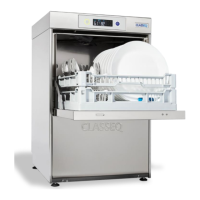
1. Open the Door of the warewasher.
2. Locate and remove the Drain Plug.


 To Next Page