8va
8va
ACC
PHR2PHR1
PAD
CHORD2CHORD1
BASS
RHY2RHY1
augsus4
13
5
9
11
7
m
M
6
dim
ACC
O.T.S
METRONOME
PORTABLE GRAND
DSP
SUSTAIN
TOUCH
TRANSPOSE
TEMPO
1
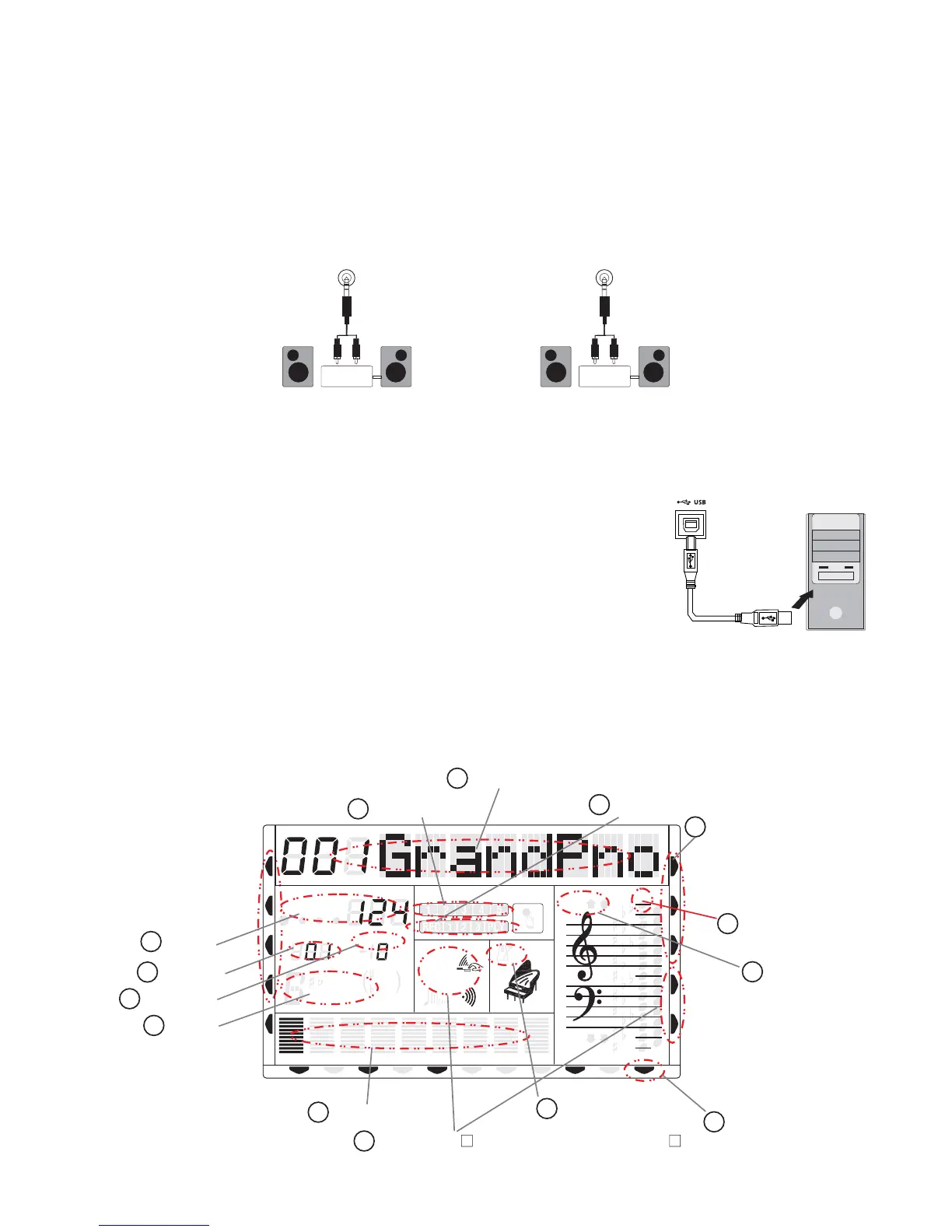
Message Display
2
Active Input
3
Note Display
4
Metronome
5
Voice Effect touch/sus/dsp/reverb/chorus
6
Track Volume
8
Chord
9
Measure
10
Tempo
11
Octave
12
Registration Memory
13
Record
7
Transpose
CHORD
HARMONY
DUAL
TWIN
VOICE
STYLE
DEMO
REVERB
CHORUS
MIDI IN MIDI OUT FREEZE
MEASURE
7
14
Freeze Status
SPLIT
U DISK
NORMAL
DUAL
LINE IN: The sound from an external sound source, for example a CD Player, iPod or
other audio device can be connected to the TB5200. This makes it possible to play along to
the music played by the CD-Player, iPad, Mp3 player.
LINE OUT: The Line Out jack provides the TB5200 audio output to a keyboard amplifier,
stereo sound system, mixing console or recording device. The Line out level is not affected
by the MASTER VOLUME setting.
knob
6 .LINE IN and LINE OUT
LINE OUT
Stereo
System
LINE IN
Stereo
System
7 .USB MIDI/Audio
USB MIDI: Connects the TB5200 to computer by means of a USB (Printer) cable. The
advantage is that the TB5200 operates as its own USB MIDI interface, no external MIDI
interface is needed for PC connectivity. Special USB drivers are not needed, as they are
already part of the Microsoft Windows and Apple OSX
specification.
USB Audio: The USB Audio interface allows transfer of high
quality digital audio from the to aTB5200 which can be transferred
computer for recording and further editing.
8.Panel Display Indications
Your TB5200 features a large multi-function display (MULTI DISPLAY) which shows the
important settings and status of the TB5200. The section below briefly explains the various
icons and indicators on the display.



 To Next Page