6
VOLERO WAVE
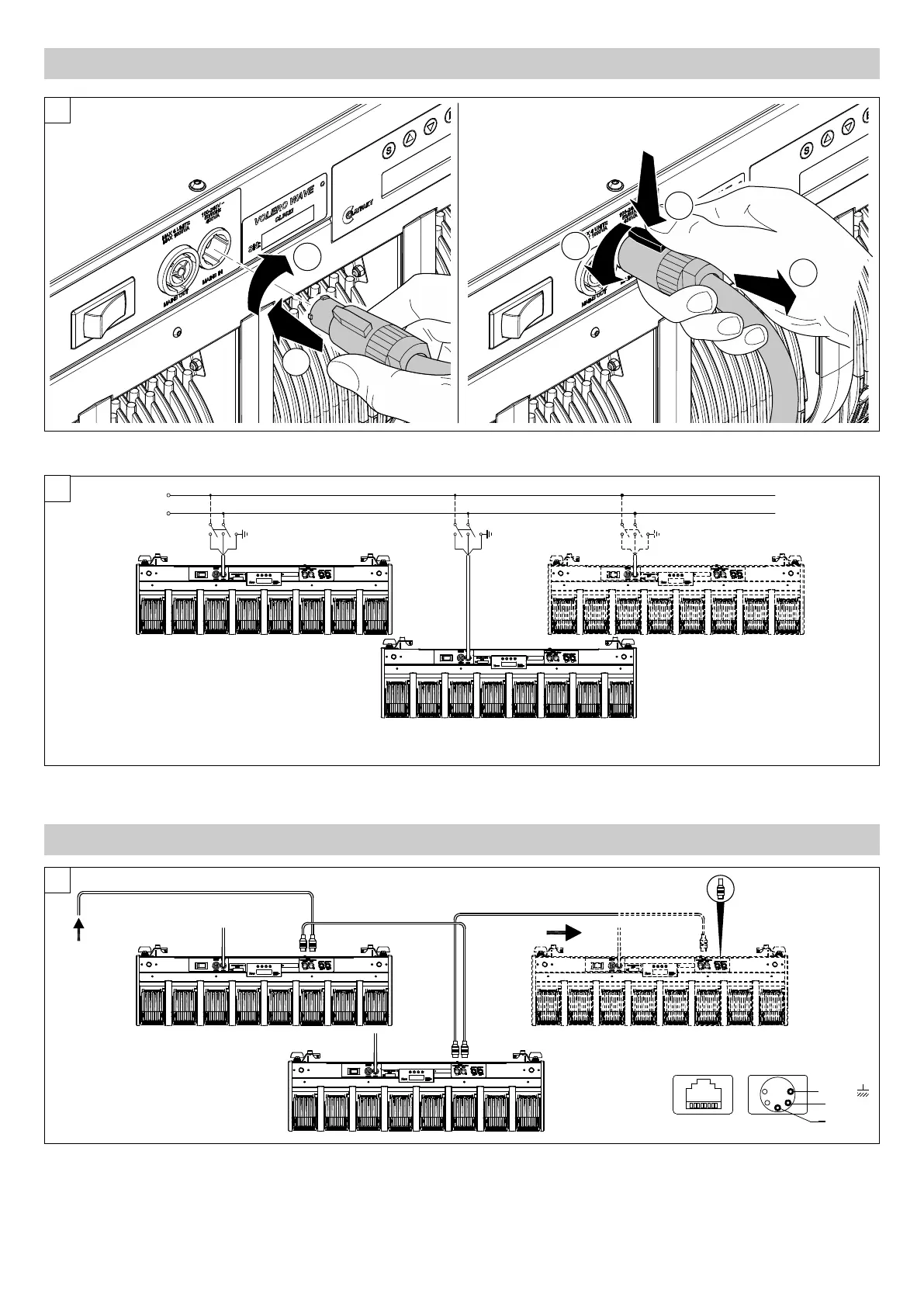
Connections to the power mains - Fig. 6
Power Supply
Connecting and disconnecting the power cord - Fig. 5
5
6
DMX 512
SIGNAL
SCREEN
DMX 512
5 PIN
1
2
3
4
5
SIGNAL
Ethernet
Connections to the control signal line (DMX) - Fig. 7
Use a cable conforming to specifications EIA RS-485: 2-pole twisted, shielded, 120Ω characteristic impedance, 22-24 AWG, low capacity. Do not use
microphone cable or other cable with characteristics differing from those specified. End connections must be made using XLR type 5-pin male/female
connectors. A terminating plug must be inserted on the last projector with a resistance of 120 (minimum 1/4 W) between terminals 2 and 3.
IMPORTANT: The wires must not make contact with each other or with the metal casing of the connectors. The casing must be connected to the shield
braid and pin 1 of the connectors.
MAINS OUT
Max 4 units
Max 1600VA
7
3.3 Connecting to mains supply
3.4 Connecting the control signal line: DMX / Art-Net




 To Next Page