EN 20
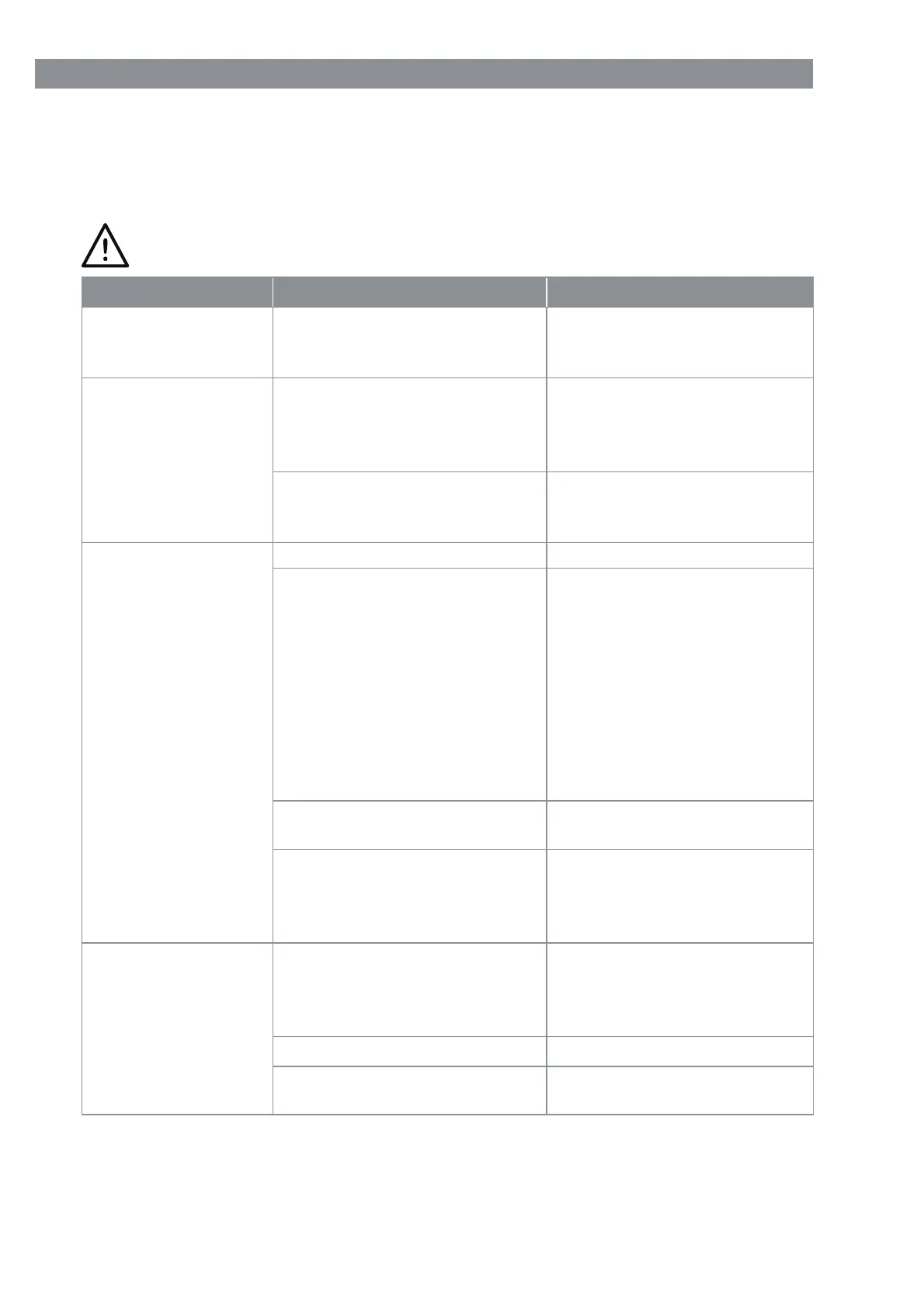
Troubleshooting
If the device does not work properly, check whether you are able to rectify the problem
yourself. If the problem cannot be solved with the steps that are listed, contact the cus-
tomer service department.
Do not attempt to repair an electrical device yourself!
Problem Possible cause Fix
The device does not
work. / Low suction
force.
The battery is empty / too
weak?
Charge up the battery (see
the “Charging Up the Battery”
chapter).
Water runs along the
surface.
The cleaning attachment (5)
is being held at an angle so
that the dirty water cannot be
sucked up.
Hold the cleaning attachment
horizontally.
Too much pressure is being
exerted on the cleaning attach-
ment (5).
Pull the cleaning attachment
down by applying gentle
pressure.
Streaks when clean-
ing windows or other
smooth surfaces.
The scraper lip (20) is dirty. Clean the scraper lip.
The scraper lip (20) is worn.
Turn over the scraper lip:
Pull the scraper lip sideways
out of its holder, moisten the
rounded edge with water or
cleaning agent and slide back
into the holder the other way
round.
If after turning the scraper lip
over both edges are worn, a
new scraper lip is required.
Too much cleaning agent is
used.
Adjust the metering of the
cleaning agent.
The cleaning cloth (1) is very
dirty.
Take the cleaning cloth off
and rinse it out under running
water. Then reattach it to the
device and carry on cleaning.
The battery is not
charging up. The
charge control
lamp (10) does not
light up when the
device is connected
to the mains power.
The mains adapter (3) or
the barrel connector are not
plugged correctly into the cor-
responding socket .
Correct the fi t.
The plug socket is defective.
Try another plug socket.
No mains voltage is present.
Check the fuse of the electri-
cal distributor (fuse box).



 To Next Page