@clearwellmobility @clearwellmob
3
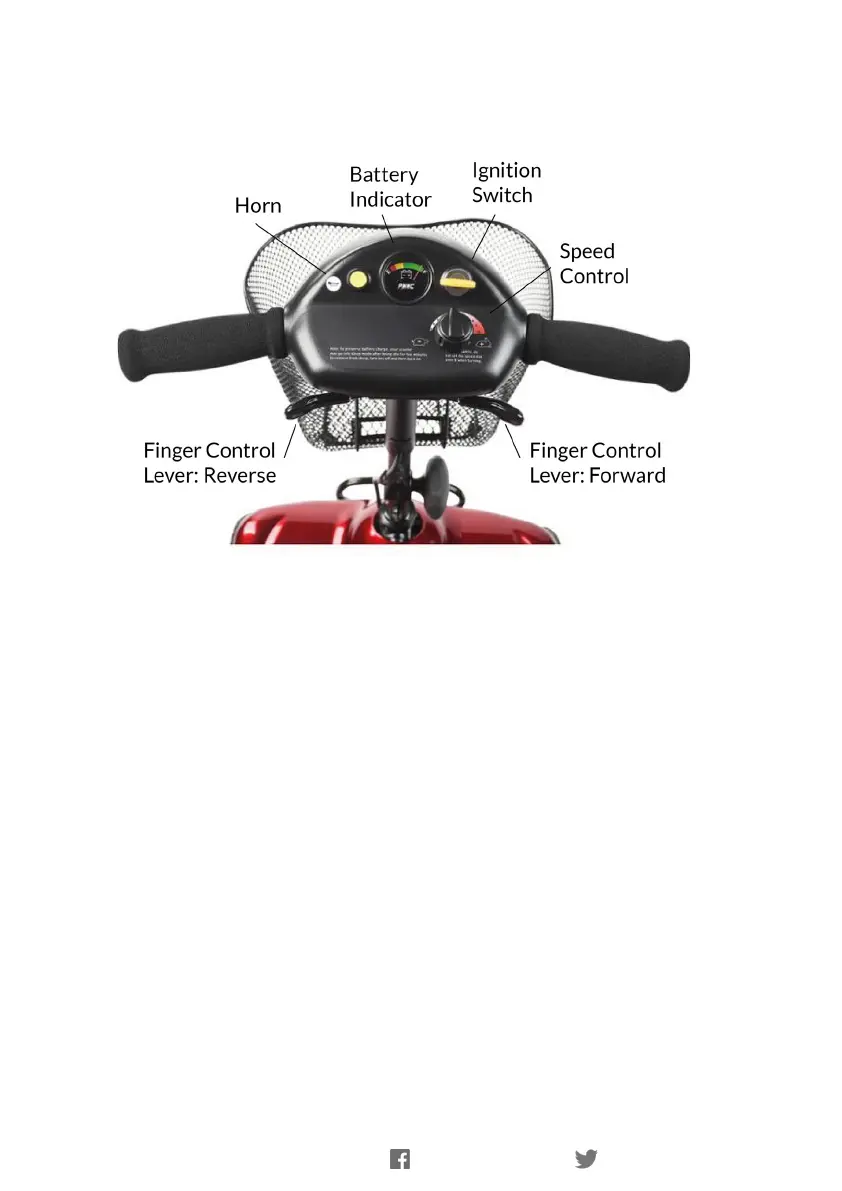
Dashboard Controls
Before driving your vehicle it is important to familiarise yourself with the controls.
Do not attempt to drive the vehicle until you have understood these instructions
To Turn On: Insert the key and turn to power on.
To Turn Off: Turn key back to power off.
To Operate: The throttle control lever (Wig-Wag) allows you to control the forward and
reverse speed of your scooter. Pull the right hand lever towards you to move the
machine forward. The more you pull the lever the faster the scooter goes. To brake,
release the lever. Again the faster the lever is released the quicker you will stop. To
reverse, pull the left lever towards you. Do not pull both levers at once.
NOTE: The controls can be changed for customers with a left-hand bias. Please contact
Clearwell Mobility.
Battery Indicator: When the scooter is powered up, this meter indicates the
approximate battery strength. The gauge will beep when the batteries are out of charge.
Note: The vehicle must be stationary in order to get an accurate reading.
Speed Control: This controls the top speed of your scooter. When the knob is turned
anticlockwise, this is at its slowest speed, marked by a tortoise. As the knob is turned to
the right, the speed will increase to a maximum, marked by a hare. Set the speed before
you move off.
Do not adjust the speed control dial while the vehicle is moving.
Horn: The horn will sound when the button is depressed.



 To Next Page