Shenzhen Clever Electronic Co., Ltd
10
5.3.1 Restore to factory settings:
Press and hold the CONTROL button to power on the MPDU at the same time (Or press and hold the
CONTROL button and press RESET button at the same time) till the RUN indicator is flashing.
5.3.2 Buzzer mute button
Press and hold the CONTROL button for 4 seconds, then press the UP button within 1 second to enable or
disable the alarm buzzer.
5.3.3 Energy-saving mode settings
5.3.3.1 Press and hold the CONTROL button for 4 seconds, then press DOWN button within 1 second, one blue
ON mark will show on the upper right corner from the first page of LCD screen. The backlight will turn
off if there is no operation for 20-30 seconds. The backlight can be turned on by pressing any button.
5.3.3.2 Press and hold the CONTROL button for 4 seconds, then press DOWN button within 1 second to turn
off the energy-saving mode and the blue ON mark will disappear from the screen and backlight will be
always on
5.4 Daisy-Chain
5.4.1 Ethernet Daisy-Chain
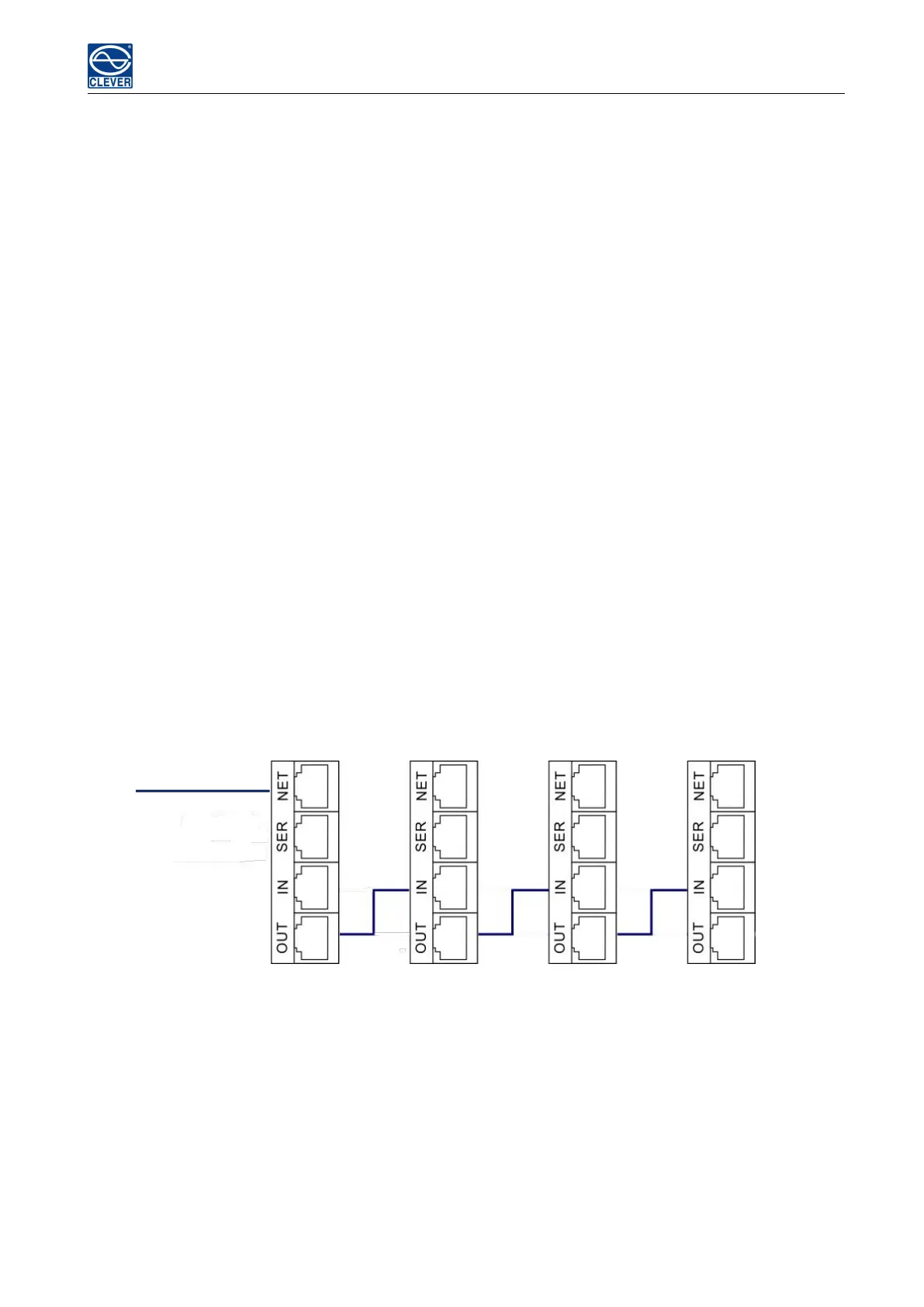
Support daisy-chain up to 4 PDUs (1 master and 3 slaves) so the user can manage multiple PDUs from one
IP address through web interface. Daisy-chain schema is as following:
Master Unit Slave Unit 1 Slave Unit 2 Slave Unit 3
MPDU1 MPDU2 MPDU3 MPDU4
Ethernet Daisy-Chain settings:
1. Log in each MPDU, and configure the Work mode (Master unit or Slave unit) on Device Manage
page.
2. Connect the NET port from the Master Unit to the WAN/LAN, other Daisy-chain cable connect the
OUT port to the IN port of the next PDU. Connect all 3 Slave unit by the same way (see Figure above)
3. Access the Master through Web interface and check all the status of Slaves. If all are readable,
daisy-chain is successful



 To Next Page