Shenzhen Clever Electronic Co., Ltd
14
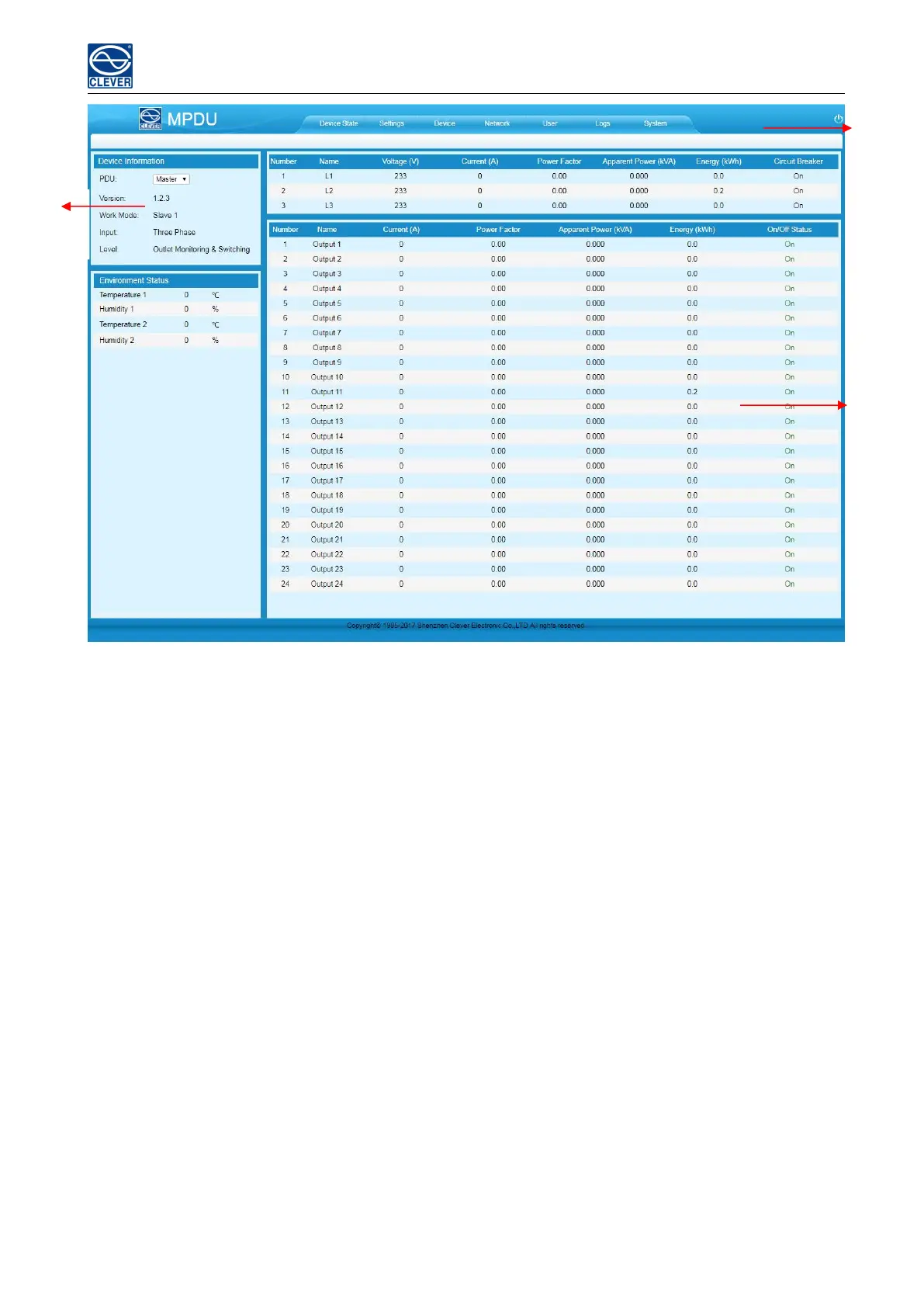
Figure 1-2
A. Device Status: After enter Figure 1-2 you can view the monitoring information as below:
1) Input monitoring:The input current, voltage. Power, power consumption, power factor of each phase and
On/Off status of circuit breaker.
2) Outlet Monitoring:The current, power, power consumption and ON/OFF status of individual outlet.
3) Environment monitoring: The Temperature/humidity status of 2 sensors.
B. Device Settings: Click the Settings tab to enter Figure 1-3 to configure thresholds of input voltage, input
current, individual outlet current, temperature, humidity. And configure values for power On/Off delay of
C. Individual outlet, power consumption return to zero and outlet switching.
1) Input threshold settings:
a. The input voltage threshold range: 170-276VAC
b. The input current threshold range: 0-63A for single phase, 0-32A for three phase
c. Temperature/Humidity threshold range: 0-40℃ for temperature, 0-99% for humidity



 To Next Page