EasyManua.ls Logo

Clevertouch clevertouchplus - Clevernote Erasing; Eraser Options; Clevernote Page Management; Adding Pages and Saving

Clevertouch clevertouchplus
11 pages
Print Icon
To Next Page IconTo Next Page
To Previous Page IconTo Previous Page
Loading...
98
clevertouch.co.uk | +44 (0)20 8319 7777 | info@clevertouch.co.uk
Clevertouch Plus Basic Functions Guide
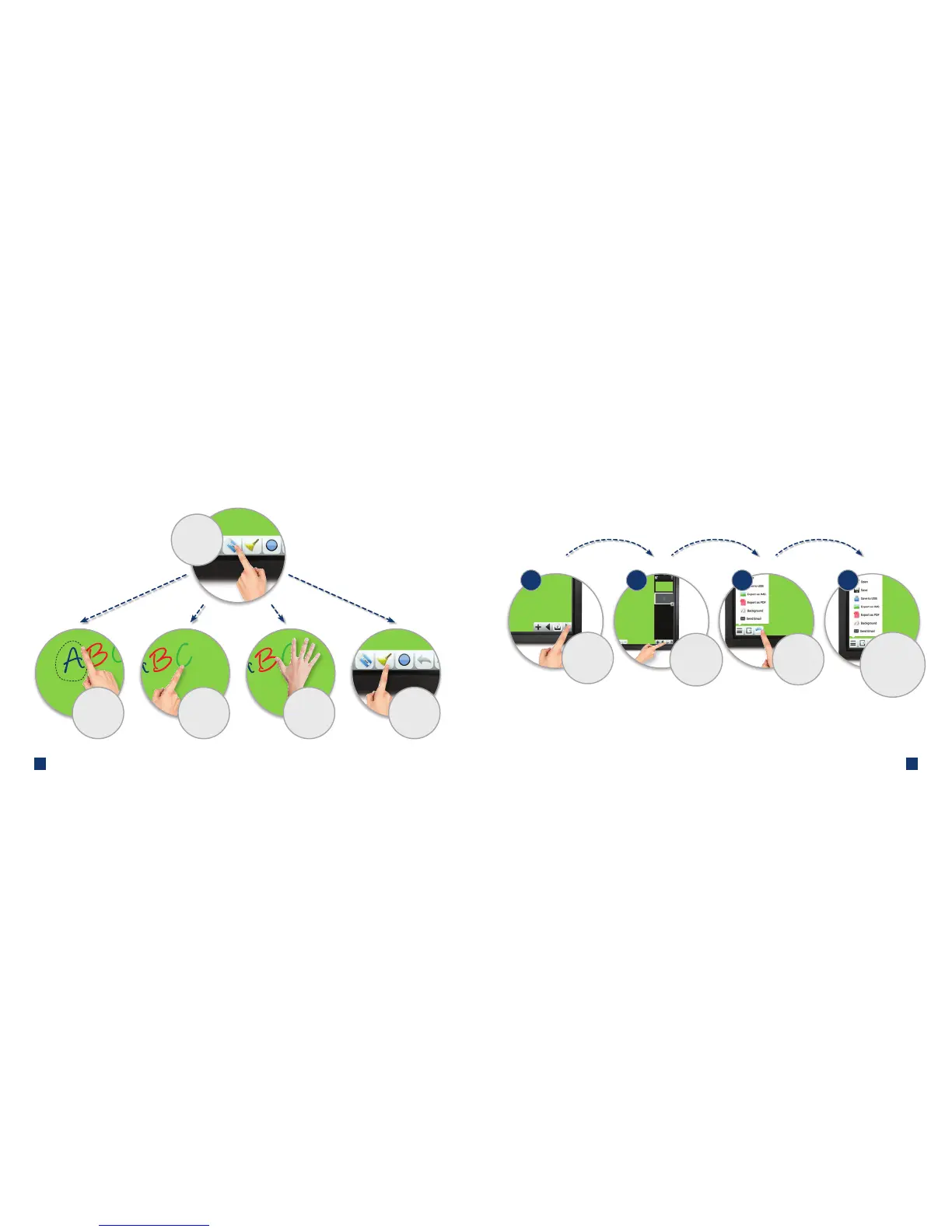
How do I erase using Clevernote?
Choose the
eraser for various
deleting options
Touch the line
you want
to delete
Draw around the
area to delete
Use the palm or
the back of your
hand to rub-out
Select the broom
to erase all notes
on the page
3 4
2
2
2
1
Touch the page
number to open
thumbnails of all
of your pages
Add and
scroll through
multiple pages
How do I add pages, insert images and save in Clevernote?
Insert an image
into your page
Change background
colour, save as an
image, or email out
your nished page

Related product manuals