EasyManua.ls Logo

Clevertouch clevertouchplus - Crop and Screenshot Tools; Screenshot and Cropping; Screen Locking; Setting a Screen Password

Clevertouch clevertouchplus
11 pages
Print Icon
To Next Page IconTo Next Page
To Previous Page IconTo Previous Page
Loading...
1514
clevertouch.co.uk | +44 (0)20 8319 7777 | info@clevertouch.co.uk
Clevertouch Plus Basic Functions Guide
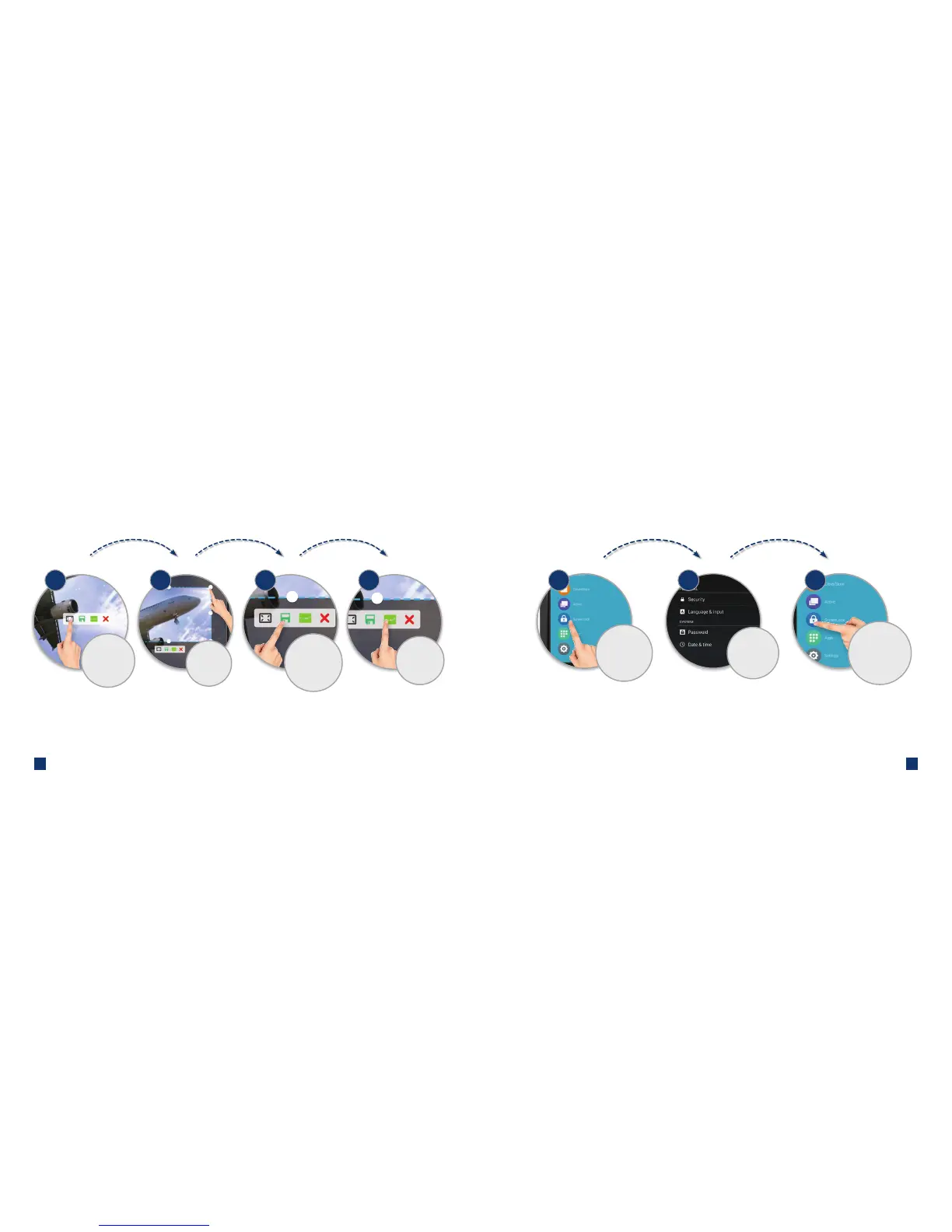
How do I use the crop / screenshot tools?
1 42
Resize or
move the
selected area
3
Take a screenshot
of the selected area.
It will save in
Files > Note
Toggle between
full-screen or a
selected area
Inserts your
screenshot into
Clevernote
How can I lock my screen?
2
Choose your
password and
click 'set'
To set up
screen password,
click on ScreenLock
then 'set'
Once the
password is set,
just press the
ScreenLock
button to lock
the screen
1 3

Related product manuals