EasyManua.ls Logo

Clevertouch clevertouchplus - On-Screen Gestures; Gesture Actions; Annotation Tools; Pen and Erase Tools

Clevertouch clevertouchplus
11 pages
Print Icon
To Next Page IconTo Next Page
To Previous Page IconTo Previous Page
Loading...
1312
clevertouch.co.uk | +44 (0)20 8319 7777 | info@clevertouch.co.uk
Clevertouch Plus Basic Functions Guide
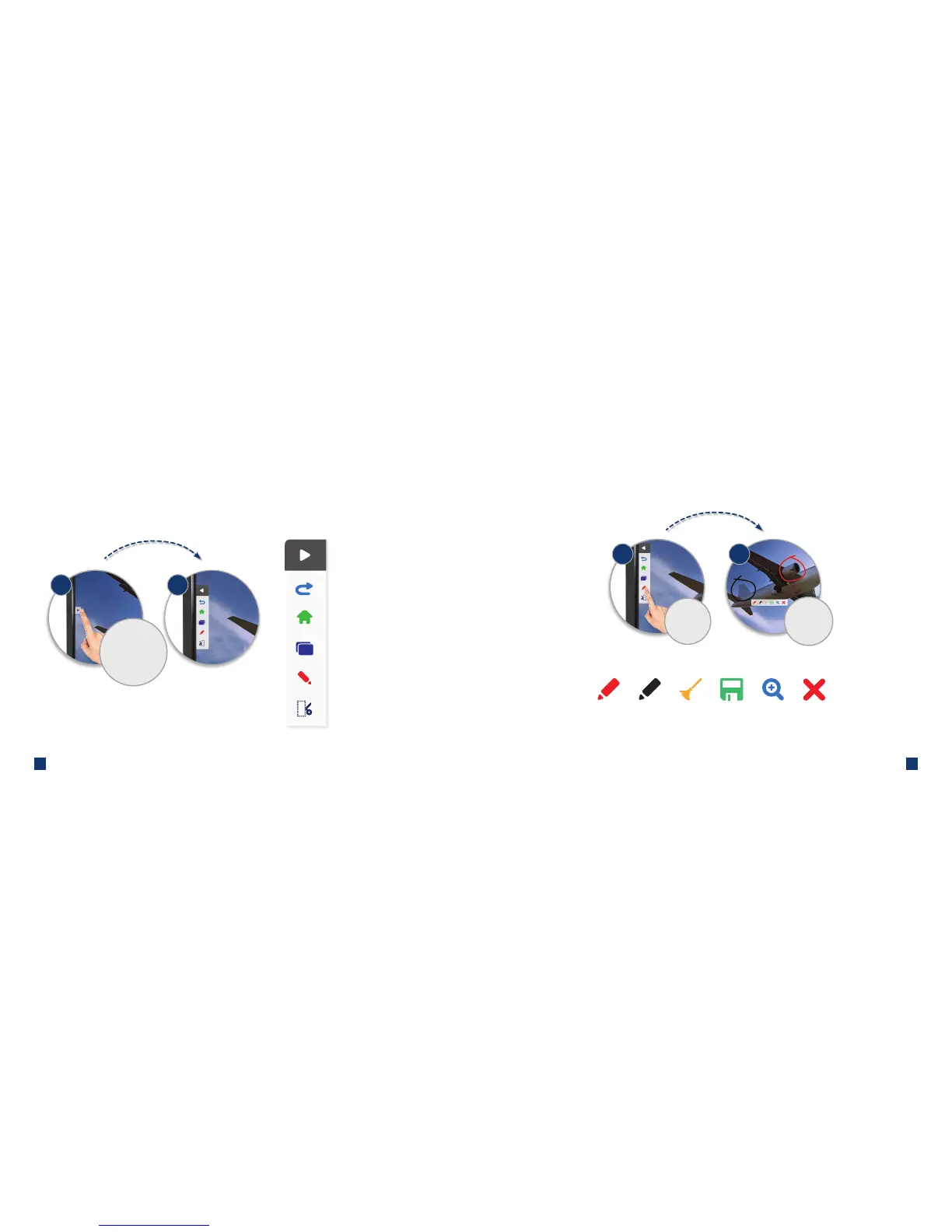
How do I use on-screen gestures?
Close widget
On-screen gestures
Undo
Home
Apps
Annotate or Zoom (see page 12)
Crop or Screenshot (see page 13)
Touch either of
the arrows at
the sides of the
screen to open the
on-screen gestures
1 2
How do I use the annotation tools?
Annotation tools
Touch the
annotate icon
Make
annotations,
erase and save
1 2
Red pen Black pen Delete all Save
annotations
Zoom Close
(nd saved annotations
in Files > Note)

Related product manuals