EasyManua.ls Logo

Clevertouch clevertouchplus - File Management; Accessing and Managing Files; Opening Files from USB; USB File Transfer

Clevertouch clevertouchplus
11 pages
Print Icon
To Next Page IconTo Next Page
To Previous Page IconTo Previous Page
Loading...
1110
clevertouch.co.uk | +44 (0)20 8319 7777 | info@clevertouch.co.uk
Clevertouch Plus Basic Functions Guide
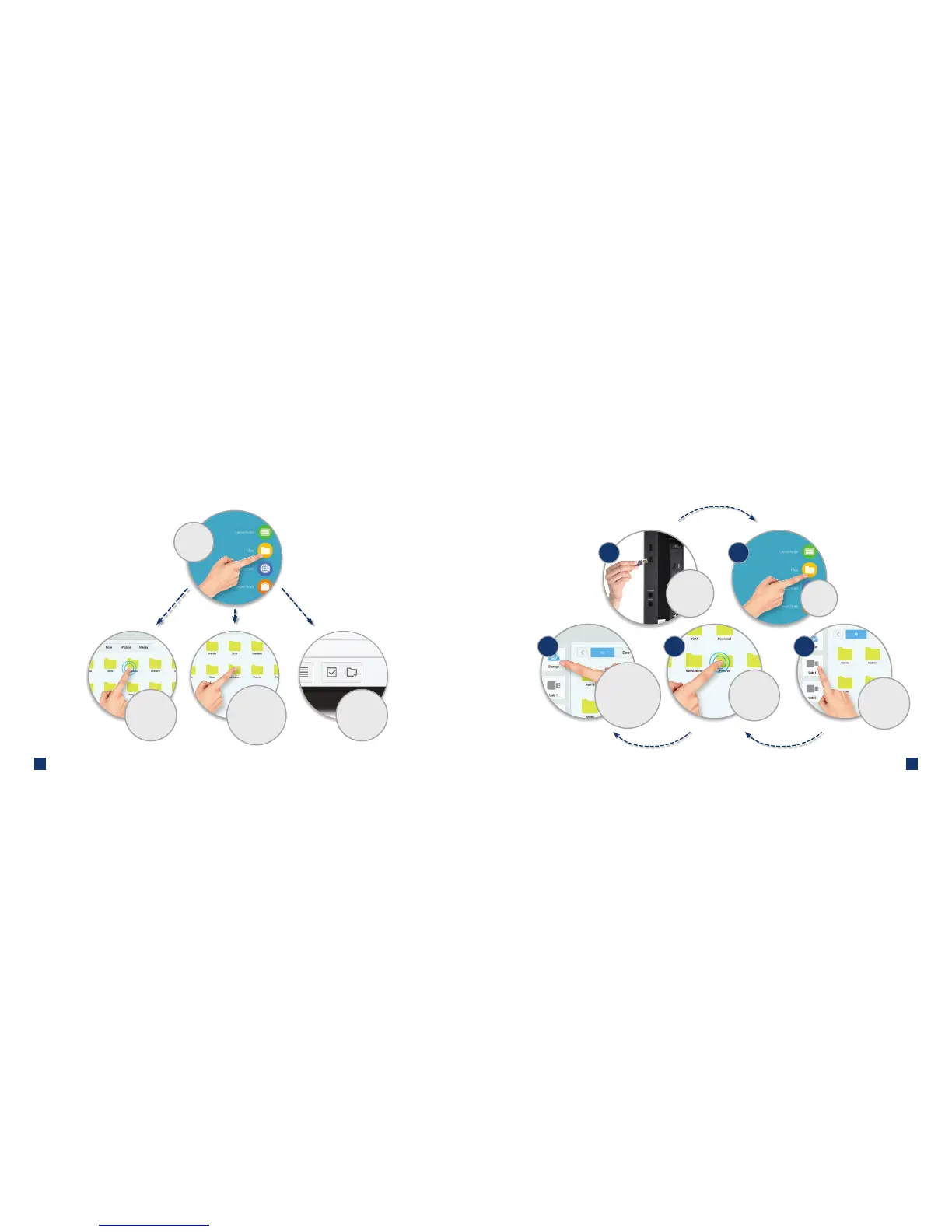
How do I manage my les?
Press
'Files'
Select multiple
folders / Add a
folder
Double-touch to
open a le
Single-touch to
select for copy, cut,
paste or delete
functions
How do I open les from a USB stick?
Choose from USB
port 1 or 2
3
1 2
2
Press
'Files'
Insert a USB
ashdrive into
the side of the
Clevertouch
1
Double-touch
on the le you
want to open
Single-touch to
select a le to
move from USB to
Clevertouch storage
45

Related product manuals