Disassembly
2 - 26 Removing the Mainboard
2.Disassembly
Removing the Mainboard
1. Turn off the computer, remove the battery (page 2 - 8), hard disk (page 2 - 9), RAM (page 2 - 10), CD Device (page
2 - 12), Bluetooth module (page 2 - 14), Wireless LAN module (page 2 - 15), CPU (page 2 - 16), keyboard (page 2 -
18), keyboard shielding plate (page 2 - 19), the top case and LCD (page 2 - 20) and speakers (page 2 - 25).
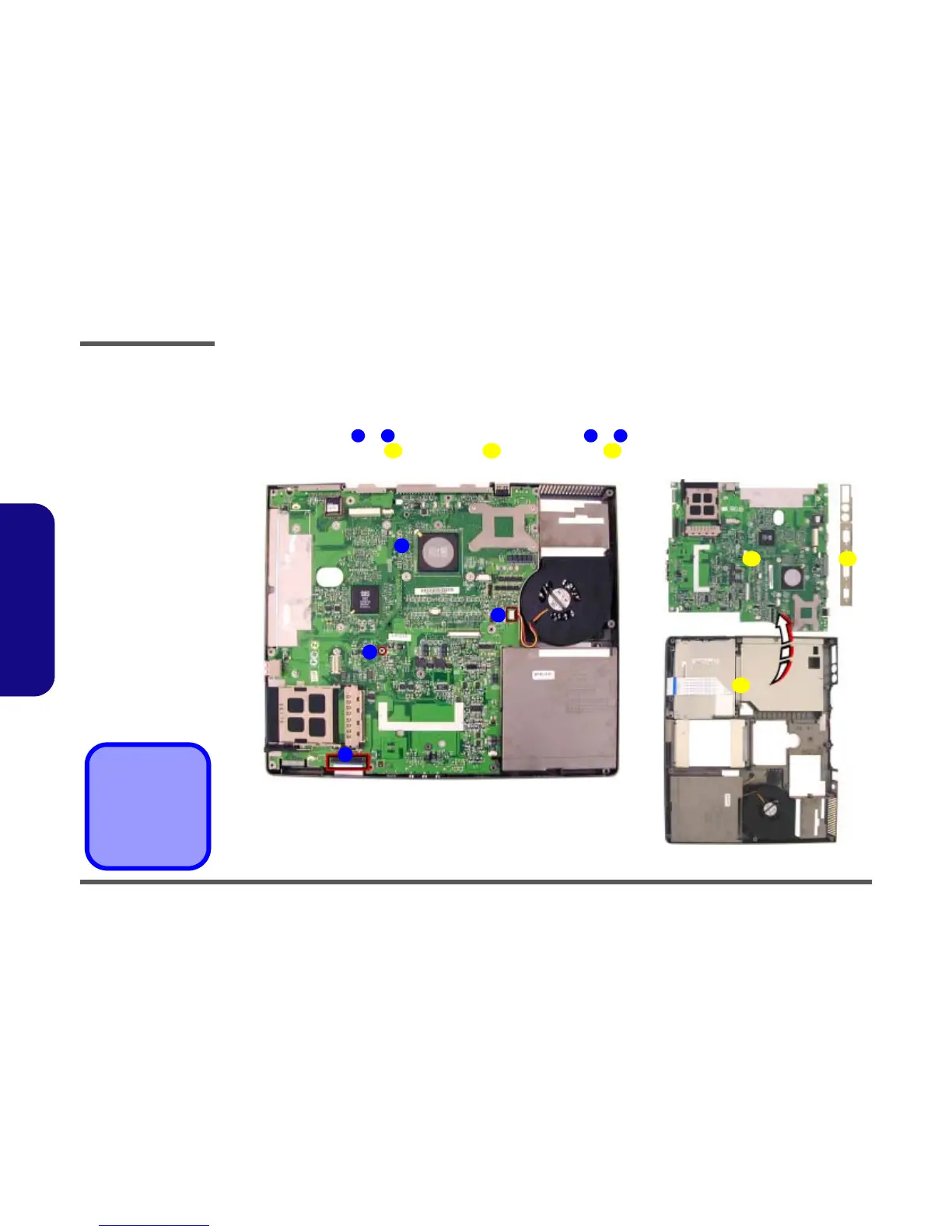
2. Disconnect cables & (Figure 19a) and remove screws & .
3. Separate the mainboard , rear bracket and bottom case (Figure 19b).
!
5. Mainboard
6. Rear Bracket
7. Bottom Case
•2 Screws
Figure 19
Mainboard Removal
a. Disconnect the cables
and remove the screws.
b. Separate the mainboard,
rear bracket and bottom
case.
1 2 3 4
5 6
1
2
5
a. b.
6
3
7
4
7



 To Next Page