
 Need help?
Do you have a question about the CLF ARES and is the answer not in the manual?
Details safety measures related to electrical shock hazards and proper grounding procedures.
Instructions on avoiding water exposure and guidelines for service operations.
Precautions against heat, fire hazards, and keeping combustible materials away from the fixture.
Guidelines for preventing physical harm during installation, operation, and handling.
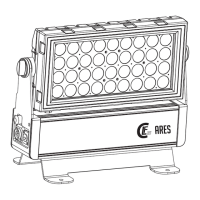
Identifies the fixture's display, DMX input/output, and AC power connectors.
Guidance for initial setup and pre-operation checks before applying power to the fixture.
Information on acceptable power voltage ranges and specifications for the fixture.
Provides advice on connecting DMX controllers to fixtures for optimal data transfer.
Steps for securely mounting the fixture to a flat surface, including safety cable attachment.
Overview of the onboard control panel, display, and button functions for navigation.
Guide to setting the fixture's DMX start channel for independent control.
Instructions for managing wireless DMX connectivity, pairing, and status indication.
Steps to manually calibrate RGBW colors to white via control panel or DMX channel.
Details the 20 built-in automatic RGBW color combination programs.
Explains master and slave functioning modes for synchronized fixture operation.
Configuration options for cooling fan speed and silent modes.
Settings for LED output levels (High, Normal, Theater modes).
Options for adjusting the dimming speed and smoothness of light output.
Information on locking and unlocking the control panel functions using a password.
Settings for enabling, disabling, or resetting the wireless DMX board.
Options for color calibration modes (No Calibration, Manual, Factory).
Available refresh rates for the fixture's LEDs (600-4800 Hz).
Adjustment of the onboard display's brightness level (1-10).
Configuration for retaining DMX values upon signal loss (DMX HOLD / NO DMX HOLD).
Accessing software version, usage time, and temperature readings.
Procedure for resetting the fixture to its factory default settings.
DMX channel breakdown for the 4-channel mode, detailing functions and values.
DMX channel breakdown for the 9-channel mode, detailing shutter, dimmer, and fixture settings.
DMX channel breakdown for the 11-channel mode, detailing shutter, dimmer, and fixture settings.
DMX channel breakdown for the 16-channel mode, detailing control of individual LED blocks.
DMX channel breakdown for the 21-channel mode, detailing shutter, dimmer, LED blocks, and fixture settings.
DMX channel breakdown for the 27-channel mode, detailing shutter, dimmer, fixture settings, macro color, and RGB dimmers.
DMX channel breakdown for the 30-channel mode, detailing LED blocks, fade, auto programs, and speed.
Setting the DMX address for fixture control via the menu.
Selecting the DMX control mode for the fixture from the menu.
Configuration options for static color settings, including dimmer and strobe.
Accessing and adjusting personality settings like fans, LED power, and calibration.
Control of automatic programs and speed settings via the menu.
Displaying software version, usage time, and temperature readings.
Loading factory default settings for the fixture via the menu.
Manual calibration of Red, Green, and Blue color channels via the menu.
Details the fixture's physical dimensions, weight, and beam angle.
Information about the light source and its configuration.
Specifies DMX channels, protocol, color, and housing details.
Requirements for fixture orientation and minimum clearance distances.
Details AC power input/output and DMX data connectors.
Information on AC power, maximum consumption, and power supply unit.
Power draw at different voltages and power factor details.
Describes the cooling system and ambient temperature limits.
 Dynamic Effects
| color mixing | RGBW |
|---|---|
| color temperature control | 10 000 - 2500 K |
| beam angle | 21° |
Electrical| ac power | 100-240 V nominal, 50/60 Hz |
|---|---|
| maximum total power consumption | 360 W |
| power consumption, all effects static, zero light output | <10 W |
Thermal| cooling | Forced air |
|---|---|
| maximum ambient temperature | 40° C |
| minimum ambient temperature | 5° C |
 Weight and Dimensions
| length | 495 mm |
|---|---|
| width | 233 mm |
| height | 387 mm |
| weight | 13 kg |

 To Next Page

