7
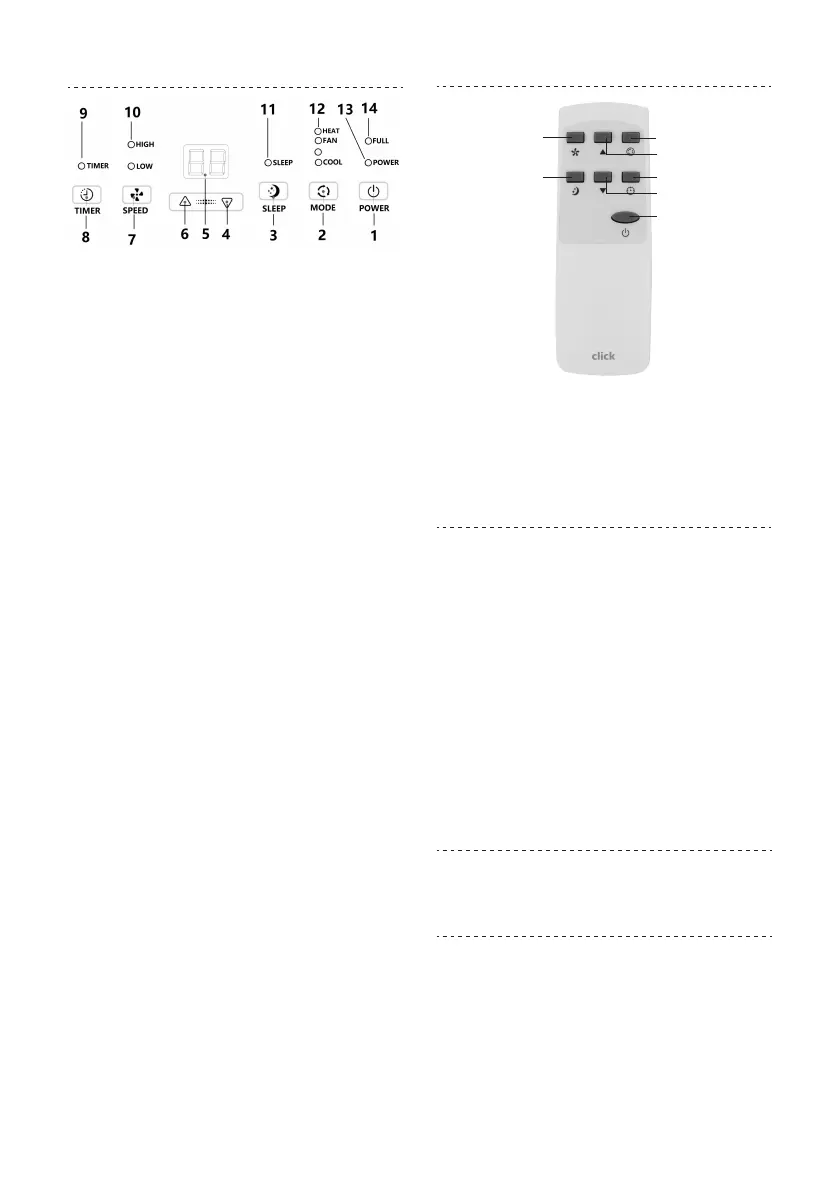
CONTROL PANEL
DEHUMID
1. POWER: Press this button to turn the appliance
on or o.
2. MODE: Press this button repeatedly to
select desired operating mode: Cooling,
Dehumidifying, Fan or Heating mode.
3. SLEEP: In Cooling or Heating mode, press this
button to activate/deactivate sleeping function.
4. DOWN: In Cooling or Heating, press this button
to decrease the setting temperature from 31-
16°C.
5. DISPLAY: Shows the selected mode, the room/
set temperature or the selected timer delay.
6. UP: In Cooling or Heating, press this button to
increase the setting temperature from 16-31°C.
7. SPEED: In Cooling, Heating or Fan mode, press
this button to set the fan speed to high or low.
8. Timer: Press this button to setup the unit auto
stop (turn o after a set number of hours) or
auto start (turn on after a set number of hours)
after a delay of up to 24 hours.
Indicators:
9. Timer indicator
10. Fan speed indicators
11. Sleep indicator
12. Mode selection indicators
13. Power on/Standby indicator
14. Water Full indicator
REMOTE CONTROL
Power
Timer
Sleep
Down
Up
Mode
Speed
Operation of functions is the same when using the
buttons on remote or the control panel.
AIR CONDITIONER
FEATURES
Cooling mode
In this mode, the exhaust hose MUST be installed
before using. Install the exhaust hose as described
in the “Exhaust hose installation” section.
• At the first time of turning on, the unit will
operate in Cooling mode with low fan speed.
The default temperature is 22°C.
• Press “MODE” button to select cooling mode,
“COOL” indicator will be illuminated.
• Press “UP” or “DOWN” button to adjust
temperature (from 16°C to 31°C).
• Press “SPEED” to select high or low fan speed.
Note: When temperature shows on
display, press UP and DOWN buttons on
control panel at the same time to switch
between Centigrade and Fahrenheit.
Fan mode
In this mode, there is no requirement to use the
exhaust hose. However, if you require stale or
smokey air to be removed from the room, install
the exhaust hose as described in the “Exhaust hose
installation” section.
• Press “MODE” to select fan mode, “FAN” mode
indicator will be illuminated and “FA” shows on
display.


 To Next Page