14
IP CAMERA / SD Card Edge Recording
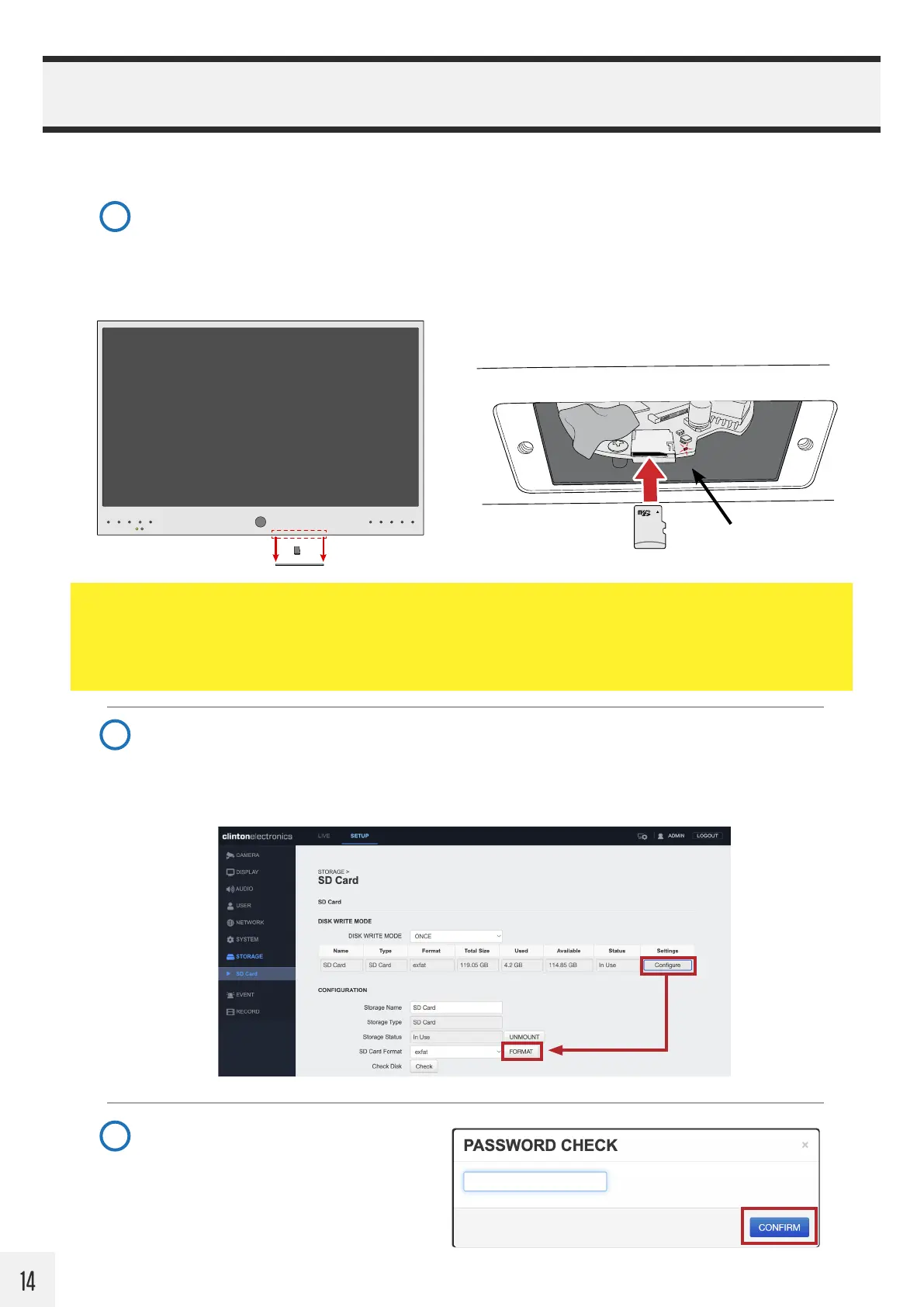
Remove the microSD card cover plate to gain access to the card slot. The location of the cover plate
varies by model, but is either located on the bottom or side of the PVM.
Insert a micro SD card as shown. Inserting the card “upside-down” can cause damage to the microSD
card and slot. A red LED indicator with illuminate when the microSD is correctly inserted.
Navigate to : STORAGE > SD Card. If the microSD card is inserted correctly, the ‘Status’ column
should display as In Use. If it shows as Unmounted, check that the microSD card is correctly inserted.
For best recording results it’s recommended to format the card while inserted into the camera. To
format: Click the Configure button. Then click FORMAT.
1
2
Follow the steps below to save recorded video locally to on the camera using a microSD card (not included).
STATUS LED
NOTE:
• The camera does not automatically record when a microSD card is inserted. Further configuration is required.
Continue following the setup procedure.
• Minimum card size is 16GB. For best results, use a Class 10 32GB or larger card designed for 24/7 operation.
When prompted, after clicking FORMAT,
enter the ADMIN password. Click CONFIRM.
This will erase all data previously saved on
the microSD card.
3


 To Next Page