15
IP CAMERA / SD Card Edge Recording
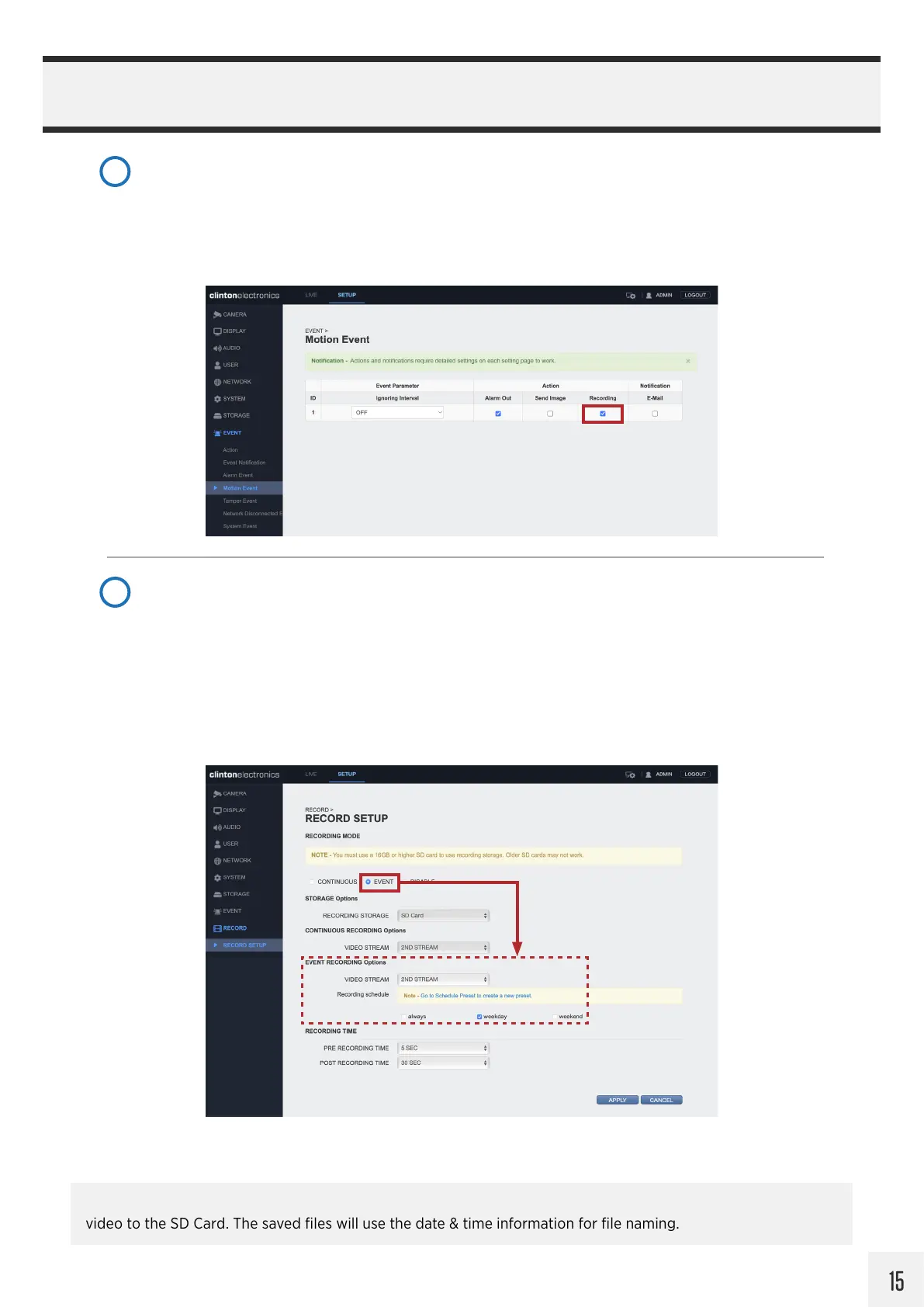
For Motion Recording, navigate to EVENT > Motion Event. (skip ahead to the next step if Continuous
recording will be used)
Click the Recording checkbox to enable recording when Motion is detected.
Click the APPLY button at the bottom of the page to save Motion Event changes.
4
Next, go to RECORD > RECORD SETUP.
Set the Recording Mode to EVENT for only recording when motion is detected. Selecting Continuous
will record non-stop, even if motion is not detected.
Select which stream to use for recording, either the 1ST or 2ND STREAM, (configurable via CAMERA /
Codec Setup). Then select what the recording Schedule should be: Always, Weekday, or Weekend.
Click the APPLY button at the bottom of the page to save Recording Setup changes.
5
It’s is recommended that the Date & Time information of the camera be verified and/or configured if recording
video to the SD Card. The saved files will use the date & time information for file naming.


 To Next Page