you want to read user‐defined length EPC data, please refer to 4.4.2.3 user‐defined read.
4.4.2.2 Read TID
Click
button, data display area will show the existing EPC data and TID data.
TID displays as hexadecimal string, length unit is word ﴾1 word =2 bytes = 4 hexadecimal characters﴿. TID
default length is 6 words.
If you want to read user‐defined length TID data, please refer to 4.4.2.3 user‐defined read.
4.4.2.3 User‐defined read
Click
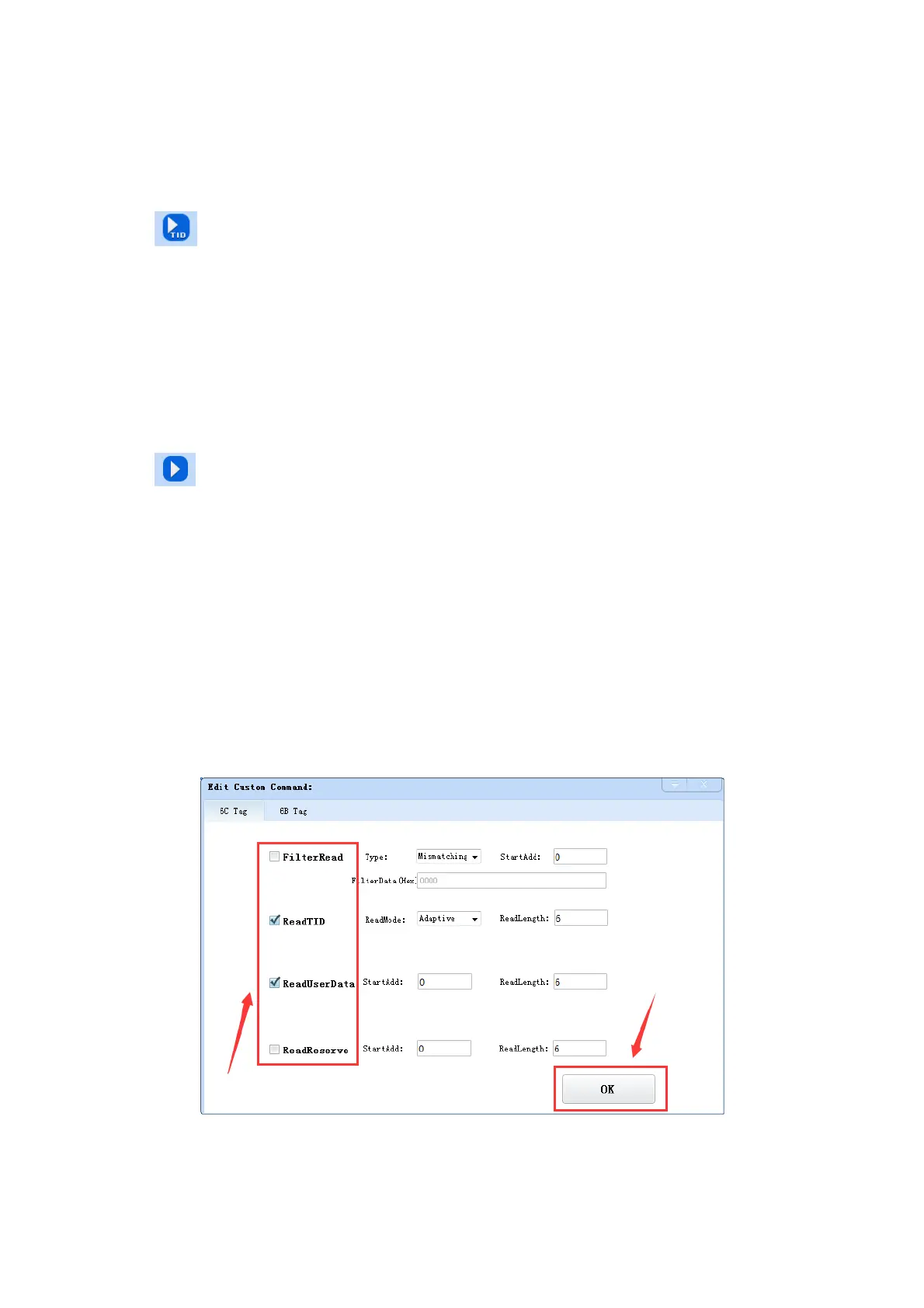
button, prompt box as in picture 4‐5 ,4‐6.
Choose “6C tag configuration” for matching reading, you can read matching tags through existing EPC
or TID data.
Read TID: choose tag TID data, read mode default as “self‐adaptive”, reading length unit is word.
Read user area: choose tag user area data, the start address & reading length takes “word” as unit.
Read reserved area: choose tag reserved area data, the start address & reading length takes “word” as
unit.
Pic 4‐5 6C tag user‐defined configuration



 To Next Page