mDT001 HazMon System Tester Technical Manual /16
CMC INDUSTRIAL ELECTRONICS LTD
Phone: (604) 421-4425 Toll Free: (888) 421-4425
Fax: (604) 421-7734
www.cmciel.com sales@cmciel.com
The Industry Leader
in HazMon Technology
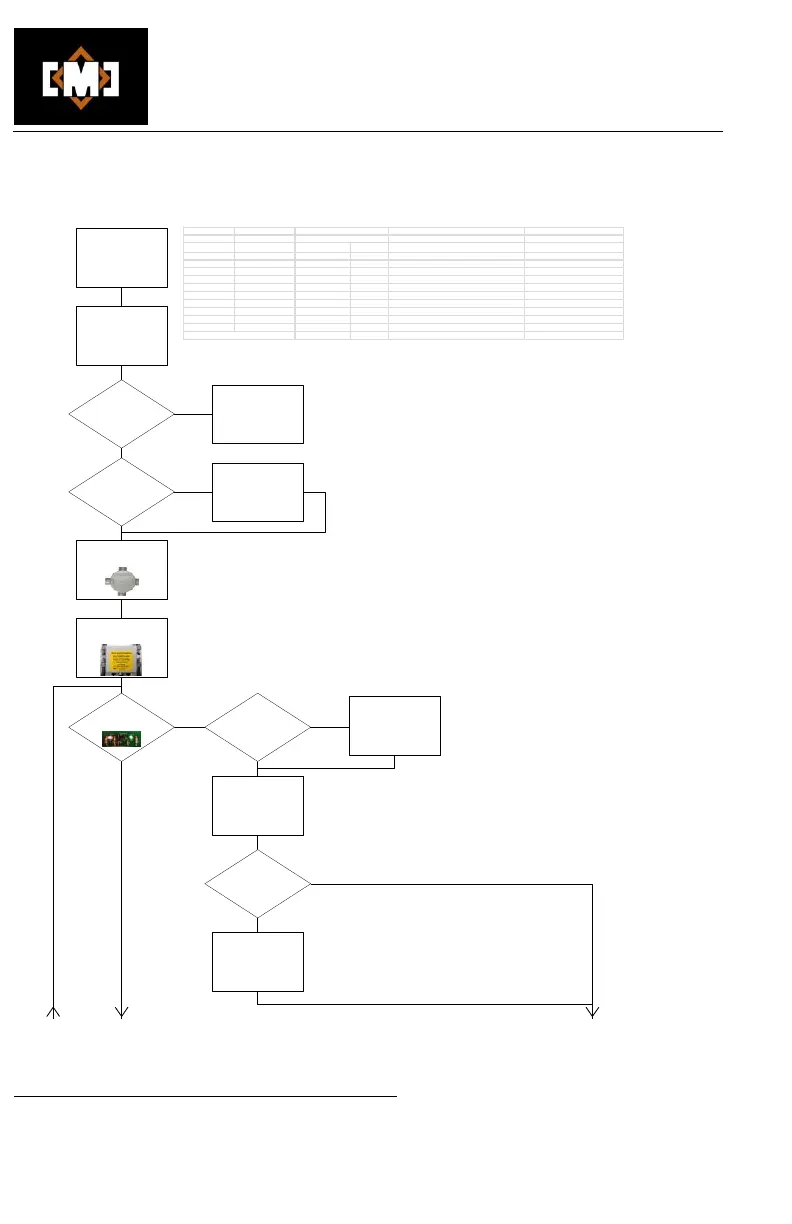
5. Troubleshooting charts
NO
NO
See "Troubleshooting
the Bus Converter RS-
485 Network"
YES
NO
YES
Is the "Faulted"
sensor plugged into in
this FIB?
YES
YES
NO
Locate the FIB where the
sensor is connected
NO
One or more sensors in
"Fault"
or not reading correctly
Check the "Status"
screen on the
EZSentinel128
or
WS1 Webserver
Are all installed bus
converters online?
Locate the first
bus converter with
faulted sensors
Are errors indicated?
Locate first Field
Interconnect Enclosure
(FIB)
Are both
the red and green
LEDs on in this FIB?
See chart above for error
codes
YES
Unplug and clean the
sensor connector with
99%+ isopropyl alcohol
on both the plug and jack
Is the sensor now
working correctly?
Replace sensor
and assign the new
serial number in WS1 or
EZ128
Error Cod es
Bus Co nve rter
WS1 Webserver EZSentinel128 Red LED
Green LED CAT5 Cable Sensor Cable
Online Online green 1 sec on/1 sec off On Bus converter OK
Offline Online red n/a Off See "Troubleshooting the RS-485 Netwrok"
Bus Low Data shorted low 3 n/a Blue shorted to any white Green shorted to white or black
Bus High Data Shorted High 4 n/a Blue shorted to green, orange or brown Green shorted to red
Bus overload Bus power overload 1 n/a Green, orange or brown shorted to any white Red shorted to white or black
No sensors No sensor on bus 2 n/a Blue open or disconnect switches off Green open or sensor unplugged
Other faults
Sensor reads 85C or 185F Green, orange and brown open Red open


 To Next Page