mDT001 HazMon System Tester Technical Manual /6
CMC INDUSTRIAL ELECTRONICS LTD
Phone: (604) 421-4425 Toll Free: (888) 421-4425
Fax: (604) 421-7734
www.cmciel.com sales@cmciel.com
The Industry Leader
in HazMon Technology
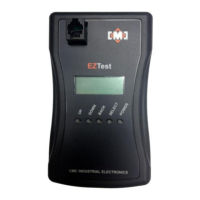
3.1 Using the Menu Control Pushbuttons
There are four menu control pushbuttons:
Select the displayed function
Go back one menu level or exit this function
There are three menu selections from the main menu. These are selected using the “UP” and
“DOWN” pushbuttons.
Test an individual sensor
Test the CMC Intrinsically Safe network
Check remaining battery level
Once the function is displayed, it is executed by pressing the “SELECT” pushbutton.
3.2 Sensor Test
The sensor test will report the health of a single sensor plugged into the modular connector on the
front of the unit. In addition, the sensor test will check for any ground fault conditions between the
sensor wiring and the metal case of the sensor.
************************************************ Caution *************************************************
Sensors connected to a bus converter on an active network or multiple sensors connected together
cannot be tested using this function. Connect a single standalone sensor the tester’s front panel
connector.
************************************************************************************************************
If “Sensor Test” is selected and no sensor is connected to the modular connector, the display will
indicate:


 To Next Page