10
C. INSTALLATION PROCEDURE
5. GENERATOR CELL INSTALLATION
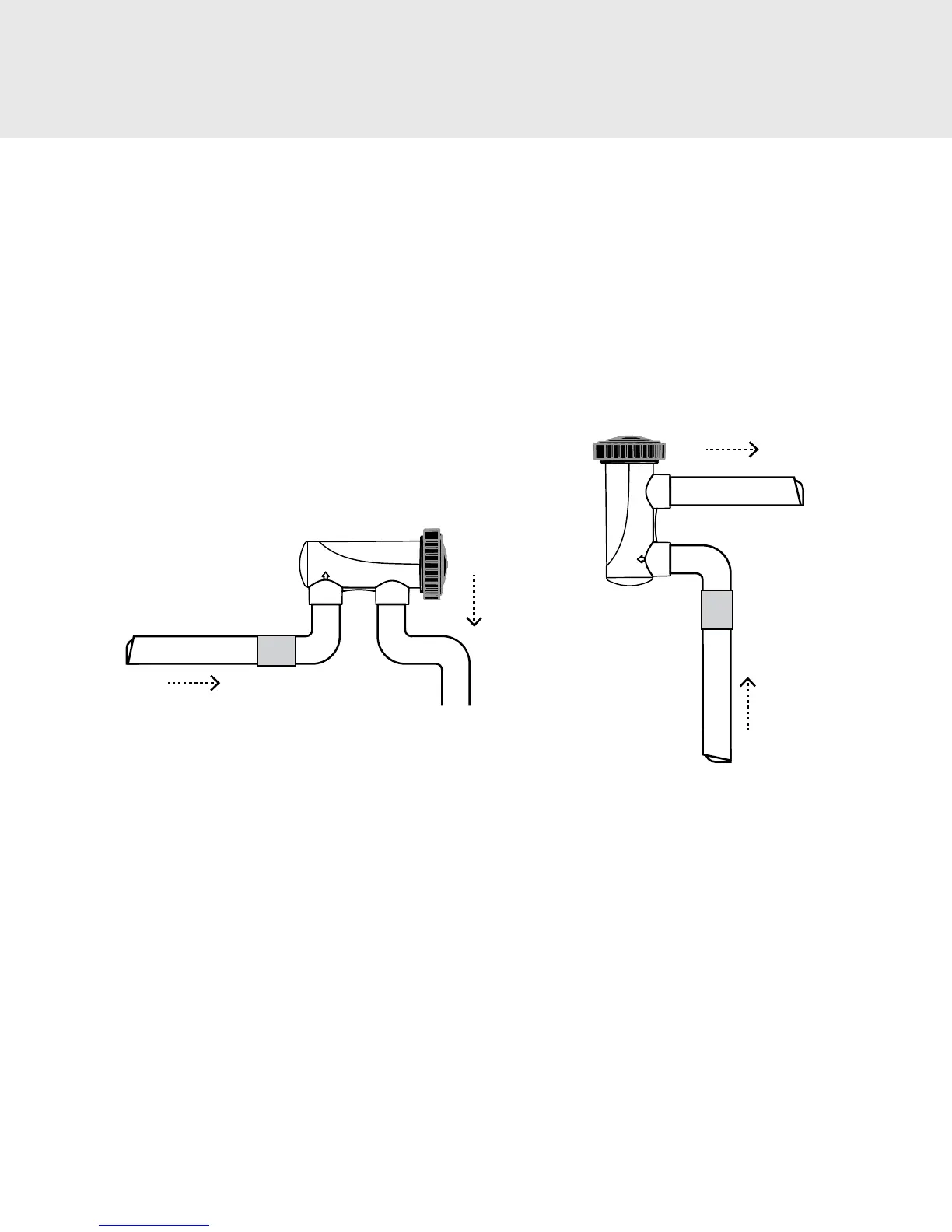
a. Locate pool return line after the heater or lter as shown in Image 1. This is the preferred location for the cell housing.
b. Cut and glue the vertical plumbing risers from the main plumbing into place. Install the cell housing to the top of the
risers, making sure the cell housing is level
c. Install the O-ring into the receiving channel inside the cell housing, and then slide the cell into the cell housing making
sure the key way on the black plastic base aligns with the matching key in the cell housing.
d. Put the main cap into place and hand tighten only; be sure not to strip the threads.
e. Connect the cell cord to the Control Center. Align the three pins of the cell cord plug with the socket on the Control
Center bottom (Image 2) and insert the connector until it clicks in place.
Powerclean Salt
Econ Cell
Check
Valve
FLOW
FLOW
Powerclean Salt
Econ Cell
Check
Valve
FLOW
FLOW
IMAGE 4A
-
HORIZONTAL CELL IMAGE 4B
-
VERTICAL CELL
6. SYSTEM START UP & BALANCING
a. Balance your water chemistry according to the Water Chemistry Parameters (Table 3). Add the proper amount of salt and
circulate 24 hours before starting the Powerclean Salt Econ.
b. Start system at the 75% Chlorine Output level and operate normally. For the rst two weeks, test the water every 2-3 days
for proper chlorine residual levels. Raise or lower the Chlorine Output by pressing the output control arrows as needed
(see operation instructions on page 12), according to your test results. ( See section D-3 for details)
c. If Chlorine Output percentage setting is 100%, and chlorine residuals are still below the 1-3 PPM range, increase the
output to BOOST, see Troubleshooting on page 16.
d. The rule of thumb for daily run time of the Powerclean Salt Econ system is 1 hour of operation for every 10 degrees of
ambient temperature (i.e. 90 degrees would equal 9 hours of run time).
e. Once chlorine output percentage setting is set, output should only be adjusted for increased chlorine demand situations.


 To Next Page