
EasyManua.ls Logo

CNCOTE CE-03 - User Manual

CNCOTE CE-03
9 pages
Print Icon
To Next Page IconTo Next Page
Loading...
SHENZHEN CNCOTE TECHNOLOGY CO., LTD
Website: www.cncote.com Attn: Jack Foo,
Skype, cncote01, whatsapp, 008613480148499, email, jackfoo168@gmail.com
Vehicle & Motorcycle & E-bike GPS Tracker
Model: CE-03
User Manual
1. Feature:
Supports GSM frequencies 850/900/1800/1900MHz.
Support Web based application tracking and mobile app tracking and SMS tracking.
SMS and GPRS TCP/UDP Communication.
Back up battery.
Voltage: 9-100V DC.
Accuracy: 10 Meter.
Internal antenna. (High Sensitive GPS)
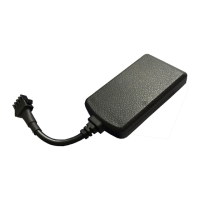
Very samll size like a car key: 67(L)mm*38.8(W)mm*11.5(H)mm.
Low current consumption sleep mode.
Water-proof.
2. Function:
Real time tracking and history tracking playback(last 3 months)
ACC detection.
Mileage calculation.
Alert: over speed/vibration alert.
Support cut off engine and oil(option)
out off power alarm.

Questions and Answers

  • B
    blake08Aug 2, 2025
    Why is my CNCOTE CE-03 GPS showing as 'offline'?
    • J
      Jessica CarterAug 2, 2025
      If your CNCOTE GPS device shows an 'offline' status on the platform, begin by checking the status of the three LEDs. Next, try calling the device's SIM card number to see if the call connects. Also, verify that the vehicle is not in an area with no GSM coverage, such as a basement. Determine if the GSM/GPS disconnection is complete or partial to identify potential issues with the operator's internet service. Ensure your SIM card has not expired due to overdue charges and supports GPRS. Finally, confirm that the device's IMEI number and GPRS sending interval parameters are set correctly.
  • L
    lorikingAug 7, 2025
    What to do if CNCOTE GPS can not receive the signals normally?
    • J
      Johnathan TorresAug 7, 2025
      If your CNCOTE GPS cannot receive signals normally, drive to an open area to acquire positioning.
  • T
    Tina JacksonAug 14, 2025
    Why CNCOTE GPS function is normal, but can not locate for a long time?
    • A
      Amanda MartinezAug 14, 2025
      If your CNCOTE GPS device's GPS function is normal but it cannot locate for a long time, ensure the GPS antenna face is pointing upwards. Also, make sure there are no electromagnetic wave-absorbent objects (like metal) above the device, especially thermal-protective coatings on the windshield, as these can affect GPS reception.
  • K
    khansenAug 20, 2025
    What to do if CNCOTE GPS GSM can not receive the signals normally?
    • C
      Christine MartinezAug 20, 2025
      If your CNCOTE GPS GSM cannot receive signals normally, check whether the SIM card is installed correctly or if there is no GSM signal at your current location, such as in a basement parking area. If so, move to a location with GSM signal reception.
  • B
    Benjamin GarciaAug 26, 2025
    Why does my cell phone receive tele-cutoff alarm SMS from CNCOTE CE-03 GPS?
    • D
      Daniel GreeneAug 26, 2025
      If your cell phone with a special number receives a tele-cutoff alarm SMS from the CNCOTE GPS, verify whether there is an illegal wire cutoff or if the FUSE on the power line has blown. If the FUSE is blown, contact your distributor to exchange it with the same model FUSE. After resolving the internal issue, power it on again to resume operation.

Summary

Device Features

Device Functions

Application and Imaging

Widely Application

Illustrates the diverse range of vehicles and scenarios where the GPS tracker can be applied.

Product Images and Dimensions

Presents visual representations and physical dimensions of the CE-03 model.

Specifications and Indicators

Technical Specifications

Provides a comprehensive list of technical parameters including voltage, current, and operating conditions.

LED Status Indicators

Details the meaning of different LED light statuses for power, GSM, and GPS indicators.

Installation and Wiring

Installation Preparation and Notices

Covers preparation steps, SIM card testing, and critical advisories for discreet and safe installation.

Device Wiring Diagram

Illustrates the detailed wiring connections for the device with different vehicle types.

Installation Steps

Outlines the sequential steps required for properly installing the GPS tracking device.

Cautions and Usage

Device Wiring Cautions

Highlights important safety precautions and guidelines for connecting the device's power wiring.

Device Usage Overview

Describes the intended applications of the GPS tracker across various vehicle types.

Message Commands

Detailed Message Commands

Enlists detailed SMS commands for controlling and querying the device's functions.

Simple Message Commands

Provides simplified SMS commands for common operations like location retrieval and engine control.

Information and Restart Commands

Covers SMS commands for viewing device information and performing system restarts.

Advanced Features and Troubleshooting

Vibration Alarm Specifications

Explains the procedure for setting up and configuring vibration-based alerts for security.

Sleeping Mode Specifications

Details the device's power-saving sleeping mode and methods to exit it.

Troubleshooting Common Issues

Offers solutions for common issues like connection failures, offline status, and signal reception problems.

CNCOTE CE-03 Specifications

General IconGeneral
BrandCNCOTE
ModelCE-03
CategoryGPS
LanguageEnglish