6 • COATS 6401 Truck Wheel Balancer
Direct Drive
Operating Overview
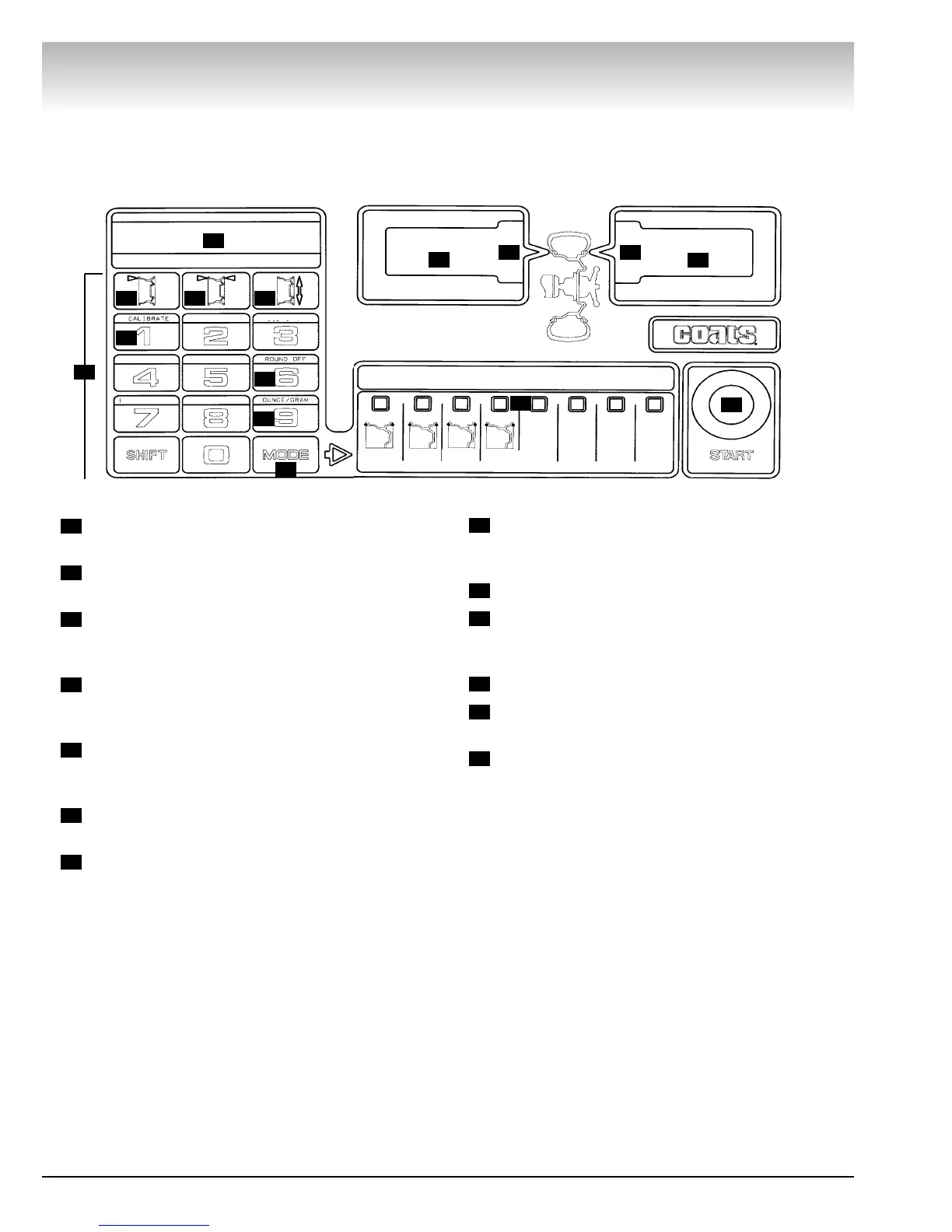
Control Panel
Keypad - User enters information and selects
function using these keys.
Wheel Measurement Display - Displays A, W,
and D values.
Wheel Offset (A) - The distance between the
inner rim flange and the edge of the balancer. Refer to
Offset on page 9 for detailed instructions.
Wheel Width (W) - The width of the rim between
the inner and outer rim flanges. Refer to Width on
page 10 for detailed instructions.
Wheel Diameter (D) - The diameter of the wheel
at the weight location. Refer to Diameter on page 10
for detailed instructions.
Calibrate - Places the balancer in the Calibrate
Mode. Press and hold the SHIFT key, and press 1.
Round Off - Toggles the balancer between the
high accuracy mode (0.01-ounce increments) and the
normal mode (0.25-ounce increments). Press and hold
the SHIFT key, and press 6.
Ounce/Gram - Toggles the balancer between
ounces or grams. Press and hold the SHIFT key, and
press 9.
Mode - Selects the desired balancing mode.
Balancing Modes - Press the MODE key to
select from the 4 available modes. The LED above the
mode will illuminate to indicate the mode is selected.
Start Button - Press to start a spin cycle.
Weight Displays - Indicate the weight amount to
be attached to the wheel.
Weight Position LEDs - Center LEDs flash when
correct weight position is at top-dead-center.
13
12
11
10
9
8
7
6
5
4
3
2
1
12
1
2
3 4 5
6
7
8
9
10
11
12
13
13
TRUCK
DYNAMIC
TRUCK
STATIC
RV
DYN
CAR
DYN


 To Next Page