Chapter 3: Connecting cables
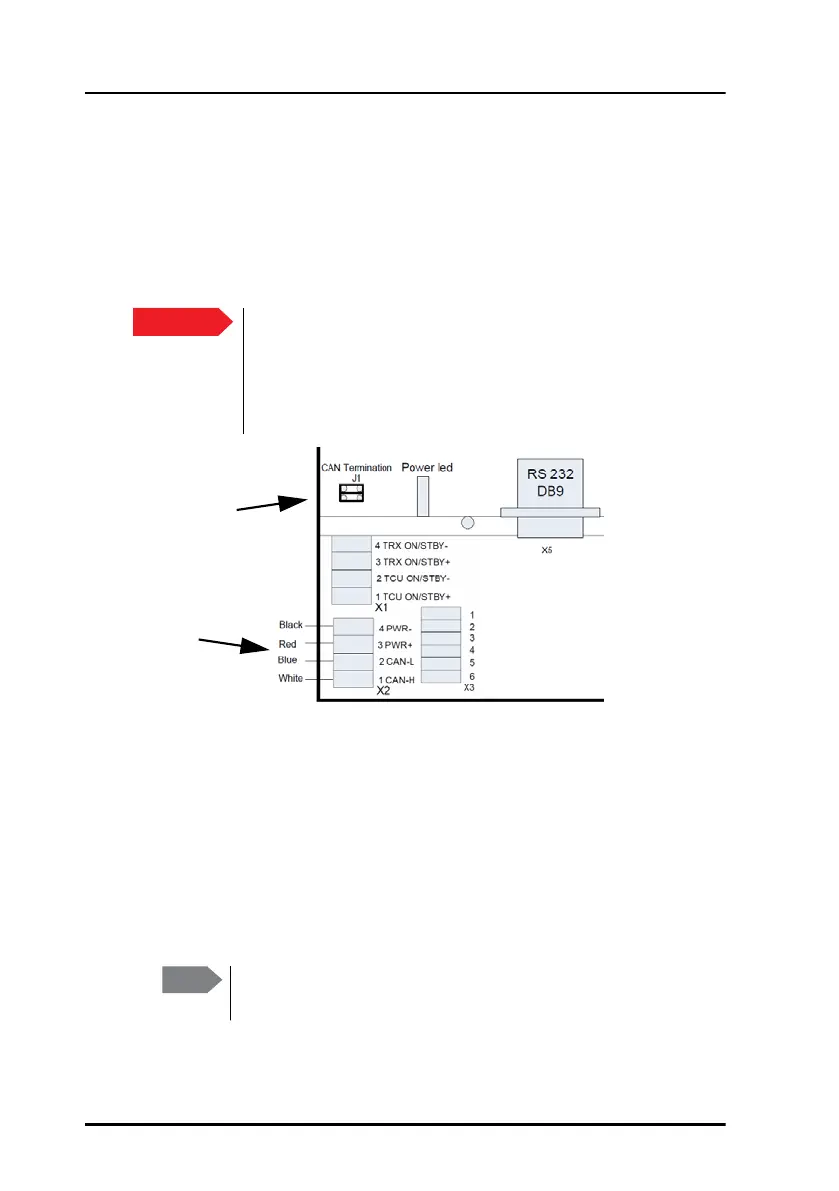
16 CAN interface (X2)
CAN interface (X2)
The Terminal Control Unit has one CAN interface (spring-loaded terminals)
used for communicating with connected equipment, such as a Message
Terminal and/or a mini-C GMDSS terminal. The CAN interface is located in
the bottom left corner of the Terminal Control Unit as shown below.
To connect the CAN interface, insert the wires as shown in the drawing
above. Use the tool supplied with the Terminal Control Unit to open the
spring-loaded terminals.
Power input
There are 2 different options for the power input:
• The Terminal Control Unit can be powered through the CAN bus
(extended range: 10.5-32 V DC).
Important
Do not connect the shield of the CAN cable to the chassis of
the Terminal Control Unit, or to any other ship ground
connection on the Terminal Control Unit. For safety reasons
the CAN shield must only be connected to ship ground at the
power supply.
CAN
interface
CAN termination
jumper
Note
If your power source is supplying more than 15 V, the system
is not protected against incorrect wiring.


 To Next Page