Chapter 4: Using the Terminal Control Unit
46 Use of Non-SOLAS Alarm Panels
Use of Non-SOLAS Alarm Panels
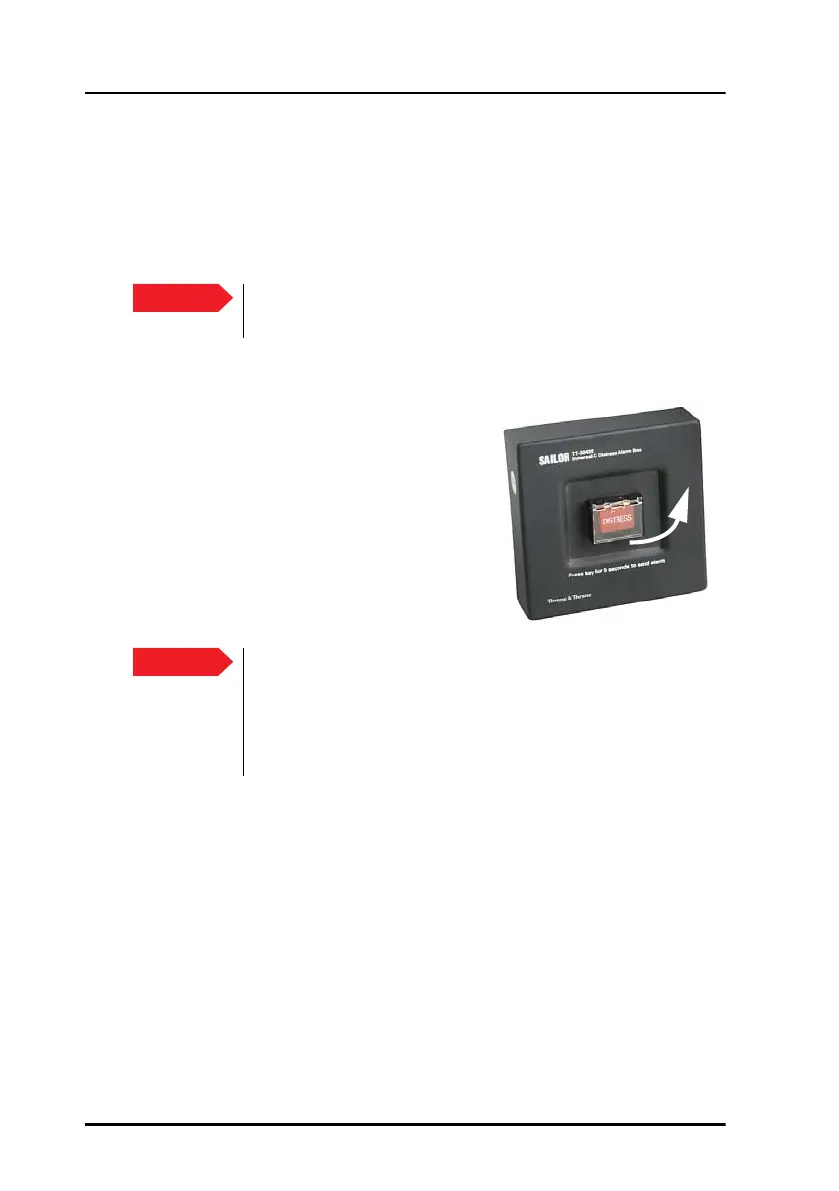
You can use the SAILOR 3042E to send a Distress alert to the rescue centre
closest to your location. The SAILOR 6108 Non-SOLAS Alarm Panel works
similar to the SAILOR 6101/6103 Alarm Panels.
To send a Distress Alert, do as follows:
1. Open the cover for the Distress button.
2. Press and hold the button until the
light is steady and the buzzer stops
(more than 5 seconds).
During this time the button light flashes
and the buzzer sounds. After 5 seconds
the red light goes steady on and the
buzzer is silent. This means the Distress
alert is being sent.
Important
Only send a Distress Alert if you are in immediate danger!
The Distress Alert can be compared to a MAYDAY call.
Important
The MRCC normally sends a message to the alerting unit to
gather more information about the situation.
If at all possible, respond to such messages with a Distress
message sent to the same LES that was used for the Distress
Alert. The LES is set up in easyMail.


 To Next Page