Chapter 5: Scripting
Complete example of a Lua script 57
55555
Scripting
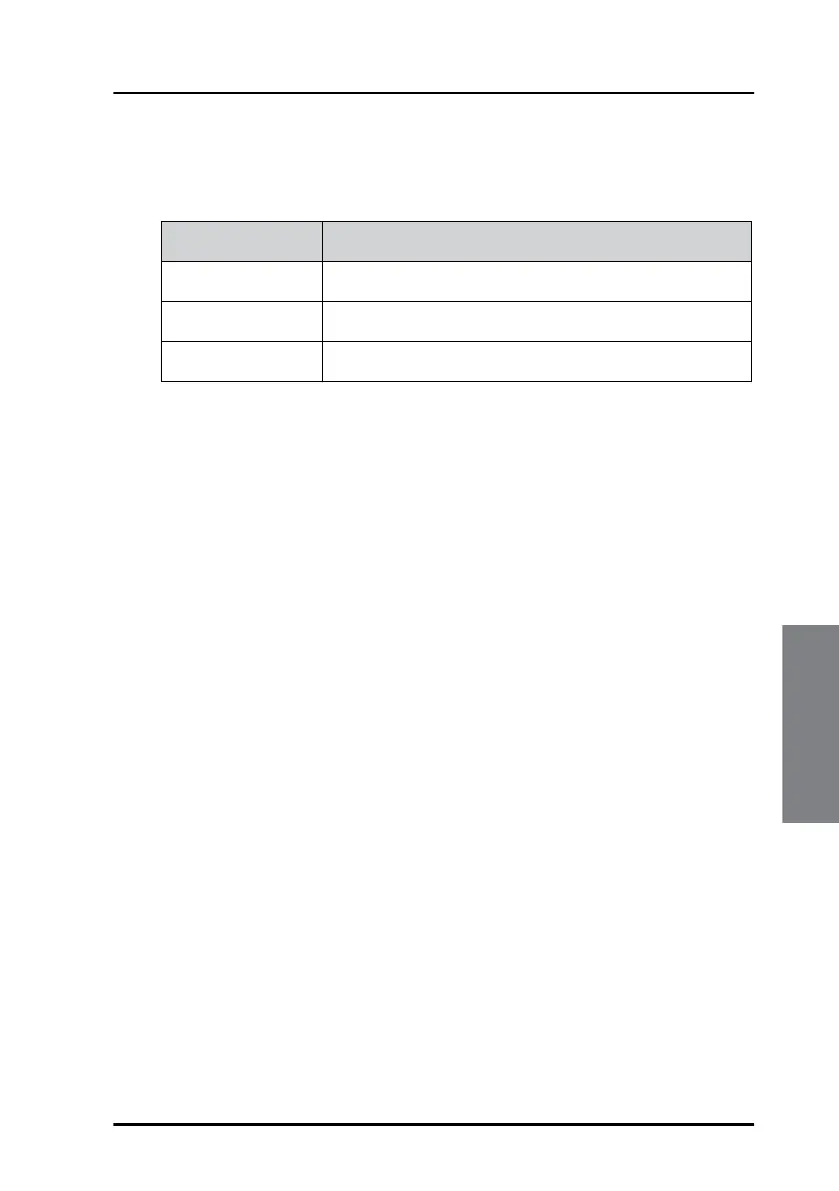
To make it easier to write portable code, the TCU defines a few
environment variables. These are available from Lua via the os.getenv
function:
Script security
In some applications it is important to ensure that only approved scripts are
used and that scripts cannot be altered. The TCU script module has a script
lock function that makes the TCU reject scripts without a specific security
tag.
To lock the Terminal Control Unit running a script
The "Hello World"-script (see First step: writing and running a test script on
page 49) is used here to illustrate how the lock function is set up and how it
works:
Objective: To ensure that the TCU can only execute the original "Hello
World" script. To prepare for locking, an empty comment line is added as
the first line (i.e., line 1):
--
-- This is our first test script
print("Hello world")
1. Copy the script to the SD memory card and insert the card in the TCU.
2. Choose a code word and calculate a corresponding checksum shell with
the following command:
lua c <file name> <code word>
With the file name test1.lua and the code word being 1234, the
command will be like this:
Variable name Content
HOME /sdcard
TMPDIR /sdcard
TCU The current software version of the TCU (e.g., 1.03)


 To Next Page