Chapter 2: Operation
DSC calls 27
22222
Operation
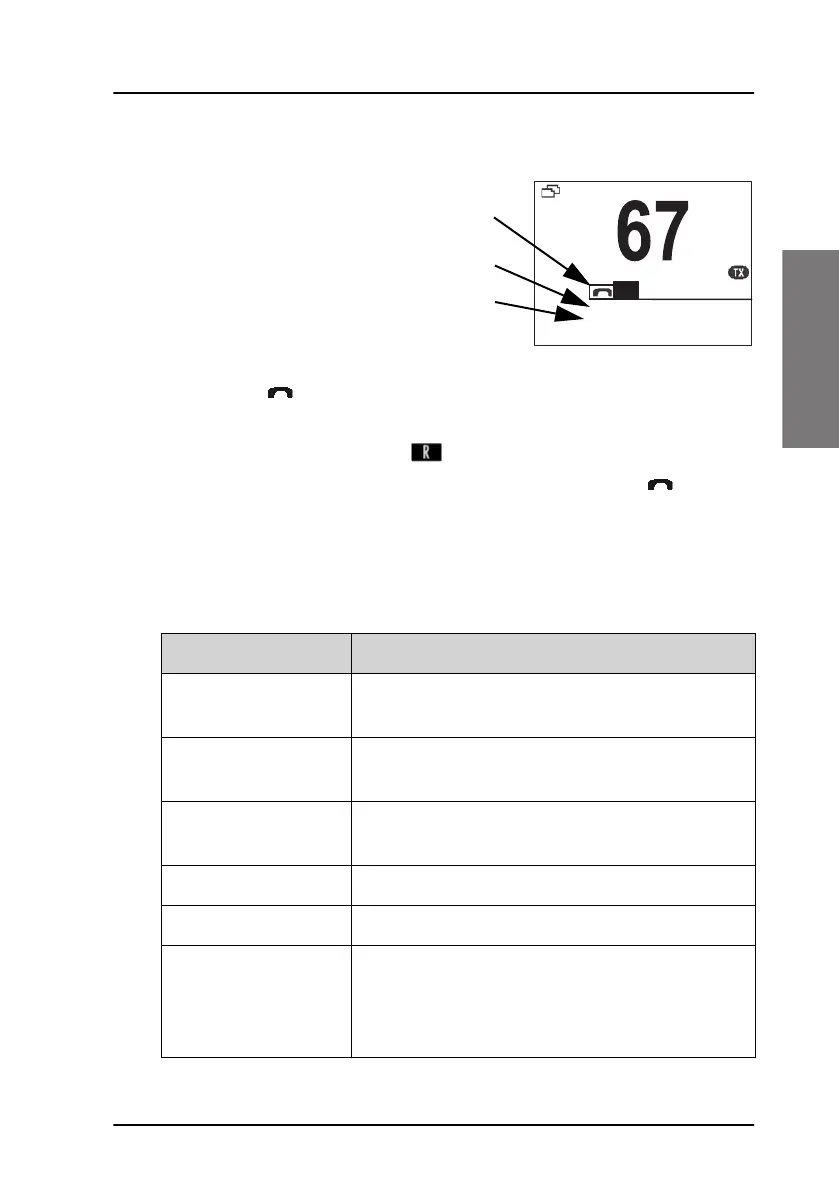
Display for a session
In the DSC window the type
of session, the current state,
MMSI number of the other
party and elapsed time since
the reception of a call
request or an
acknowledgment is shown.
The session state icons, in
the example and R, show the state of the session:
• ACTIVE — inverted, transmitter tuned into the communication
channel in the example , a DSC Routine call).
• HOLD — normal view, parked session (in the example , VHF
voice communication.
For more information on the session state icons see Session state icons on
page 32.
The DSC Session line can be one of the following:
Session line Explanation
OWN DISTRESS The ship is in own distress. See also To send a
distress message on page 19.
DISTRESS RX You watch or participate in a distress
communication for another station in distress
RELAY calls
(numerous)
You watch or participate in a distress
communication for another station in distress
ALL SHIPS TX/RX You have sent / received an all ships call
GROUP TX/RX You have sent / received a group call
INDIVIDUAL TX/RX You have either sent a call request to a station to
establish contact, or another station has made a
call to you to establish contact. The call needs a
reply.
QUIT
RESEND
MORE
INT
INTERSHIP/PORT
INDIVIDUAL RX
LINK FOR COM: 0:00:19
TO: 123456789
R
Session state
Session line
Session status


 To Next Page
 Loading...