Set CTCSS Privacy Codes
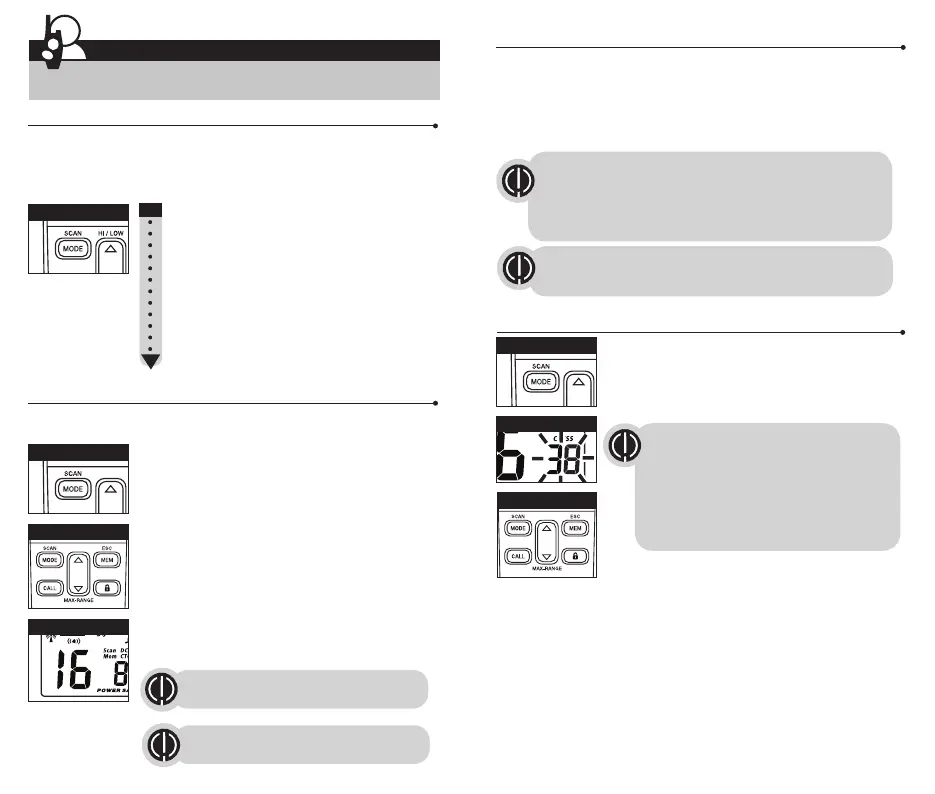
To select a CTCSS privacy code:
1. After selecting a channel, press the Mode button until
the CTCSS icon appears and the small numbers next to
the channel number flash on the display.
2. Press using the Up or Down button to select a privacy code. You can hold
the Up or Down button for fast advance.
3. When your desired CTCSS privacy code is displayed, choose one of the
following:
a. Press the Mode button to enter the new setting and proceed to other
functions.
b. Press the Talk or Call button to enter the new setting and return to
Standby mode.
c. Do not press any buttons for 6 seconds to enter the new setting and
return to Standby mode.
Channel Selection
The radio has 16 channels, all are compatible with other brands of PMR-446
Two-Way radios.
1. Briefly press and release Mode button, the channel
number flashes.
2. Press Up or Down button to select a channel. (You can
hold the Up or Down button for fast advance)
3. When the desired channel is displayed, choose one of
the following.
a. Press the Mode button to enter the new setting and
proceed to other functions.
b. Press the Talk or Call button to enter the new setting
and return to Standby mode.
c. Do not press any buttons for 6 seconds to enter the
new setting and return to Standby mode.
8
Both radios must be tuned to the
same channel to communicate.
See page 19 for frequency
allocations charts.
Channel Selection
Set CTCSS Privacy Codes
Set DCS Privacy Codes
Set Vox On/Off
Set Vox Sensitivity
Set Call Tones 1-10
Set VibrAlert On/Off
Set Roger Beep On/Off
Set Key Tones On/Off
To successfully communicate using a privacy code, both
the sending and receiving radios must be tuned to the same
channel and to the same privacy code system (CTCSS or DCS)
and privacy code number. Each channel will remember the
last privacy code system and number you select.
Operation
Mode Functions
CTCSS Privacy Code
Channel Number
Up/Down Button
Up/Down Button
Mode Button
Mode Button
Mode Button
9
Privacy Codes
Your microTALK
®
radio incorporates two advanced coded squelch systems that
can help to reduce interference from other users on any given channel. CTCSS
(Continuous Tone Coded Squelch System) provides 38 privacy codes and DCS
(Digitally Coded Squelch) provides 83 privacy codes. This provides a total of
121 Privacy Codes. Either system can be used on channels (CH1-CH16), but
both systems cannot be used on the same channel at the same time.
Scrolling Through the Mode Function
By scrolling through the Mode function, you will be able to select or turn on
preferred features of your microTALK
®
radio. When scrolling through the Mode
function, your radio features will be displayed in the same predetermined
order:
If DCS is turned on at the channel selected,
the display will flash the CTCSS icon and
“OFF.” To switch from DCS to CTCSS, press
the Up or Down button while the display is
flashing “OFF.” The display will then show the
small numbers flashing and you will then be
able to proceed to step 2.
The privacy code 00 is not a privacy code, but allows all signals
to be heard on a channel that is set to 00 on both the CTCSS
and DCS systems.




 To Next Page