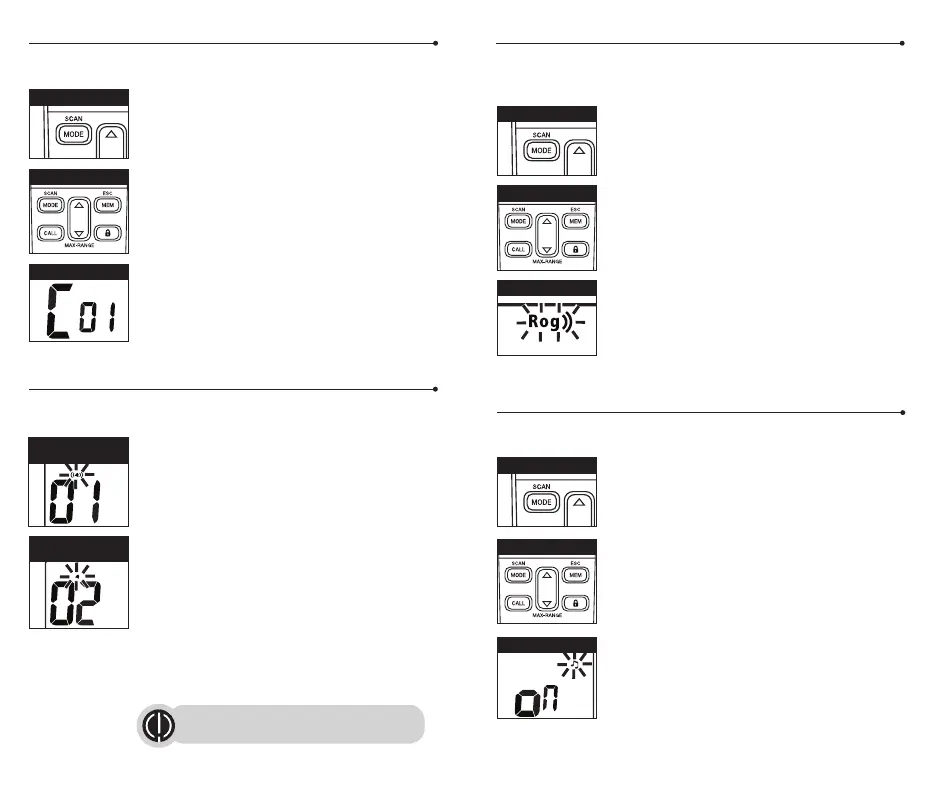
Roger Beep Confirmation Tone
Your listener will hear an audible tone when you release the Talk button and
the user transmitting will hear this as well. This alerts the other party that you
are finished talking and it is OK for them to speak.
To turn roger beep on or off:
1. Press the Mode button until the Roger Beep icon
flashes. The current on or off setting is displayed.
2. Press the Up or Down button to select Roger Beep on
or off.
3. Choose one of the following:
a. Press the Mode button to enter the new setting and
proceed to other functions.
b. Press Talk or Call button to enter the new setting
and return to Standby mode.
c. Do not press any buttons for 6 seconds to enter the
new setting and return to Standby mode.
Key Tone On/Off
When Key Tone is On, an audible tone will sound each time a button is
pressed.
To turn key tone on or off:
1. Press the Mode button until Key Tone icon flashes.
Current key tone status on or off will flash.
2. Press the Up or Down button to select key tone
on or off.
3. Choose one of the following:
a. Press the Mode button to enter the new setting and
return to Standby mode.
b. Press Talk or Call button to enter the new setting
and return to Standby mode.
c. Do not press any buttons for 6 seconds to enter the
new setting and return to Standby mode.
Ten Call Tone Settings
You can choose between ten different Call Tone Settings to transmit
a call alert.
To change a call tone setting:
1. Press the Mode button until the letter “C” and the
current call tone number (01 through 10) is displayed.
The current call tone will sound for three seconds.
2. Press the Up or Down button to hear the other call
tone settings.
3. Choose one of the following:
a. Press the Mode button to enter the new setting and
proceed to other functions.
b. Press Talk or Call button to enter the new setting
and return to Standby mode.
c. Do not press any buttons for 6 seconds to enter the
new setting and return to Standby mode.
VibrAlert
®
and Call Alert
Your microTALK
®
radio can alert you to incoming signals by sounding an
audible call tone only or both with vibrating.
To change call settings:
1. Press the Mode button until the Call Setting icon
flashes on the display. The current setting (“01”
vibrate + ring, “02” ring only) is displayed.
2. Press the Up or Down button to change the call
setting.
3. Choose one of the following:
a. Press the Mode button to enter the new setting and
proceed to other functions.
b. Press Talk or Call button to enter the new setting
and return to Standby mode.
c. Do not press any buttons for 6 seconds to enter
the new setting and return to Standby mode.
Up/Down Button
Up/Down Button
Up/Down Button
Mode Button
Mode Button
Mode Button
12 13
Call Tone Setting
Call Tone On/
Vibrate On
Call Tone On/
Vibrate Off
Roger Beep Icon
Key Tone Icon
Note: VibraAlert will be suspended during
charging.





 To Next Page